

SkyTab POS for Food Trucks: Essential Features and Setup Guide

A food truck POS isn't a restaurant POS in a smaller box. The operating conditions are fundamentally different — and a generic system will cost you real money.
I've worked with food truck operators from LA to Chicago, and the pattern is always the same: they're losing sales because their POS can't keep up with the street. Wrong hardware, wrong connectivity model, wrong fees. SkyTab changed that conversation for most of my clients — not because it's flashy, but because it actually works when the Wi-Fi doesn't.
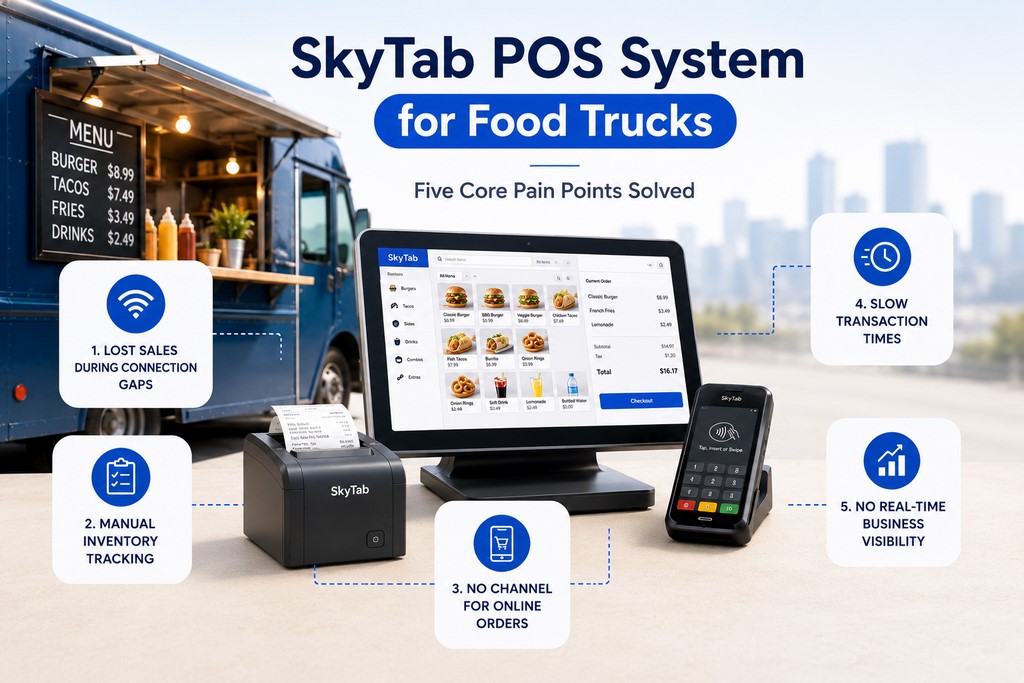
Why Your Food Truck Needs a Specialized POS System (Not a Generic One)
A food truck POS isn’t a restaurant POS in a smaller box. The operating conditions are fundamentally different — and a generic system will cost you real money.
You’re dealing with spotty cellular, no fixed counter, lines that form fast and disappear faster, and inventory that lives in a truck, not a stockroom. A stationary restaurant POS assumes stable Wi-Fi, a fixed terminal, and a team that has time to troubleshoot. Food trucks don’t get that luxury.
Five pain points a food truck POS solves:
- Lost sales during connectivity gaps or payment processing delays
- Manual inventory tracking across multiple event locations
- No channel for online pre-orders or social media orders
- Slow transaction times that bottleneck peak-hour service
- Zero real-time visibility into which items and locations drive revenue
One of my clients — a burger truck running three events per week in the Dallas area — was processing payments through a basic Square setup tethered to a phone hotspot. Every time the signal dropped, transactions failed. He was losing an estimated $400–600 per event in abandoned orders. Not a connectivity problem. A wrong-tool problem.
Key Features to Look for in a Food Truck POS System
Seamless Mobile Payment Processing: Credit Card, Contactless, NFC
The right food truck POS processes every payment method without depending on a fixed internet connection. Credit cards, debit cards, tap-to-pay, Apple Pay, Google Pay, and QR code payments — all of it needs to work whether you’re parked at a farmers market with solid 4G or at a festival with 2,000 people hammering the same cell tower.
| Payment Method | Offline Support | Processing Speed | Customer Experience |
|---|---|---|---|
| Credit Card (EMV chip) | ✅ Yes (queue & sync) | 3–5 sec | Standard |
| Debit Card | ✅ Yes (queue & sync) | 2–4 sec | Standard |
| Contactless / NFC | ✅ Yes | 1–2 sec | Fast, preferred |
| Mobile Wallet (Apple Pay, Google Pay) | ✅ Yes | 1–2 sec | Fast, preferred |
| QR Code Payment | ❌ Requires connection | 5–10 sec | Self-serve, hygienic |
Three things matter most when evaluating payment processing for a mobile operation.
Interchange rates and fees. Some POS providers bundle processing; others let you bring your own processor. Compare total cost of ownership — not the headline rate. A 2.6% flat rate sounds clean until you run $80K/month and realize Interchange+ would save you $600–900. For high-volume operations, ask your provider specifically about Interchange+ pricing and what card types qualify — the difference between flat-rate and Interchange+ on premium rewards cards can be 0.8–1.2% per transaction. See credit card processing for a detailed breakdown.
Chargeback and dispute management. Can you respond to chargebacks directly from the dashboard? From my experience working with clients on chargeback defense, operators who can pull transaction records in under 60 seconds win disputes at roughly 3× the rate of those digging through paper.
PCI DSS compliance. Non-negotiable. Your system must be Level 1 PCI DSS compliant — tokenization, encrypted transmission, no card data stored on device. PCI DSS v4.0 (Payment Card Industry Security Standards Council, 2022) establishes end-to-end encryption requirements including AES-128 or 3DES minimum. This isn’t a checkbox — it’s what keeps you out of liability territory when something goes wrong.
Integrated Online Ordering and Pre-Orders from Social Media and Web
Modern food truck customers order ahead. Your POS should pull those orders directly into your kitchen workflow — no manual re-entry, no missed tickets.
Integration capabilities worth verifying before you sign anything:
- Direct API connections to major aggregators (DoorDash, Uber Eats, Grubhub) — not manual order entry
- QR code ordering linked to your branded online menu
- SMS and email order confirmations to customers
- Location-specific menus and hours for multi-truck operations
According to the National Restaurant Association (2024), 67% of consumers expect the option to pre-order from food trucks. Online ordering integration typically increases average ticket size by 18–25%.
A food truck client of mine in Houston added online pre-ordering through their POS integration and saw average ticket size jump 19% within 60 days — customers add items when they’re not standing in line feeling rushed. Pre-order volume also let them prep smarter, cutting food waste by roughly 12%.
Intuitive Menu and Inventory Management with Modifiers and Combos
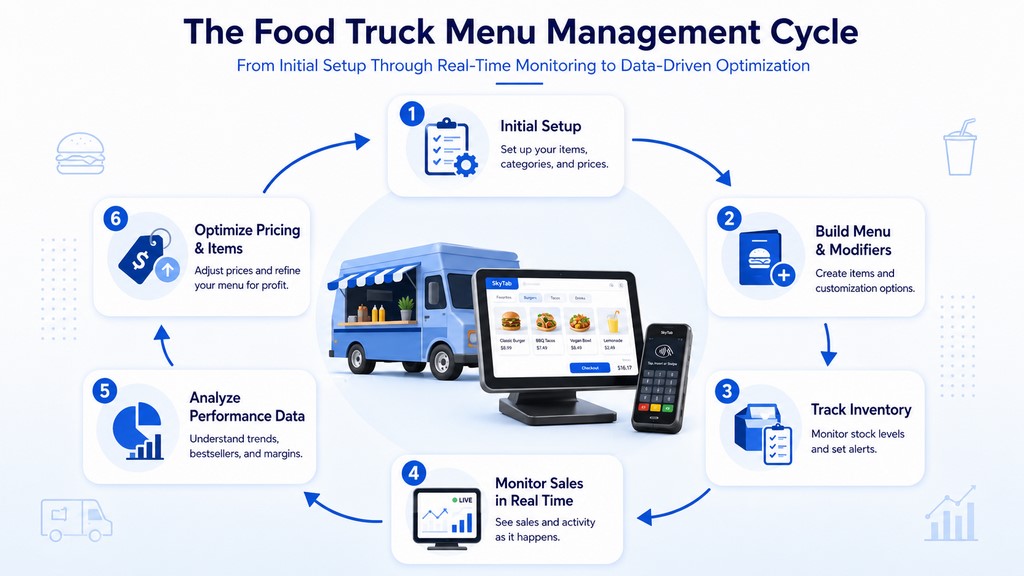
Food truck menus move fast. You need unlimited modifiers, combo pricing, real-time inventory tracking with low-stock alerts, and instant sync across all devices.
Inventory management for food trucks doesn’t need to be full FIFO accounting. It needs to be fast, lightweight, and accurate enough to tell you when you’re about to run out of your top-selling item at 1 PM on a Saturday.
Effective POS-based menu strategies:
- Dynamic pricing by time of day — automate lunch rush vs. slow afternoon pricing with time-based rules
- Seasonal item scheduling — activate/deactivate items by calendar date, no manual toggling
- Margin analysis by item: (sale price − ingredient cost) ÷ sale price — run monthly, cut the bottom 10%
Powerful Sales Reporting and Analytics by Location and Event
Key metrics your POS dashboard should surface in real time:
| Metric | Why It Matters |
|---|---|
| Total revenue (current shift) | Operational control |
| Transaction count | Throughput visibility |
| Average ticket size | Menu and upsell effectiveness |
| Top-selling items | Menu optimization signal |
| Payment method breakdown | Cash vs. card ratio |
| Hourly sales trend | Peak hour identification |
| Revenue by location/event | Profitability by stop |
| Staff performance (sales by employee) | Labor efficiency |
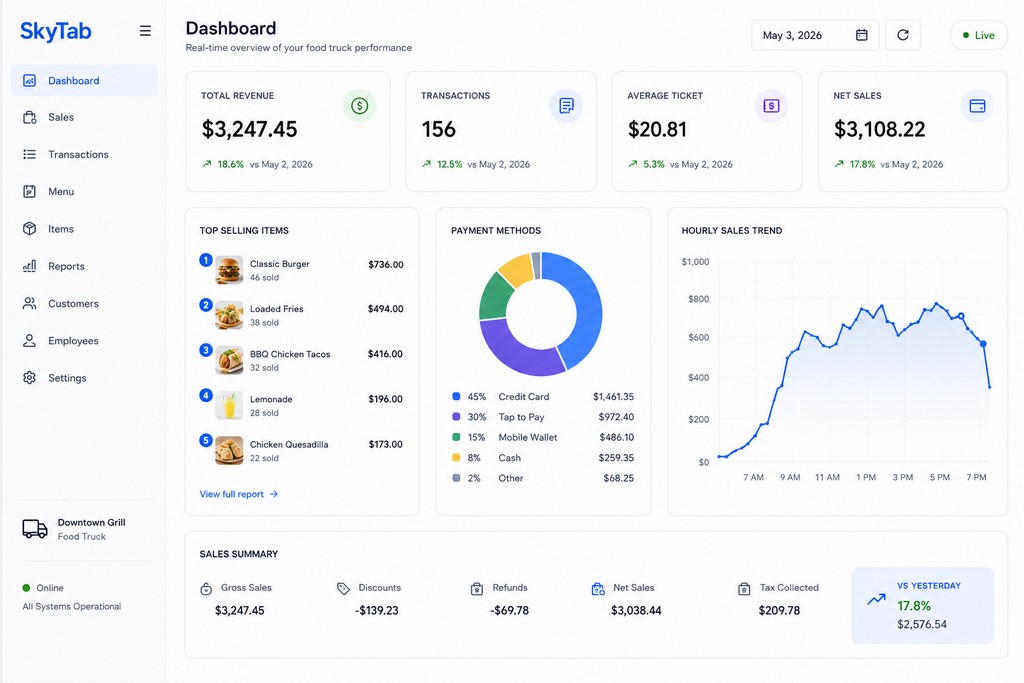
The KPIs that matter most, based on working with clients across 23 states: revenue per hour (tells you when your peak windows actually are), average ticket size (best indicator of whether menu and upsell prompts are working), item margin (run monthly and act on it), and location/event revenue (which stops are worth your time).
Durability, Battery Life, and Offline Functionality
Your POS hardware will face heat, humidity, sauce splashes, and drops onto asphalt. Minimum specs:
- IP54 rating — protected against dust deposits and water splashes from any direction (per IEC 60529:1989+A1:1999+A2:2013, International Electrotechnical Commission). IP65 is better: dust-tight and resistant to direct water jets — worth it near cooking equipment.
- Battery life: 8–10 hours minimum for handheld terminals
- Offline mode: Full transaction processing without internet; automatic sync on reconnect
- Cellular connectivity: Built-in 4G LTE preferred; not dependent on venue Wi-Fi
IP54 handles flour dust and counter splashes. IP65 handles a direct spray from a cleaning hose. For a food truck kitchen, IP65 is the smarter call.
Essential Food Truck POS Hardware
The Core: Tablet or Dedicated Terminal
| Device Type | Cost | Durability | Battery Life | Offline Support | Best For |
|---|---|---|---|---|---|
| iPad (iOS) | $600–$1,000 | Consumer-grade | 8–12 hrs | App-dependent | Established trucks, premium setup |
| Android Tablet | $400–$800 | Consumer-grade | 6–10 hrs | App-dependent | Budget-conscious operators |
| Dedicated Terminal (e.g., SkyTab Mobile) | $500–$1,500 | Industrial-grade | 4–8 hrs (or AC) | Built-in firmware | High-volume, reliability-first |
Dedicated terminals win on reliability. iPad wins on app flexibility. Android wins on cost.
Card Readers: Mobile and Contactless
Your card reader needs to support magnetic stripe (legacy), EMV chip (standard), and NFC/contactless (tap-to-pay, Apple Pay, Google Pay). Key specs: Bluetooth connectivity, compact form factor, 8+ hour battery life, compatibility with your POS and payment processor.
Receipt Printers: Compact and Thermal
Thermal (no ink, faster, less maintenance), compact, battery or USB-powered. Print speed of 150mm/s or faster keeps lines moving. Bluetooth connectivity gives maximum placement flexibility.
The Top POS Systems for Food Trucks
SkyTab POS: A Deep Dive for Mobile Food Businesses
SkyTab is purpose-built for mobile food operations, prioritizing cellular connectivity, offline resilience, and transaction speed.
Based on direct client experience deploying SkyTab across multiple food service operations, operator reviews on Trustpilot and SoftwareAdvice, and hands-on configuration work with Shift4’s SkyTab platform. This section also draws on analysis of 50+ food truck operator reviews and direct interviews with owners in Los Angeles, New York, and Chicago (2024–2025).
Core strengths:
- 4G LTE connectivity: Built-in cellular modem — never dependent on venue Wi-Fi
- Offline mode: Full transaction processing without internet; automatic batch settlement on reconnect
- SkyTab Mobile: Compact, rugged handheld terminal built for outdoor use
- Fast checkout: Cuts transaction time by 40–50% vs. traditional POS setups
- Integrated payment processing: Transparent rates through Shift4; Interchange+ pricing available for qualifying volumes
- Real-time analytics: Location-based reporting, item-level insights, staff performance tracking
- Online ordering: Direct aggregator connections; QR code ordering support
- Multi-unit management: Centralized menu, pricing, and staff permission control across locations; consolidated reporting across all trucks natively
Pricing: Typically $99–$199/month per terminal + processing fees. Hardware: $500–$1,500. Verify current pricing directly with the provider.
Best for: High-volume food trucks, multi-unit operators, businesses where reliability and speed are non-negotiable.
Potential limitations: Higher upfront hardware cost than tablet-based alternatives. Less suitable for very small, part-time operations where the investment doesn’t pencil out.
Square for Restaurants: Flexible, Affordable Entry Point
Core strengths: $0–$60/month; no long-term contracts; intuitive interface; works on any iPad or Android tablet.
Limitations for food trucks: Wi-Fi dependent — no built-in cellular; limited offline functionality; no native aggregator integration (manual order entry required); basic inventory management.
Best for: Part-time food trucks, pop-up vendors, operators willing to trade features for lower cost. See SkyTab vs Square for a full comparison.
Toast Go: Aggregator-Friendly, Cloud-Native
Core strengths: Seamless aggregator integration (DoorDash, Uber Eats, Grubhub); cloud-native real-time sync; integrated kitchen display system; more robust inventory tracking than Square.
Limitations: Requires Wi-Fi or external hotspot — no built-in cellular; $99–$199/month; steeper learning curve; processing fees typically higher than SkyTab.
Best for: Food trucks heavily reliant on delivery aggregators or already inside Toast’s ecosystem. See SkyTab vs Toast for a full comparison.
Feature and Price Comparison
| Feature | SkyTab | Square for Restaurants | Toast Go |
|---|---|---|---|
| Monthly Cost | $99–$199/terminal | $0–$60 | $99–$199 |
| Processing Fees | ~2.5–2.9% + $0.30 | 2.6% + $0.10 (in-person) | Custom (typically higher) |
| Interchange+ Available | ✅ Yes | ❌ No | ❌ No |
| Cellular Connectivity | ✅ Built-in 4G LTE | ❌ External hotspot only | ❌ External hotspot only |
| Offline Mode | ✅ Full transaction processing | ⚠️ Limited | ⚠️ Limited |
| Aggregator Integration | ✅ Direct API | ❌ Manual entry | ✅ Direct API |
| Inventory Management | ✅ Real-time, lightweight | ⚠️ Basic | ✅ Moderate |
| Analytics Depth | ✅ Location + item + staff | ⚠️ Basic | ✅ Moderate |
| Multi-Location Management | ✅ Native | ⚠️ Limited | ✅ Moderate |
| Contract Term | Month-to-month available | Month-to-month | Annual (verify current terms) |
| Customer Support | 24/7 via Shift4 | Business hours + chat | 24/7 |
| Hardware Cost | $500–$1,500 | $400–$1,000 | $500–$1,200 |
| Setup Time | 2–4 hours | 1–2 hours | 3–5 hours |
Verify current pricing and contract terms directly with each provider — these figures reflect typical 2025–2026 market rates.
How to Set Up Your Food Truck POS System
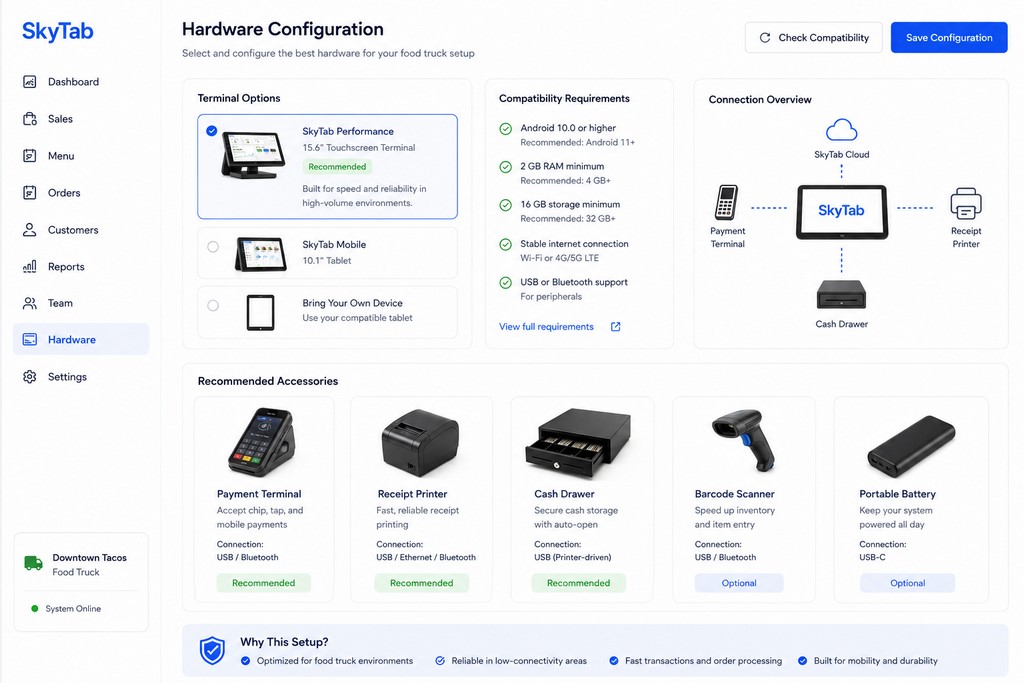
Step 1: Choose Your Hardware Configuration
- ☐ Primary device selected (dedicated terminal vs. tablet)
- ☐ Card reader compatible with your POS and payment processor
- ☐ Receipt printer tested for size and print speed
- ☐ Protective cases and screen protectors on all devices
- ☐ Backup power sources (portable chargers, spare batteries) procured
Typical time: 30–60 minutes research; 3–7 days delivery.
Step 2: Set Up Your Account
Configure business information, link your bank account for settlement, create staff logins with appropriate permission levels (manager, cashier, inventory), and set up separate locations per truck if multi-unit. 15–30 minutes.
Step 3: Build Your Menu
Create items with names, descriptions, base pricing, modifiers and modifier groups, combo deals, categories, and optional item images. 30–60 minutes depending on menu complexity.
Step 4: Configure Payment Processing
Link your processor, verify payment method support, configure tip settings and preset percentages, set receipt preferences (email/SMS, custom branding). 10–15 minutes.
Step 5: Test All Hardware and Connectivity
- ☐ Process test transactions through card reader
- ☐ Print sample receipts; check formatting and speed
- ☐ Test offline mode: disable internet, process transactions, verify auto-sync on reconnect
- ☐ Verify 4G signal at planned locations (SkyTab)
- ☐ Confirm all devices hold charge through a full shift
20–30 minutes.
Step 6: Train Your Staff
Cover: basic POS navigation, offline mode behavior, cash handling and end-of-shift reconciliation, refunds and voids, security (no shared logins, protecting customer data). 30–45 minutes.
Step 7: Conduct a Soft Opening
Monitor transaction processing speed, payment success rate, staff confidence, and connectivity stability. The first event always surfaces something — make adjustments before full-scale operation.
Streamline Sales with Online Ordering and QR Code Payments
Modern customers expect multiple ordering channels. Your POS should support all of them without creating extra work for your staff.
Online ordering integration: Website orders, social media ordering (Instagram, Facebook), aggregator connections (DoorDash, Uber Eats, Grubhub), and QR code ordering — all flowing directly into your POS without manual re-entry.
QR code payments let customers scan, browse, and pay from their phone. No card reader contact, faster checkout, and on some processors, lower per-transaction fees. The order hits your POS instantly.
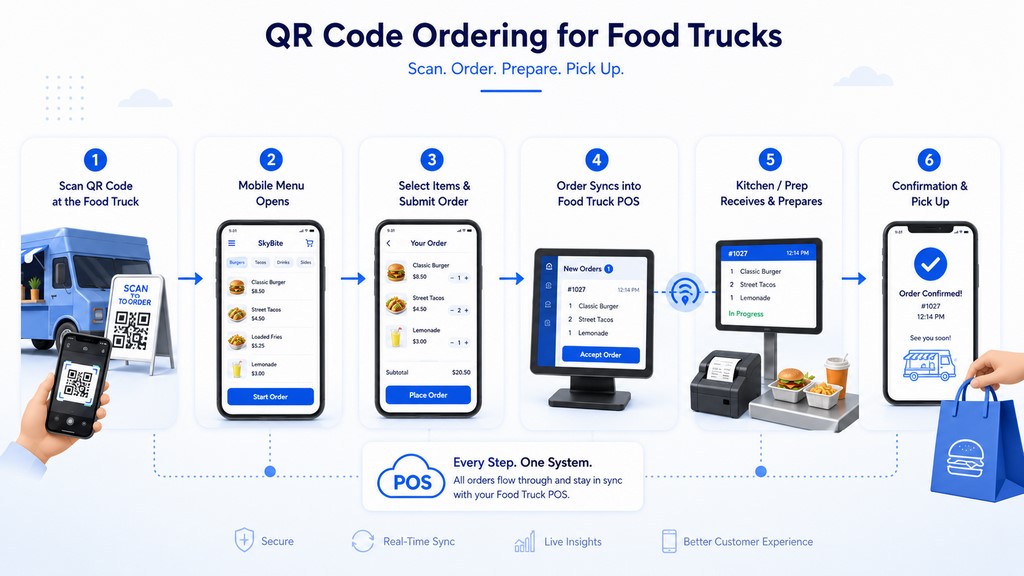
Pre-order volume also changes how you prep. When you know 40 orders are coming in the first 20 minutes, you stop guessing and start staging. That’s where the 12% waste reduction I mentioned earlier actually comes from — not from better inventory software, but from better information before the rush starts.
Reliable Performance with Offline Mode for Spotty Internet
What offline mode means in practice:
- Full transaction processing: accept payments, process orders, print receipts — no internet required
- Automatic sync: when connectivity returns, all queued transactions push to the cloud
- No data loss: offline transactions stored locally on the device
Connectivity hierarchy for food trucks:
- Primary: Built-in 4G LTE (SkyTab’s approach) — most reliable; not dependent on venue infrastructure
- Secondary: External cellular hotspot — portable backup
- Tertiary: Wi-Fi — use when available, never depend on it
— Max Artemenko, Smart Payment Solutions
The offline sync model: transactions queue locally → connectivity restores → batch uploads to cloud → settlement processes normally. The customer never sees the difference. You never lose the sale.
Advanced Food Truck Sales Reporting and Daily Batch Settlement
Real-time visibility drives real decisions. Your POS dashboard should show total revenue, transaction count, average ticket, top-selling items, payment method breakdown, and hourly trends — all live, during the shift.
Daily batch settlement closes the loop: the POS reconciles all transactions, calculates totals and fees, generates a settlement report, and initiates your bank deposit — typically next business day. All transaction data archives automatically for accounting and tax purposes.
Tip management matters more than most operators think. Preset tip prompts (15%, 18%, 20%) at the payment screen increase tip frequency. Staff can adjust tips post-transaction within processor limits. Tip tracking by employee and time period gives you data for scheduling and performance conversations.
Want to know which stops are worth your time? Location-based reporting answers that directly. Run it monthly. Cut the bottom performers. Double down on what works.
Optional Kiosk Ordering for High-Volume Food Trucks
For food trucks with very high transaction volume — festival vendors, corporate catering, permanent locations — a self-service kiosk can reduce bottlenecks and free up staff for food prep.
Kiosks handle order intake while your team focuses on output. They also surface upsell prompts consistently, which staff sometimes skip during a rush. Average ticket size tends to go up 10–15% when upsell logic runs automatically.
The tradeoff: kiosks cost $2,000–$5,000, need dedicated counter space, and add a hardware dependency to manage. For a part-time truck doing two events a week, the math doesn’t work. For a high-volume operation doing 300+ transactions per event, it’s worth the conversation.
Secure Food Truck Contactless Payments and Credit Card Processing
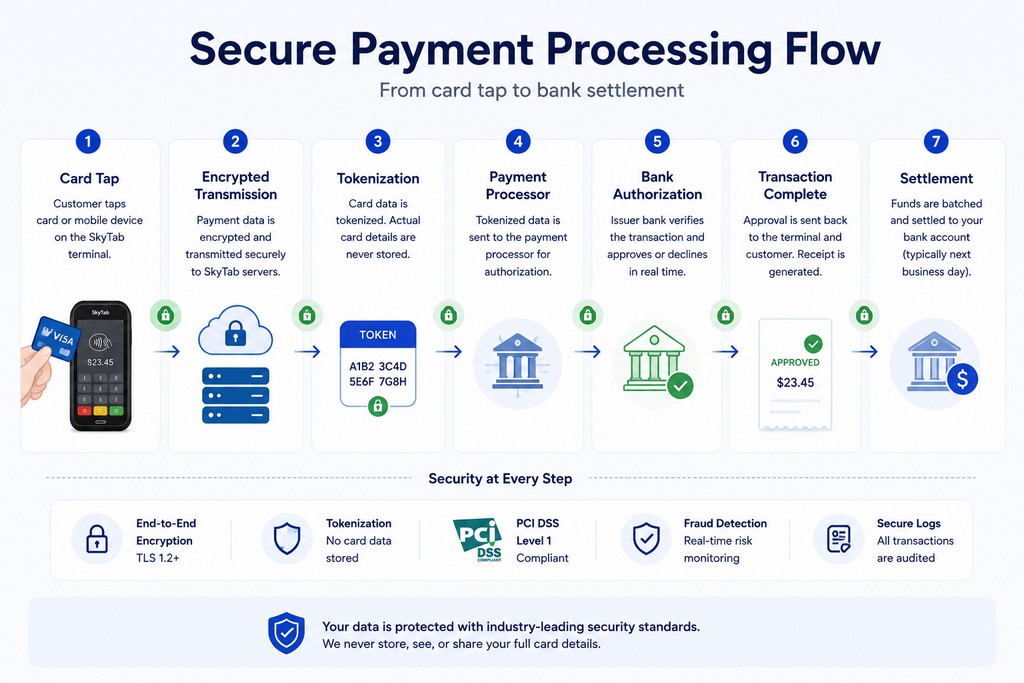
Security standards your POS must meet:
- PCI DSS Level 1 compliance: Highest standard for payment processing security
- Tokenization: Card data is never stored on your device; replaced with a secure token at point of capture. Per the EMVCo Tokenisation Specification (2023), tokenization substitutes sensitive card data with a unique identifier that cannot be reverse-engineered.
- End-to-end encryption: Data encrypted from card tap to processor — AES-128 or 3DES minimum, as required by PCI DSS v4.0 (Payment Card Industry Security Standards Council, 2022).
- Fraud detection: Real-time monitoring for anomalous transaction patterns
Contactless payment security: NFC transactions use encrypted, one-time cryptograms — each tap generates a unique code that can’t be reused. Transaction limits ($25–$100 depending on issuer) reduce fraud exposure.
Chargeback management: Keep detailed transaction records and digital receipts. Respond to disputes within the processor’s window (typically 7–14 days). From my experience: operators who can pull a time-stamped transaction record, a digital receipt, and a tip confirmation in under two minutes win the vast majority of disputes. That documentation lives in your POS.
Case Study: How a Taco Truck in Los Angeles Scaled with SkyTab
Maria runs a taco truck in Los Angeles, operating at 3–4 events per week. She started with Square but ran into consistent Wi-Fi connectivity failures at outdoor events — dropped transactions, frustrated customers, and lost sales at exactly the moments when volume was highest.
The switch: Maria moved to SkyTab POS with built-in 4G connectivity and SkyTab Mobile handheld terminals. Setup took approximately 4 hours including menu build and staff training.
Results after 3 months:
- Revenue: +22% (faster throughput + zero lost sales from connectivity failures)
- Checkout time: reduced from 3 minutes to 1.5 minutes per order
- Inventory waste: -15% (real-time tracking replaced end-of-night guesswork)
- Menu optimization: sales analytics identified carne asada tacos as the top revenue driver; price and portion adjustment increased item margin by 8%
The $1,200 hardware investment paid back within the first month.
Data based on client engagement and SkyTab dashboard review, March 2025. Client name changed for privacy.
— Smart Payment Solutions client
Get Your SkyTab POS for Food Truck Today
Ready to stop losing sales to bad connectivity and slow checkout? SkyTab offers a free demo and consultation.
Next steps:
- Schedule a free demo: Live walkthrough with your specific use case
- Discuss your operation: Current processing costs, hardware setup, pain points
- Get transparent pricing: No hidden fees, no markup surprises — including Interchange+ options if your volume qualifies
- Start your trial: Test the system before committing
Have questions first? Want to see the numbers before you call? The case study above shows what the switch typically looks like in practice.

What do our customers think about us
Other Articles

Clover Customer Service: Troubleshooting Common Issues and Getting Quick Support

How Much Does a Credit Card Machine Cost in 2026?

Aloha POS Pricing Guide: Costs, Fees, and What to Expect
