

Best POS System for Small Business in 2026

Compare POS systems for small businesses by checkout flow, features, pricing, hardware, integrations, support, and 3-year total cost before choosing a provider.
Most owners don't need 'the most advanced POS.' They need one that processes payments fast, keeps fees visible, and doesn't break operations on a busy day. If fees eat margin and support disappears when something fails, that POS is a bad deal no matter how pretty the dashboard looks. — Max Artemenko, Smart Payment Solutions

What Is a POS System for Small Business — and Why It Matters
A POS system for small business is the system that runs your checkout, records the sale, moves payment data, and feeds operations data back into the business. Plain English: it’s not just a cash register. It’s the point where money, sales data, inventory, and customer activity meet.
For a small business POS system, the real value is operational control. A modern point of sale for small business ties sales, payment processing, and reporting together — instead of leaving the owner to patch five tools and three spreadsheets.
In practice, owners usually buy a POS after one of three pain points: fees got ugly, reporting got messy, or staff started wasting time on work the system should handle. That’s when POS systems for small business stop being a “software choice” and become a margin decision.
How a POS System Helps Accept Payments and Track Sales
A modern POS handles payment processing, records every transaction, and gives you real-time sales visibility. The system accepts payments, tracks what sold, and shows what happened — without waiting for end-of-day manual reports.
For payments, the current standard is contactless and tokenized card acceptance.
“EMV Contactless enables secure contactless payments using EMV security features to prevent fraud in NFC-based transactions.” — EMVCo, Contactless Technologies, 2023. https://www.emvco.com/emv-technologies/contactless/
For gateway connectivity, payment systems connect through authenticated HTTPS APIs rather than isolated local boxes — Stripe API Docs, 2024 (https://stripe.com/docs/api). That’s the mainstream pattern now.
Cloud systems sync sales data every 5–10 seconds in some architectures. That matters because a point of sale system for small business shouldn’t force the owner to wait until tomorrow to know what sold today.
Quick real-world scenario. A restaurant group runs lunch rush on one processor, online orders on another, and end-of-day reports in a separate back-office export. Staff wastes time fixing mismatches. The operator moves to one POS flow with unified payment and reporting logic. Result: fewer reconciliation headaches, faster close, cleaner sales tracking. Not magic — just less chaos.
How a POS Differs from a Traditional Cash Register
A cash register records sales. A POS system records sales and turns them into usable business data. That’s the difference that matters.
Traditional cash registers keep local records and basic metrics — amount, count, date. Modern POS systems sync to the cloud and support broader reporting, customer data, and integrations. Epson’s cash register materials reflect the traditional side of that setup — Epson cash register materials, 2023 (https://epson.com/business/cash-registers).
Short version:
- a cash register logs the sale;
- a POS system logs the sale, routes the payment, updates records, and gives you reporting;
- a good small business POS system also reduces manual cleanup later.
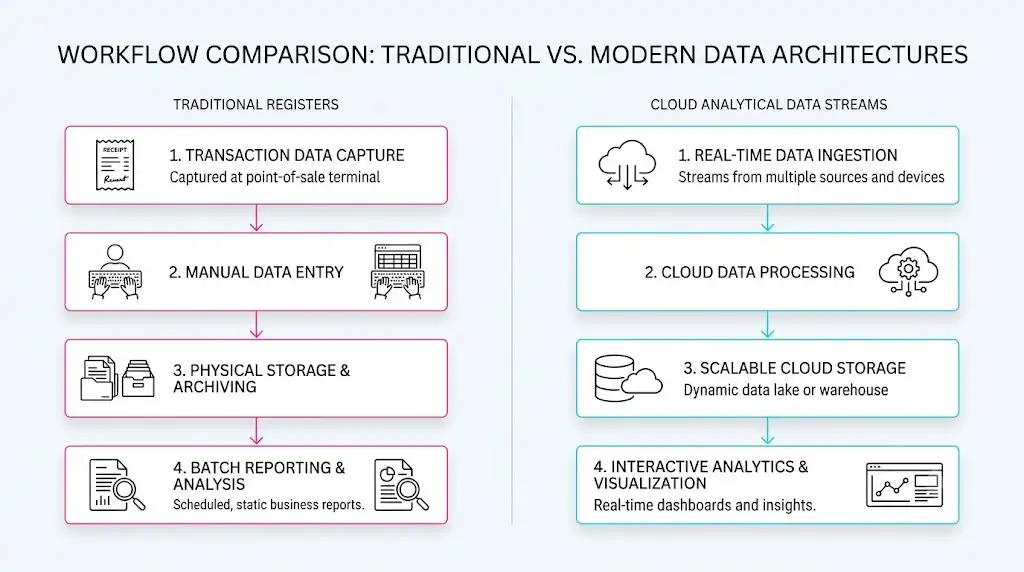
If you only need a drawer that opens and a receipt that prints, a cash register may still work. If you need sales visibility, staff control, customer records, and cleaner operations — a register won’t carry the load.
Key Features a POS System Must Have
The POS features that matter are the ones that save time, reduce mistakes, and help you make decisions faster. For most small businesses, the core stack is inventory management, customer management, reporting and analytics, employee controls, and stable POS software tied to payment operations.
A POS is useful when it changes daily operations — not when it adds ten shiny menu tabs nobody touches. There’s also a forward-looking angle: AI analytics and stronger identity/security layers are becoming more relevant. AI-driven demand forecasting in POS platforms now achieves accuracy of 85–92% according to NIST AI risk management methodology — NIST AI RMF 1.0 / AI 100-1, 2024 (https://nvlpubs.nist.gov/nistpubs/ai/NIST.AI.100-1.pdf). For security baselines, ISO 27001 remains the serious standard for information security management — ISO/IEC 27001 (https://www.iso.org/standard/27001).
Inventory Management, Stock Tracking, and Sales Data
Inventory management matters because dead stock, stockouts, and bad counts all cost money. A POS should reduce those problems by connecting sales and inventory in one flow.
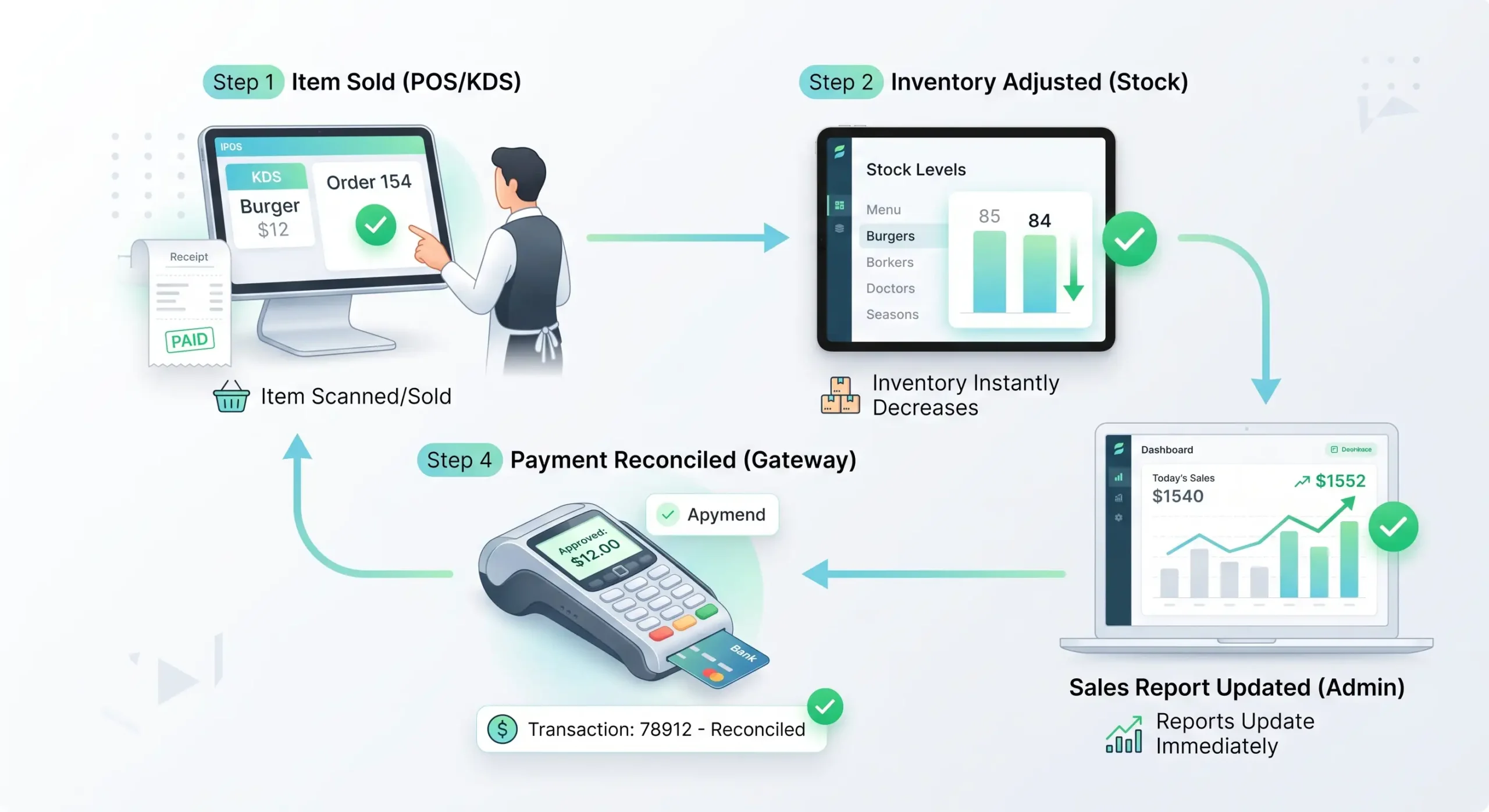
A sale should automatically reduce stock levels and feed reporting in real time. That’s the minimum expectation for a modern POS and inventory system for small business. If your POS can’t manage inventory without manual cleanup, it’s basically creating work instead of removing it.
Important honesty point: the source pack explicitly says NO DATA was found on formal standards for automatic replenishment logic, omnichannel stock sync methods, or real-time inventory protocols in the strict research set. So I’m not going to invent benchmark numbers here.
What can be said safely: your POS should update item counts when a sale closes, show sales inventory data fast enough to support reordering decisions, and separate sold-out items from available items if you run a menu, retail catalog, or service inventory.
A practical operator test:
- Sell one item.
- Check if stock changes right away.
- Refund it.
- Check whether inventory corrects cleanly.
- Export the sales reporting and compare it to processor totals.
If that breaks, the POS isn’t ready.
CRM, Loyalty Programs, and Marketing Tools
CRM inside a POS matters when it helps track repeat behavior, purchase history, and service patterns. Loyalty matters when it drives repeat spend without turning your checkout into a circus.
The research pack clearly states NO DATA for official standards proving the effectiveness of built-in loyalty programs or built-in email marketing in POS systems. So here’s the practical read: customer information can help staff recognize repeat buyers, purchase history can support better service and targeted offers, and loyalty programs are useful only if staff can explain them in one sentence and customers can use them without friction.
Security matters here too. If you collect customer records, access control and authentication matter. NIST SP 800-63B supports the broader principle that identity and access practices are essential when handling customer-linked data — NIST SP 800-63B, 2023 (https://csrc.nist.gov/800-63B).
From operator experience, most loyalty programs fail for a boring reason: staff doesn’t ask, customers don’t care, and the offer is weak.
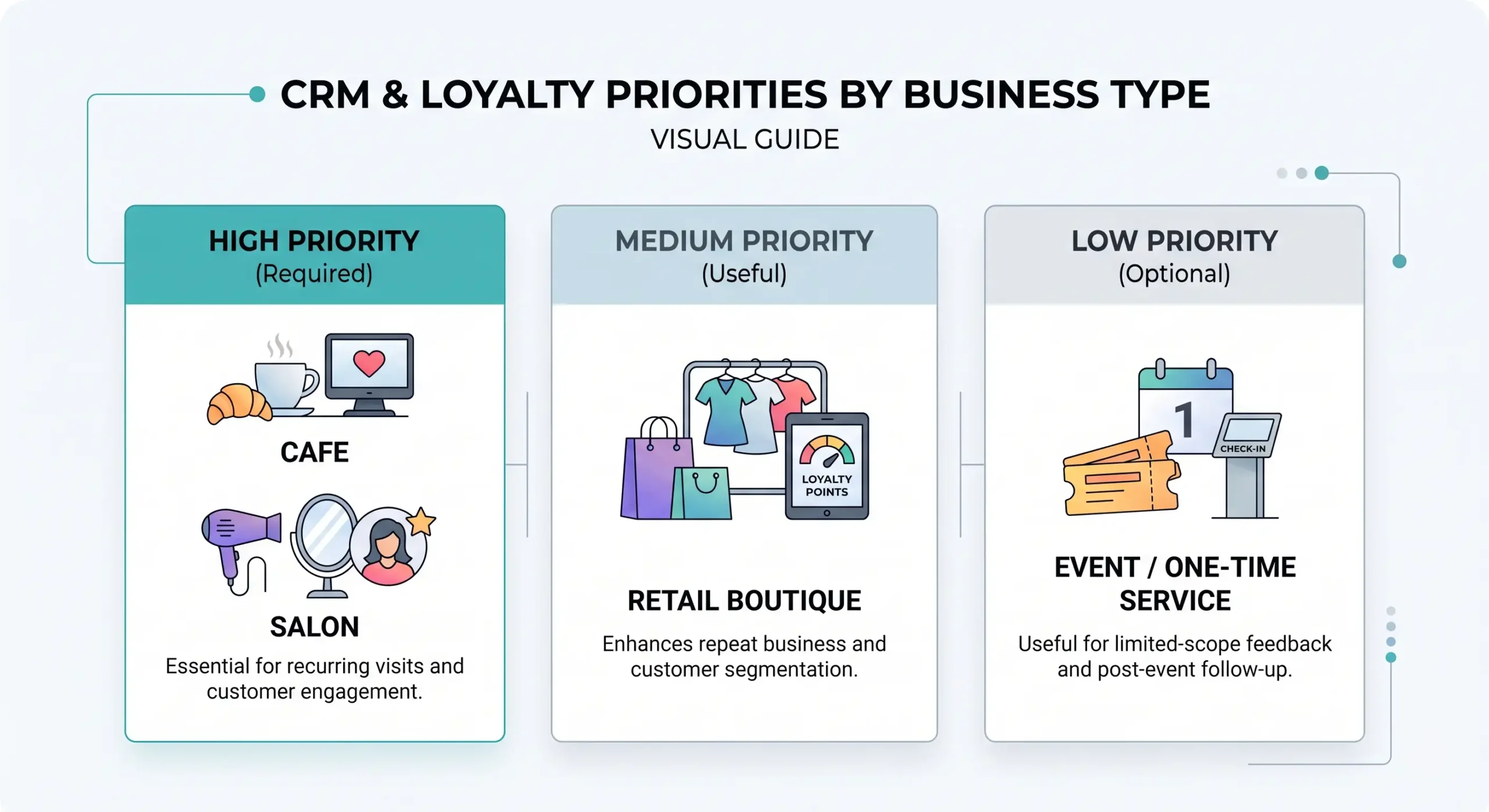
Loyalty and CRM priority by business type:
- Required for repeat-driven restaurants, cafés, salons, and service businesses;
- Useful for retail with repeat traffic;
- Optional if your business is mostly one-time, low-frequency, or event-based.
Types of POS Systems for Small Businesses
There are several POS options, but the practical buckets are simple: cloud-based POS, mobile POS, and more fixed-location setups built around countertop hardware. The right format depends on where you sell, how many stations you run, and how much flexibility you need.
There is no single global standard that formally classifies all POS types. So this section uses practical market structure rather than pretending there’s some grand POS constitution somewhere.
For most small businesses, the useful distinction is:
- cloud-based POS for centralized management and easier updates;
- mobile POS for line-busting, tableside, field sales, and pop-up use;
- industry-shaped systems for restaurant POS and retail POS workflows.
Cloud-Based POS and Mobile POS Systems
A cloud-based POS system is good when you need centralized data, easier updates, and remote visibility. A mobile POS system is good when the sale happens away from a fixed checkout station.
“Cloud architectures can reduce hardware and maintenance costs by 30–50% by eliminating the need for local servers.” — NIST cloud-based POS security publication, 2023 (https://www.nist.gov/publications/cloud-based-pos-systems-security)
That’s the upside. The downside is simple: internet dependency can hurt. If a provider sells you cloud POS without clearly explaining offline behavior, sync rules, and recovery procedures — that’s a red flag.
For mobile POS systems, the strongest use case is flexibility. Smartphones with NFC work as Tap to Pay devices under ISO/IEC 14443 and EMV Contactless principles — ISO/IEC 14443 (https://www.iso.org/standard/14443) and EMVCo contactless standards (https://www.emvco.com/contactless/).
A mobile POS setup is especially useful for: food trucks, curbside pickup, tableside restaurant service, field services, and pop-up retail or seasonal booths.
Explore Mobile Credit Card Payment solutions for field and pop-up commerce use cases.
A short case from practical operations. A service business uses one front-desk terminal and manually keys in cards when staff are on-site. That slows payment and raises avoidable friction. The business switches to mobile acceptance with a handheld or tablet-based flow. Result: faster checkout in the field and less “send me an invoice later” leakage.
POS for Retail vs. POS for Restaurants
Retail POS and restaurant POS are not the same animal. Pick one like they’re interchangeable, and you usually pay for it later.
For retail businesses, barcode scanning, returns, SKU-level inventory, and fast exchanges matter more. GS1 standards are the backbone for retail item identification and scanning workflows — GS1 standards (https://www.gs1.org/standards/gs1-ecommerce).
For restaurants, the critical workflows are table management, menu modifiers, kitchen routing, split checks, and service speed. Oracle MICROS materials reflect that restaurant-specific direction — Oracle MICROS POS (https://www.oracle.com/retail/products/micros-pos/).
Quick vertical guide:
| Business type | Top POS priority |
|---|---|
| Coffee shop / café | Fast checkout, online ordering sync, simple loyalty |
| Full-service restaurant | Table management, modifiers, kitchen display, split checks |
| Quick-service / fast casual | Speed, self-ordering kiosk option, delivery integration |
| Retail (5,000+ SKUs) | Barcode scanning, inventory depth, returns, variant tracking |
| Retail (small boutique) | Simple catalog, online/in-store sync, easy reporting |
| Salon / spa / service | Appointments, client history, deposit handling |
| Food truck / pop-up | Mobile-first, offline capability, fast setup |
Check out specialized restaurant POS systems if food service is your primary use case.
How to Choose the Right POS System for Your Small Business
The right POS system is the one that fits your workflow, cost structure, and growth plan without creating hidden operational drag. Picking the best POS system for small business is less about brand hype and more about matching specific needs to daily use.
Owners often reverse the evaluation order — buy based on headline price, then get smoked by hardware lock-in, weak support, or bad integrations. The right order: evaluate functionality, scalability, support, security, and total cost of ownership.
A practical 5-part filter:
- Can the system handle your real checkout flow?
- Can the team learn it fast?
- Can it grow with the business?
- Can it integrate with accounting, online ordering, or your online store?
- Can you clearly understand every fee?
Criteria Checklist: Usability, Scalability, Support
Ease of use matters because staff training costs money and bad UX slows checkout. Scalability matters because replacing a POS too early is expensive. Support matters because failures never wait for a convenient time.
ISO 9241-11 covers usability logic and sets a practical benchmark around short task completion times — ISO 9241-11, 2023 (https://www.iso.org/standard/9241-11). If a cashier needs five taps to do a refund or apply a modifier, that problem repeats all day. Every day.
For support, what matters in the real world is simpler than any standard: who answers after hours, who owns the issue, how fast replacement hardware arrives, and whether support is a script reader or an actual technician.
“He responds in a timely manner because he understands the importance of keeping businesses running efficiently.” — Client testimonial, Smart Payment Solutions
Smart Payment Solutions is built around real specialists, not just account reps — direct support, payment audits, and hands-on POS implementation. Multiple client testimonials repeat the same pattern: responsive help, fast issue resolution, and support during transitions. A user-friendly POS that nobody supports is still a liability.
🔎 Looking for a reliable POS with 24/7 support? Smart Payment Solutions offers SkyTab and Clover implementation with next-day technician visits, transparent processing rates, and a free payment audit. No surprises on the bill.
What to Look for in Integrations and Compatibility
Integrations matter because your POS should not become a data island. It should connect cleanly to accounting software, online ordering, your online store, and any core third-party tools you actually use.
For a point of sale software for small business setup, the must-check integration areas are: accounting software like QuickBooks, ecommerce or online store sync, online ordering for restaurants, payroll or staff tools if needed, reporting exports, and loyalty or CRM if you truly plan to use them.
If the vendor says “we integrate,” ask two questions: native or via middleware? One-way sync or two-way sync? That answer saves a lot of pain. Two-way sync is the critical one — especially for retail where selling the same SKU twice because inventory didn’t update is a real and costly problem.
| Criteria | What to check | Why it matters | Red flag |
|---|---|---|---|
| Ease of use | Staff can complete common tasks fast | Less training time, fewer errors | Too many taps for refunds, modifiers, discounts |
| Core features | Inventory, reporting, payments, customer records | Covers daily operations | Add-ons required for basics |
| Integrations | QuickBooks, online store, online ordering, third-party apps | Less duplicate work | CSV exports as the “integration” |
| Offline mode | Can it keep selling during connection issues | Protects revenue | Vendor is vague about offline behavior |
| Support | 24/7 availability, real technicians, replacement path | Downtime costs money | Ticket-only support with slow response |
| Scalability | More registers, users, locations, devices | Grows with business | Rebuild needed after one new location |
| Security | PCI, encryption, access controls | Protects card and customer data | No clear compliance documentation |
This table is an operator checklist, not a fake scientific ranking. The strict research pack says there is NO DATA from qualifying independent studies for several of these comparison variables.
POS System Pricing: Subscriptions, Fees, and Hidden Costs
A POS system cost is never just the monthly subscription. Real POS pricing includes software, payment processing, hardware, setup, and whatever little fee the vendor hoped you’d ignore.
In 2026, pricing commonly falls into a hybrid model: software subscriptions from $20 to $150 per month, processing fees from 1.5% to 3.5% + $0.10 to $0.30 per transaction, and possible setup or integration costs from $500 to $2,000. Those ranges come from the author-source brief and official provider pricing references — not from independent peer-reviewed studies. Better to say that than pretend.
Subscriptions, Processing Rates, and One-Time Costs
Your recurring cost usually comes from the monthly fee plus per-transaction processing fees. Your surprise cost usually comes from add-ons, setup, premium support, extra terminals, or advanced modules.
Official pricing examples:
- Stripe: $0 monthly, 2.9% + $0.30 per transaction — Stripe Pricing, 2024 (https://stripe.com/pricing)
- PayPal: $0 monthly, 3.49% + $0.49 per transaction — PayPal Pricing, 2024 (https://www.paypal.com/us/pricing)
- Square: $0 monthly, 2.6% + $0.10 per transaction — Square Pricing, 2024 (https://squareup.com/pricing)
Quick math. If a business runs $80,000 per month in card volume, the spread between 2.6% + 10¢ and 3.49% + 49¢ can get ugly fast depending on ticket size. That’s why processing fees deserve line-by-line review.
⚠️ Hidden Fees Checklist — Ask These Before You Sign:
- Keyed-in vs. card-present rates — Square charges 3.5% + 15¢ for keyed-in transactions vs. 2.6% + 10¢ for card-present. If you take many phone orders, this can cost you 30%+ more than alternatives.
- PCI compliance fee — Some processors charge $50–$120/year separately. Square, Toast, and Shopify POS include this in their standard plans as of 2025 — Square fees, 2025 (https://squareup.com/fees); Toast fees, 2025 (https://toasttab.com/fees); Shopify POS fees, 2025 (https://shopify.com/pos-fees).
- Chargeback fees — Typically $15–$25 per disputed transaction. Ask explicitly.
- Early termination fee — Some processors (notably Toast on 2-year contracts) charge ETFs. Month-to-month plans exist; ask for them.
- Statement fees — Some older processing agreements charge $5–$15/month just for a PDF statement.
- Gateway fees — Separate from processing, some setups charge $10–$25/month for the payment gateway itself.
- Feature unlock fees — Reporting modules, loyalty features, advanced staff permissions — these are often add-ons in lower-tier plans.
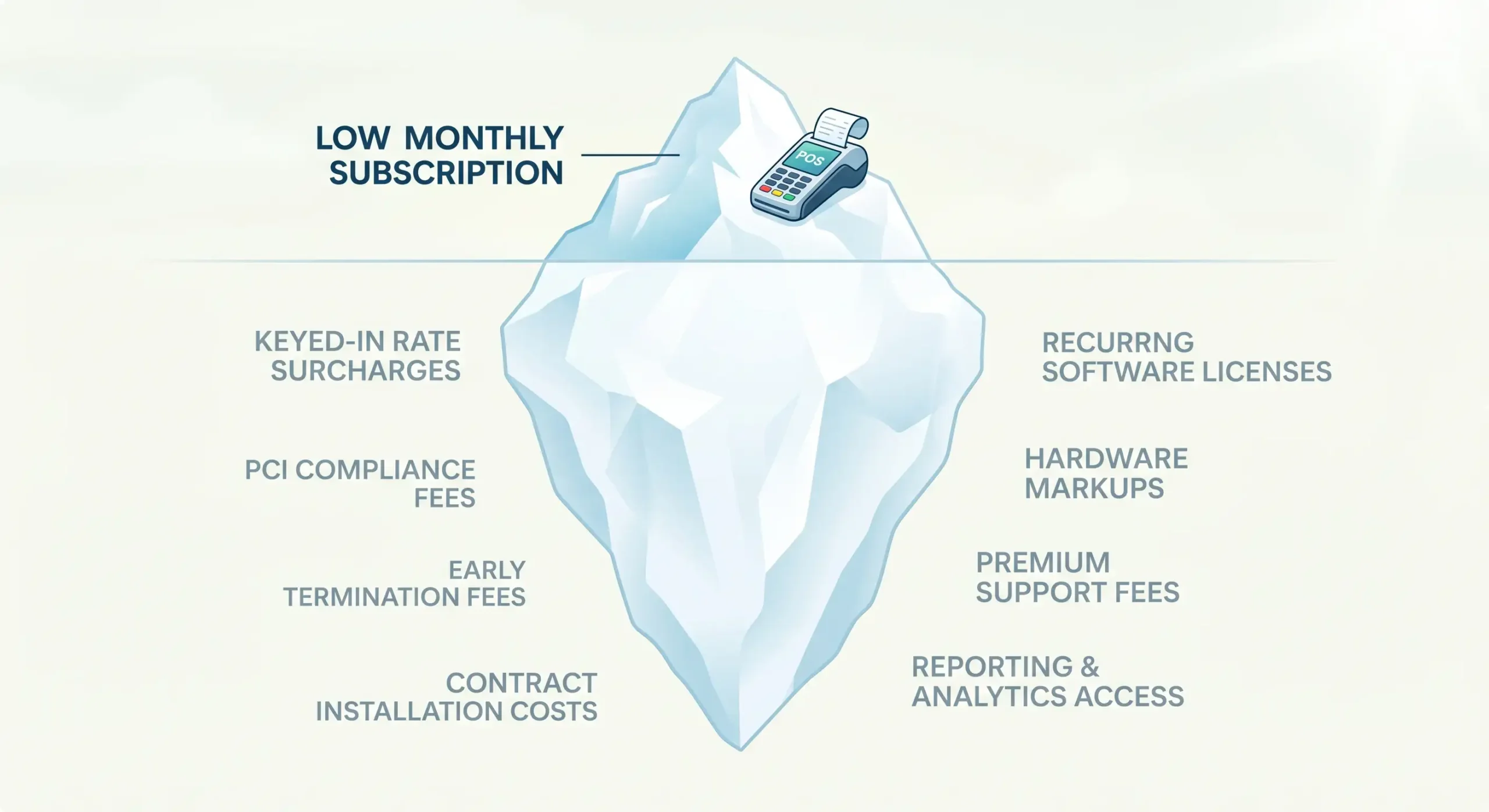
In my experience, owners undercheck these four items most often: keyed-in vs. card-present rates, chargeback handling, gateway or platform fees, and feature unlock fees for reporting, loyalty, or staff access. Yes, it’s frustrating. But knowing costs before signing is the only way to protect margin.
How Not to Overpay for Hardware and Software
The cheapest advertised hardware deal is not always the cheapest operating model. You can get burned by overpriced bundles, locked devices, or paying for equipment you don’t need.
Hardware ranges from official sources:
- POS terminals: $150–$300 for basic units and $1,200–$2,500 for advanced terminals — Square product pricing, 2024 (https://squareup.com/products/pos-terminals)
- Receipt printers: $80–$150 basic thermal, $250–$400 network-capable — Epson America, 2023 (https://www.epson.com/products/printers/thermal-printers)
- Card readers: $20–$50 magnetic readers, $60–$150 EMV chip readers — Verifone card readers, 2024 (https://www.verifone.com/products/card-readers)
BYOD-style models may be possible in cloud POS environments, but PCI DSS restrictions apply — PCI DSS v4.0 (https://www.pcisecuritystandards.org/documents/PCI_DSS_v4-0.pdf).
A real short story. A merchant picks the “free” POS package because the upfront number looks nice. Then they add inventory tools, extra users, a better terminal, and online ordering. Six months later the stack costs more than the “expensive” option they rejected. Bad decision driven by bad comparison math. Run a 3-year TCO calculation before signing.
What POS Hardware Does a Small Business Actually Need?
Most small businesses don’t need a giant hardware stack. They need the minimum reliable setup that supports fast checkout, secure card acceptance, and the way the business actually sells.
Basic Starter Hardware Kit
| Hardware | What it does | Who usually needs it | Typical note |
|---|---|---|---|
| POS terminal / tablet | Runs the POS software | Almost every business | Fixed counter or mobile |
| Card reader | Accepts chip, tap, swipe payments | Any business taking cards | EMV and contactless support matter |
| Receipt printer | Prints customer receipts | Retail, restaurants, service counters | Some businesses go digital only |
| Cash drawer | Stores cash safely | Cash-accepting businesses | Not needed if fully cashless |
| Barcode scanner | Scans items fast | Retail, liquor, convenience, inventory-heavy stores | Big speed win with many SKUs |
If you’re a restaurant, replace barcode obsession with service-flow hardware: kitchen printer or kitchen display if relevant, handhelds for tableside payment, backup connectivity.
If you’re a salon, spa, or service business, you may only need a tablet, reader, and optional printer. That’s it. Don’t buy a spaceship to sell coffee.
When You Need a Mobile POS or Tablet Setup
A tablet or mobile POS setup makes sense when checkout moves around the space or out into the field. If the sale happens at the table, curbside, booth, truck, event, or customer site — mobile wins.
Security still matters here. TLS 1.3 and MFA guidance for mobile commerce security from NIST, plus mobile device controls under ISO/IEC 27001, set the right baseline. Mobile POS is convenient, but convenience without device security is asking for trouble.
A mobile POS setup is especially useful for: restaurants doing tableside checkout, pop-up retail, food trucks, service businesses on-site, and seasonal or temporary booths.
If a business runs from one counter all day, a fixed terminal may still be cleaner and faster. Know your flow before you buy the hardware.
Top POS Systems Compared: Square, Clover, Shopify, Toast, and Lightspeed
There is no single best POS for every small business. The best POS systems for small business depend on whether you sell in-store, online, across locations, or through a restaurant workflow.
Reality check: the research pack says there are no independent 2024–2025 peer-reviewed or audited comparative studies for this exact topic. So if you see a “Top 10 Best POS Systems” article speaking with total certainty, chances are it’s recycling affiliate content.
At-a-Glance Comparison: Top 5 POS Platforms
| Brand | Best For | Monthly Software Fee | Processing Fee (card-present) | Key Strength | Watch Out For |
|---|---|---|---|---|---|
| Square | Cafes, small retail, startups | $0 (free plan) / $29+ (Plus) | 2.6% + $0.10 | Easiest entry, free plan, great accounting integrations | 3.5% + $0.15 for keyed-in; no volume discounts |
| Shopify POS | Omnichannel retail, existing Shopify users | $0 Lite / $89/location (Pro) | 2.4%–2.9% + $0–$0.30 | Best in-store + online sync; massive app ecosystem | Extra 0.5%–2% surcharge for third-party processors |
| Clover | Retail, QSR, service businesses | $14.95–$94.85/month | 2.3% + $0.10 in-store | Versatile hardware lineup; deep app marketplace | Hardware cost $150–$1,000+; setup requires sales rep |
| Toast | Full-service and quick-service restaurants | $0 (starter) / $69–$165+/month | 2.49%–2.99% + $0.15 | Purpose-built restaurant tools; kitchen display, tip automation | 2-year contracts; hardware $627–$1,339+; locked processor |
| Lightspeed | Growing restaurants, multi-location retail | $89–$239/month + add-ons | Custom (Lightspeed Payments) | Advanced inventory; multi-location reporting; strong analytics | Learning curve; limited third-party integrations |
Data sourced from official vendor pricing pages, June 2025–2026. Prices subject to change.
Square, Clover, and Shopify POS: Pros, Cons, and Fit
Square POS
- ✅ Pros: Free to start, no monthly fee required, clean UI, excellent accounting integrations (Xero, QuickBooks), reliable offline queue mode, good for cafes/bars/small retail.
- ❌ Cons: Limited customization for complex operations; 3.5% + $0.15 for keyed-in transactions; no volume discounts ever; account freezes possible with no warning; no dedicated account manager.
- 🎯 Best for: Single-location cafes, bars, small retail, service businesses, startups under $30K/month in volume.
Clover POS
- ✅ Pros: Best hardware variety (Station, Mini, Flex, Go); large app marketplace; works with third-party processors like Smart Payment Solutions for better rates; strong dashboard visibility.
- ❌ Cons: Hardware costs more upfront; pricing structure can be opaque online; requires sales rep conversation to get started.
- 🎯 Best for: Retail stores, quick-service restaurants, service businesses that want hardware flexibility and the ability to negotiate processing rates.
Shopify POS
- ✅ Pros: Best-in-class omnichannel sync (online + in-store inventory, orders, customers); massive app store; works seamlessly for businesses already on Shopify.
- ❌ Cons: Surcharge if you use non-Shopify Payments; subscription items not yet fully supported in POS; limited hardware compared to Clover; POS Pro is $89/month per location on top of your Shopify plan.
- 🎯 Best for: Retailers with both online store and physical location, especially those already using Shopify for ecommerce.
For a head-to-head comparison on one specific alternative, see SkyTab vs Square.
How to Compare POS Systems Without the Marketing Noise
Compare POS systems by workflow, full cost, and operational risk. Ignore homepage slogans until the ugly details are clear.
Six-step evaluation process:
- Test one real sale flow.
- Test one refund flow.
- Test one inventory update.
- Test one report export.
- Test one support request.
- Price the full stack for 36 months.
That last one matters. Compare TCO over 3 years, not just first-month pricing. That’s how you spot whether the best POS for small business is actually affordable or just dressed up nicely.
TCO example for a business doing $50,000/month in card volume:
- Square flat-rate: ~2.6% = $1,300/month in processing alone = $46,800 over 3 years
- Interchange-plus pricing through a processor like Smart Payment Solutions: typically 1.7%–2.1% effective rate = ~$850–$1,050/month = $30,600–$37,800 over 3 years
That’s a potential savings of $9,000–$16,000 over three years — from the same hardware, just a different processing agreement.
Expert Tip: “Ask every vendor: what is my effective rate on $X monthly volume? If they can’t give you a number, they’re hiding the answer.” — Max Artemenko, Smart Payment Solutions
Why Smart Payment Solutions
Working with a POS reseller or payment specialist is different from buying directly from a brand. The difference shows up in three situations: when rates need to be negotiated, when hardware fails at the worst possible moment, and when you need someone who actually picks up the phone.
Smart Payment Solutions has implemented SkyTab, Clover, and Shift4 payment systems across restaurant and retail businesses, consistently receiving feedback on fast issue resolution, responsive support, and transparent rates. Clients specifically note next-day technician visits, same-day problem resolution, and rate audits that caught overcharges the previous processor never disclosed.
“Very well trained professional work done right! Best POS by far! Definitely will recommend to all my business friends. I really love that they have real technicians that come to assist next day. And their customer service is excellent 24/7. I always get an answer and a follow up!” — Client testimonial, Smart Payment Solutions
“Max demonstrated strong technical knowledge, which greatly contributed to the successful transition to the new system Shift4. His ability to grasp and effectively explain technical details to me and my staff was impressive.” — Client testimonial, Smart Payment Solutions
The company offers free payment audits — a review of your current processing agreement to identify if you’re overpaying. For businesses doing $30,000+ per month in card volume, this review routinely finds $200–$600/month in recoverable fees.

What do our customers think about us
Other Articles
What to Do if Your Credit Card Machine Says “Terminal Not Found”
The Ultimate Directory of Credit Card Decline Codes for Merchants
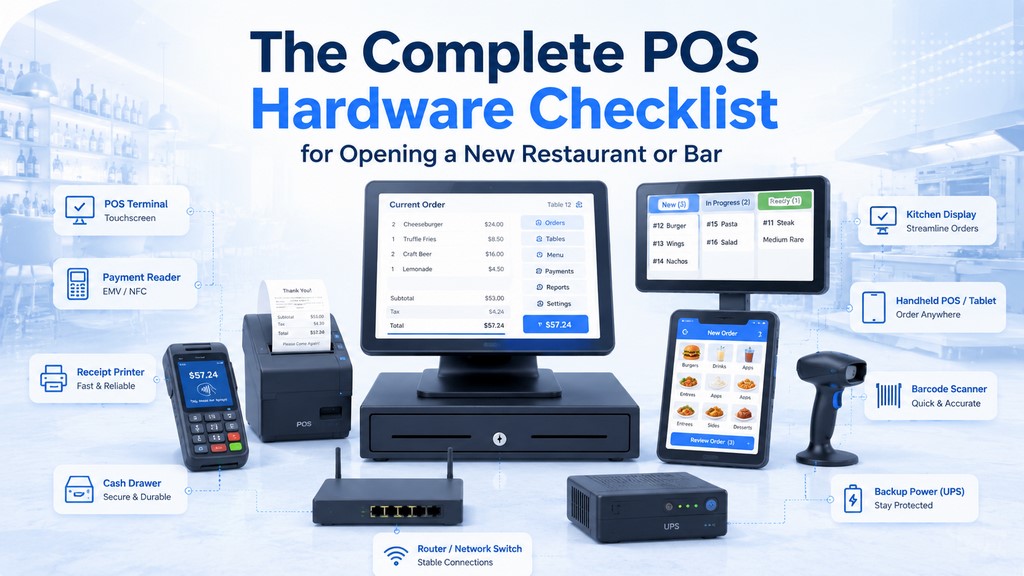
The Complete POS Hardware Checklist for Opening a New Restaurant or Bar
