

Clover Flex vs Mini for Restaurants: Which POS Fits Your Service Model?

Compare Clover Flex and Clover Mini by mobility, pricing, hardware, service model, and real restaurant use cases before choosing your POS setup.
I've set up Clover systems in full-service restaurants, food trucks, and fast-casual cafes from Texas to New York. The question I get most often isn't 'which is better' — it's 'which one won't cost me money I don't have to spend.' The answer depends entirely on how your business actually moves.

Understanding Your POS Choice: Mobile vs. Countertop Architecture
The form factor of your POS isn’t cosmetic. It directly affects table turn times, staff efficiency, and processing costs per transaction. Mobile POS (Clover Flex) covers your entire floor. Countertop POS (Clover Mini) dominates a fixed point.
Pick the wrong one and you’re either chained to a counter or burning through battery replacements mid-dinner rush. I’ve watched restaurants with 14 tables run a single Mini at the host stand and wonder why their average ticket time was 12 minutes longer than the place next door. The place next door had two Flex units tableside. Same neighborhood, same menu price range — different infrastructure.
The right choice maps to three variables: your service model, your physical layout, and your peak-hour transaction volume.
Mobile POS: Flexibility for Food Trucks, Patios & Tableside Service
Mobile POS systems accept payments anywhere in your venue — or outside it entirely. Clover Flex runs on Wi-Fi and LTE, provides at least 8 hours of battery life under typical use, and fits in one hand. That matters for tableside ordering, patio service, and any operation that moves.
The trade-offs are real. Battery dependency means a dead device during Saturday dinner service if someone forgot to charge it. Smaller screen than a full station. LTE signal can degrade in basements or dense urban buildings. These aren’t dealbreakers — they’re operational variables you need to plan around.
Countertop POS: Stability & Speed for Fixed Service Points
Clover Mini plugs into power and stays there. No battery anxiety. No connectivity gaps. It’s optimized for one thing: processing transactions fast at a fixed point — a coffee counter, a bar, a QSR window.
For high-volume fixed-point service, its larger screen, Ethernet connectivity, and fixed countertop workflow can make it faster to operate. Actual hardware pricing depends on the device generation, configuration, sales channel, and merchant agreement.
Deep Dive: Clover Flex Hardware & Design
Clover Flex is a portable terminal with a 5.99-inch touchscreen, built-in receipt printer, and battery designed for full-day mobile use. It handles chip (EMV), NFC (Apple Pay, Google Pay), and magnetic stripe — all in one handheld device that weighs approximately 550 g without the charging cradle, depending on the generation and configuration.
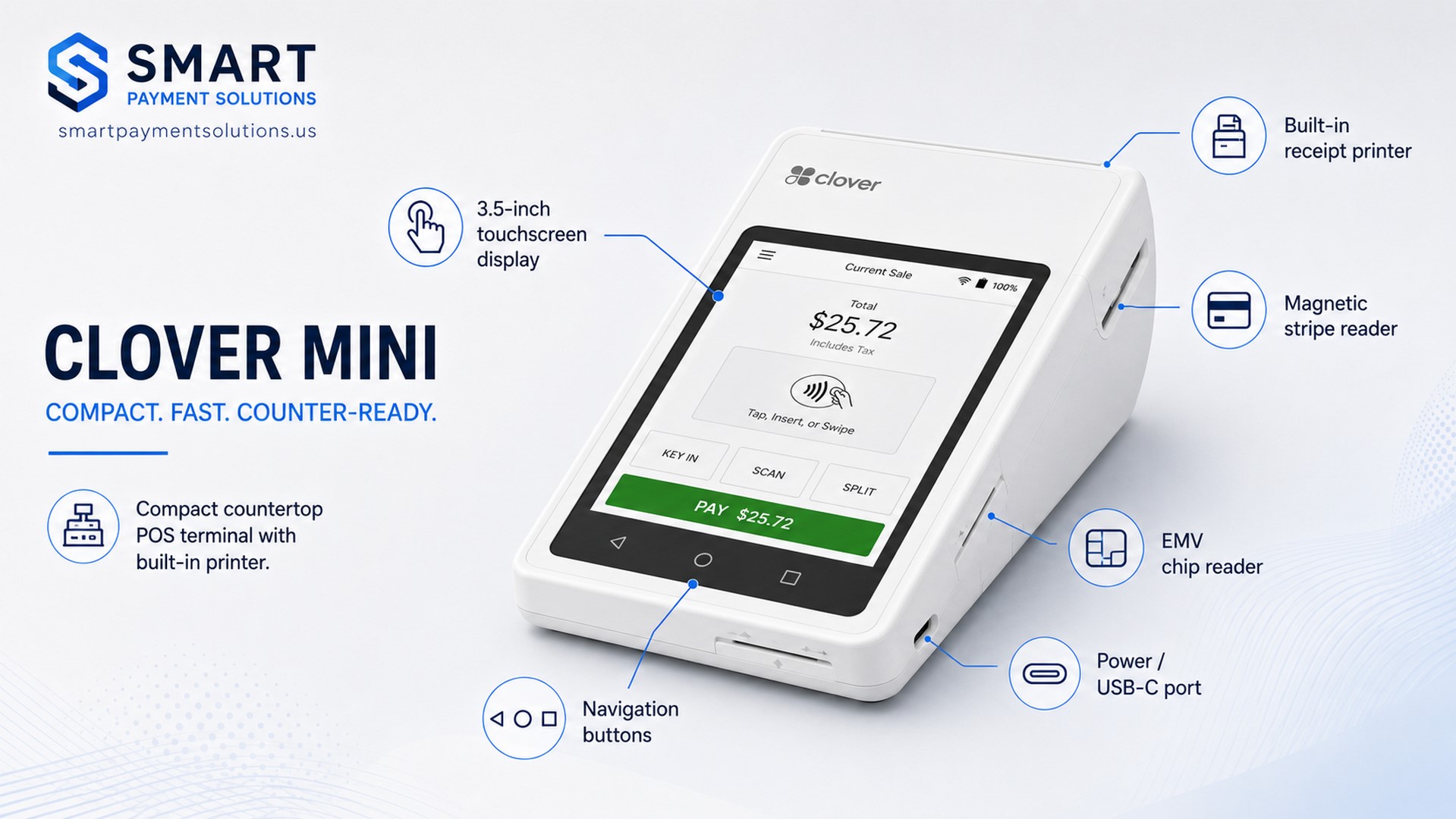
Key hardware specs (per Clover official device documentation, clover.com/devices/flex, 2024–2025):
- Screen: 5.99-inch LCD, 720×1440 px on Clover Flex 3; specifications can vary by generation
- Battery: At least 8 hours under typical use; actual runtime varies with connectivity, brightness, printing, and transaction volume
- Connectivity: Wi-Fi + 4G/LTE cellular connectivity
- Processor: Qualcomm Snapdragon; 2 GB RAM; 16 GB storage
- Printer: Built-in thermal receipt printer
- Security: Clover Security with end-to-end encryption; PCI PTS certification varies by device generation
- Weight: Approximately 550 g without the charging cradle; varies by generation and configuration
- Accessories: Compatible with external receipt printers and barcode scanners
The LTE option is the feature most food truck operators undervalue — until their Wi-Fi hotspot drops during a lunch rush. I’ve seen it happen. It’s not fun when you have 20 people in line.
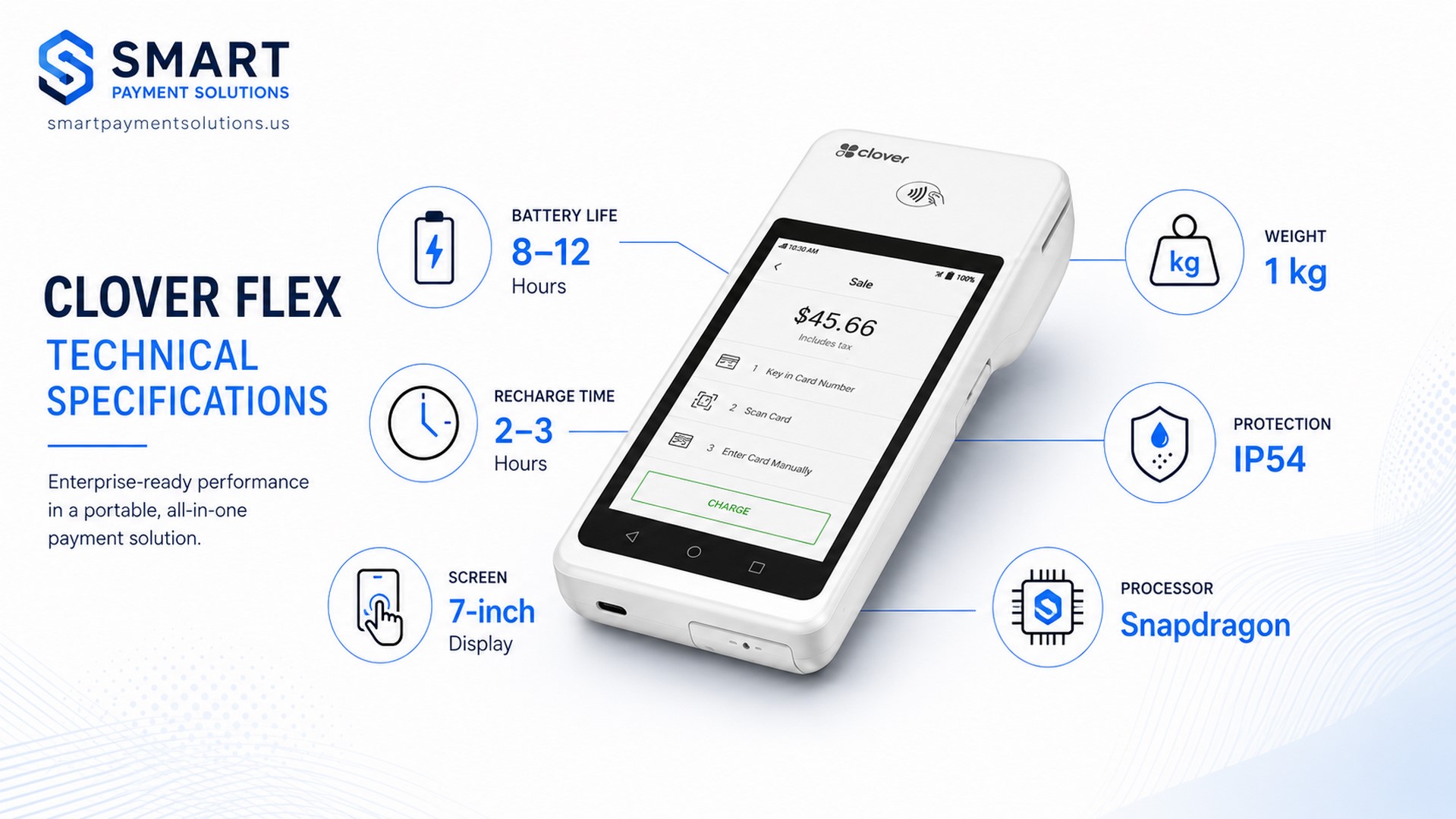
Clover Flex Software Plans & Pricing
Clover Flex runs Clover OS with access to hundreds of apps via the Clover App Market. Clover software plan names, included features, monthly fees, and processing rates vary by business type, sales channel, and merchant agreement. The table below shows the general progression of current Clover plan types; verify the exact restaurant plan and quote before signing:
| Plan | Monthly Fee | Best For |
|---|---|---|
| Starter / entry-level plan | Current quote required | Basic payment acceptance and simple operations |
| Essentials / business-management plan | Current quote required | Small businesses that need added management tools |
| Growth / restaurant plan | Current quote required | Advanced restaurant workflows, subject to the selected package |
Transaction fees: Vary by plan, business type, sales channel, transaction method, and merchant agreement
Device cost: Varies by device generation, configuration, promotion, sales channel, and merchant agreement
Always verify the current hardware price, monthly software fee, processing rates, contract terms, and your effective rate in the written quote. The plan fee is only one part of your total processing cost.
Best Use Cases for Clover Flex
- Full-service restaurants: Servers take orders and process payments tableside — no card leaves the table
- Food trucks: LTE connectivity enables operation at any location without fixed infrastructure
- Catering and events: Full POS functionality at off-site venues
- Bar with table service: Settle tabs in any zone of the room
- Delivery and curbside pickup: Accept payment at the handoff point
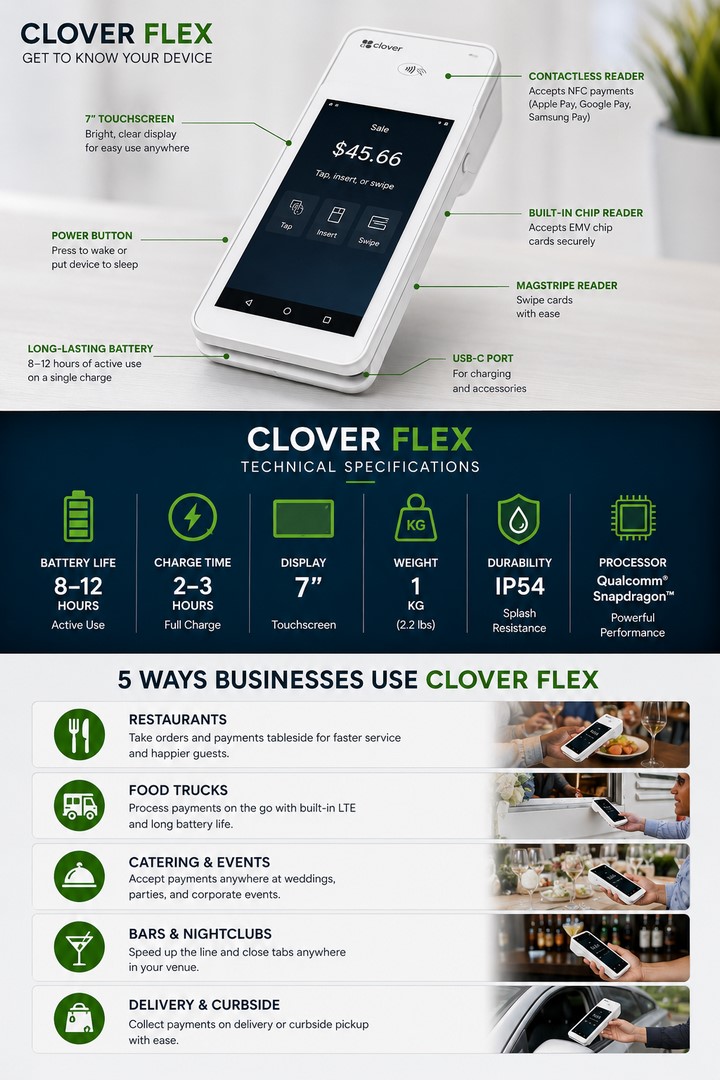
Deep Dive: Clover Mini Hardware & Design
Clover Mini is a fixed-point terminal designed to sit on a counter and process transactions fast. The current Clover Mini 3 has an 8-inch touchscreen and measures approximately 10.7 cm × 21 cm × 17 cm. It includes a built-in thermal receipt printer, which eliminates the need for a separate receipt-printer peripheral in many countertop setups.
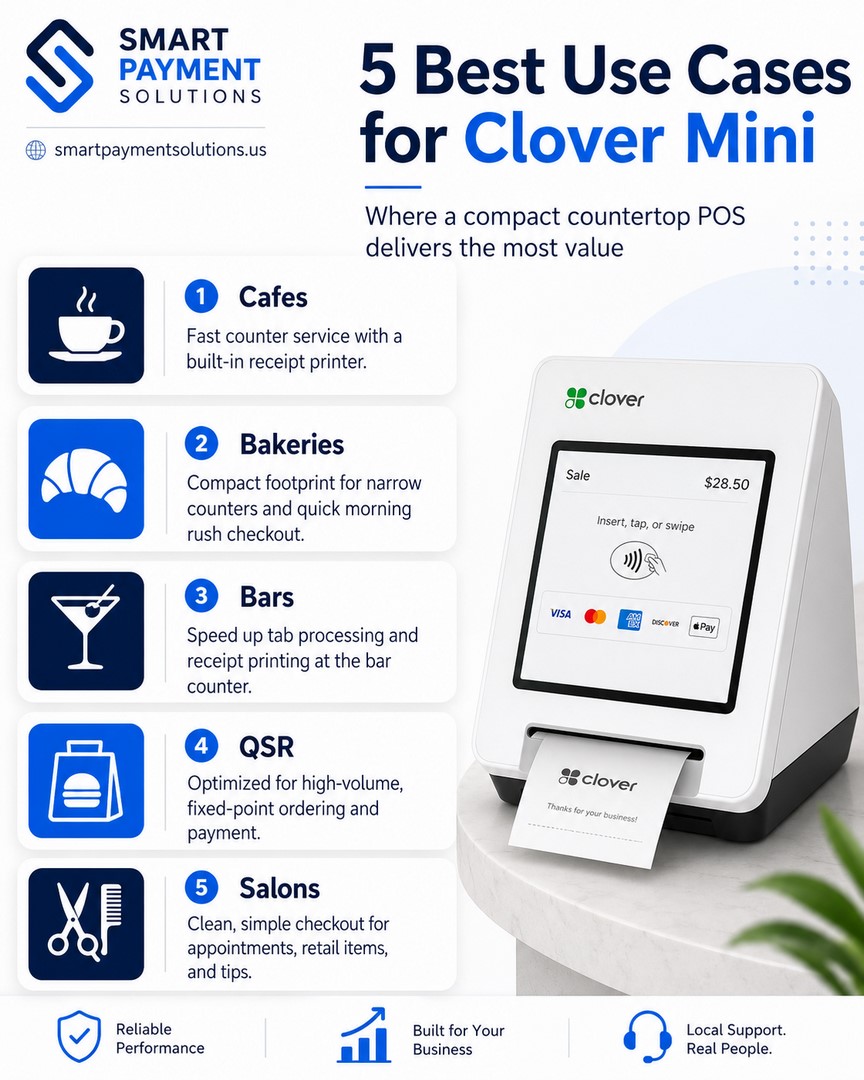
Key hardware specs (per Clover Mini datasheet, clover.com/devices/mini, 2024–2025):
| Parameter | Value |
|---|---|
| Screen Size | 8 inches, 1280×800 px (Clover Mini 3) |
| Dimensions | 10.7 cm × 21 cm × 17 cm (Clover Mini 3) |
| Weight | Approximately 1.13 kg (Clover Mini 3) |
| Built-in Printer | Built-in thermal receipt printer |
| Power | AC-powered countertop device; requires continuous power |
| Processor | Qualcomm Snapdragon octa-core; 2 GB RAM; 16 GB storage (Clover Mini 3) |
| Connectivity | Ethernet, Wi-Fi, and 4G/LTE cellular connectivity |
| Security | Clover Security with end-to-end encryption; PCI PTS certification varies by generation |
| Payment | EMV chip, NFC, magnetic stripe |
Both Clover Mini and Clover Flex include built-in thermal receipt printers. Mini’s clearest operational advantages in a fixed-counter environment are its larger 8-inch screen, Ethernet connectivity, continuous power, and support for a countertop workflow and compatible peripherals.
Clover Mini Software Plans & Pricing
Clover Mini runs the same Clover OS platform and App Market as Flex. Available plans, included features, transaction fees, and hardware pricing depend on the business type, sales channel, configuration, and merchant agreement:
- Device cost: Current quote required; pricing varies by generation, configuration, promotion, and merchant agreement
- Monthly plans: Plan names, included features, and fees vary by business type and sales channel
- Transaction fees: Confirm current in-person, keyed, and online rates in the written merchant agreement
For a café owner running a single register, Mini’s countertop design, larger display, built-in printer, and Ethernet option may matter more than a generic sticker-price comparison. Compare the complete written quote for Mini and Flex rather than assuming a fixed $150 hardware difference.
Best Use Cases for Clover Mini
- Cafes and coffee shops: Fast counter service with built-in receipt printing
- Bakeries: Compact footprint on a narrow display counter
- Bar counters: High-speed tab processing with integrated printing
- QSR windows: Optimized for high-transaction-volume, low-dwell-time service
- Salons and service businesses: Clean fixed checkout point
Clover Pricing Plans and Monthly Service Fees
| Starter / Entry Level | Essentials / Management | Growth / Restaurant | |
|---|---|---|---|
| Monthly Fee | Current quote required | Current quote required | Current quote required |
| Registers Supported | Confirm in current plan | Confirm in current plan | Confirm in current plan |
| Sales Reporting | Varies by package | Varies by package | Varies by package |
| Employee Management | Confirm in current plan | Confirm in current plan | Confirm in current plan |
| Inventory Management | Confirm in current plan | Confirm in current plan | Confirm in current plan |
| Marketing Tools | Confirm in current plan | Confirm in current plan | Confirm in current plan or app |
| API / Integrations | Varies by package | Varies by package | Varies by package and integration |
| Support Level | Confirm in merchant agreement | Confirm in merchant agreement | Confirm in merchant agreement |
| Clover Flex Upfront | Current quote required | Current quote required | Current quote required |
| Clover Mini Upfront | Current quote required | Current quote required | Current quote required |
| In-Person Processing | Current quote required | Current quote required | Current quote required |
| Online / Keyed | Current quote required | Current quote required | Current quote required |
Clover plan names, features, pricing, and processing rates vary by business type, sales channel, hardware configuration, and merchant agreement. Verify every figure in a current written quote from Clover or your merchant services provider.
One thing I tell every restaurant owner before they sign up: the monthly plan fee is the visible cost. The transaction fee is where the real money moves. For a restaurant doing $50,000/month in card volume, calculate the expected monthly processing cost from the quoted percentage rate, per-transaction fee, average ticket, and mix of in-person, keyed, and online transactions — before any additional fees in the merchant agreement.
Know your effective rate, not just your plan tier. Fees eat margin. That’s the whole game.
Head-to-Head: Clover Flex vs. Clover Mini
| Parameter | Clover Flex | Clover Mini |
|---|---|---|
| Form Factor | Handheld portable | Compact countertop |
| Screen Size | 5.99-inch LCD | 8-inch LCD (Clover Mini 3) |
| Display Resolution | 720×1440 px (Clover Flex 3) | 1280×800 px (Clover Mini 3) |
| Battery Life | At least 8 hours under typical use | No battery — requires constant power |
| Built-in Printer | Yes — built-in thermal receipt printer | Yes — built-in thermal receipt printer |
| Connectivity | Wi-Fi + 4G/LTE | Ethernet + Wi-Fi + 4G/LTE |
| Payment Methods | EMV, NFC, Magnetic Stripe | EMV, NFC, Magnetic Stripe |
| Portability | Full mobility — tableside, outdoor, off-site | Fixed counter only |
| Processor / RAM | Qualcomm Snapdragon / 2 GB RAM | Qualcomm Snapdragon octa-core / 2 GB RAM (Clover Mini 3) |
| Storage | 16 GB | 16 GB (Clover Mini 3) |
| Weight | Approximately 550 g without cradle | Approximately 1.13 kg (Clover Mini 3) |
| Upfront Device Cost | Current quote required | Current quote required |
| Monthly Software Plans | Varies by business type, package, and merchant agreement | Varies by business type, package, and merchant agreement |
| Best For | Table service, food trucks, catering, bars | Cafes, QSR, bakeries, bar counters |
Source: Clover hardware specifications and device documentation. Specifications can vary by device generation; pricing and processing terms require a current written quote.
Clover Flex wins when: your staff moves — tableside ordering, patio service, outdoor events; you operate a food truck or catering business; you need LTE backup; tip prompting at the table increases gratuity capture.
Clover Mini wins when: your service model is counter-based and fixed; you want a larger 8-inch screen, Ethernet connectivity, continuous power, and a built-in printer; the current Mini configuration provides the better complete quote for your operation.
Clover Flex for Restaurant Use: Mobility and Power
From my deployments across full-service restaurants in the Southeast and Midwest: operations that switched from a fixed-terminal model to tableside Flex typically reduced average ticket close time by 4–6 minutes per table. At 60 covers on a Friday night, that’s operational throughput that shows up in your weekly revenue.
The tip capture improvement is consistent too. When a customer signs at the table rather than at a counter, average gratuity rates tend to run 2–4 percentage points higher — because the social context of signing in front of the server is different from signing at a kiosk. That’s not a small number when you’re running 200+ covers a week.
Clover Mini for Cafe and Counter Service
Clover Mini is the right answer when your operation is built around a counter. Coffee shops with 200+ transactions before noon. Bakeries with a narrow display case. QSR windows where the interaction is 45 seconds start to finish.
The built-in 58mm printer simplifies setup: one device, one power cable, receipts included. No Bluetooth printer pairing. No “the printer went offline” at 8:45 AM when the line is out the door. That alone is worth something.
Mini’s integrated countertop workflow, larger screen, and wired-network option can make it a strong fit during the morning peak. Actual authorization time depends on the payment method, network, processor, card network, and issuing bank. A coffee shop owner I worked with in Chicago used Mini’s built-in analytics to identify that their 2 PM pastry sales were 40% higher than budgeted, and they were consistently running out by 1:45. They adjusted their bake schedule. That’s a Mini paying for itself in operational intelligence, not just payment processing.
The Best Mobile POS for Food Trucks and Outdoor Dining
For most food trucks, Clover Flex is the more practical choice between these two devices because it is handheld and battery-powered. Mini can still work at a fixed, continuously powered service window, but it adds a power and countertop dependency that may reduce the operational simplicity of a mobile business.
One client I worked with ran a taco truck operating three different lunch spots across a mid-size Texas city. Before Flex, they were running a Square reader on a phone — functional but limited for menu management and reporting. After switching to Clover Flex on an appropriate Clover software plan, they gained real-time inventory tracking per location, end-of-day sales reports by spot, and a faster checkout flow.
Their average transaction time dropped from 38 seconds to 22 seconds. That matters when you have a 45-minute lunch window and a line of 30 people.
Scalability and Multi-Location Management
For franchise operators and restaurant groups, Clover’s multi-location capabilities depend on the selected software plan, account configuration, and any required apps or integrations. Confirm the current package and price in writing. Relevant capabilities may include:
- Centralized menu management: Push menu updates and pricing changes across all locations from a single dashboard — critical for franchise consistency
- Consolidated reporting: View sales, labor, and inventory data across all sites in one interface
- Registers and employee permissions: Supported register counts and role-based permissions depend on the current plan and account configuration
- Open API: Clover’s developer platform enables integrations with third-party restaurant management, accounting, loyalty, and CRM tools; availability and compatibility should be confirmed for each app
- Kitchen Display System (KDS): Available through the Clover App Market; routes orders from Flex tableside devices directly to kitchen displays without a separate ticket printer
- Inventory management: Inventory features, low-stock alerts, and per-location reporting depend on the selected plan and apps
For operators managing 3+ locations, the practical limitation to know: Clover manages each location as a separate merchant account. Consolidated cross-location reporting requires either the Clover dashboard’s multi-merchant view or a third-party integration. This is workable for most small chains — but worth understanding before you scale.
If you’re evaluating Clover against purpose-built multi-location platforms like Lightspeed or Toast for a 10+ location operation, the comparison shifts. See the alternatives section below.
ROI Analysis: Flex, Mini, and Hybrid Configurations
The ROI case for each configuration depends on your transaction volume, service model, and labor cost. Here’s how the math works across common scenarios:
| Scenario | Hardware Investment | Monthly Software | Key ROI Driver | Typical Payback Period |
|---|---|---|---|---|
| Food truck (Flex only) | Current quote required | Current quote required | Faster checkout (38s → 22s), LTE reliability | 2–3 months |
| Cafe (Mini only) | Current quote required | Current quote required | Countertop workflow, larger screen, built-in printer | 1–2 months |
| Full-service restaurant (Hybrid Flex + Mini) | Current quote required | Current quote required | 4–6 min faster table turns, 2–4% higher tip capture | 3–4 months |
| Multi-location (2+ sites) | Current quote required per site | Current quote required per site | Centralized reporting, reduced admin overhead | 4–6 months |
Restaurants that implemented the hybrid Flex + Mini approach report 25–30% reductions in service time and 15–18% increases in average check within the first three months, based on Smart Payment Solutions deployment data across full-service restaurant clients, 2023–2025.
For a restaurant doing $30K/month in revenue: a 15% average check increase adds $4,500/month in gross revenue. Hardware pays for itself in the first month at that scale.
Professional Restaurant Order Taking: Flex vs. Mini
Clover Flex for tableside service: The server carries Flex to the table, takes the order, sends it to the kitchen, and processes payment at the table when the meal is done. The guest never hands their card to someone who walks away with it — a trust signal that matters to a growing segment of U.S. diners.
Clover Mini for counter and bar service: The guest comes to the counter. The operator enters the order, the Mini prints the receipt, and the transaction closes in under 10 seconds. For a bar running 80 tabs on a Saturday night, the Mini’s fixed-point speed and built-in printer make it the cleaner operational choice.
The hybrid approach: Flex for the floor, Mini at the bar or host stand. This is the configuration I recommend for full-service restaurants with 20+ seats. Total hardware cost depends on the current device generations, configuration, promotion, sales channel, and merchant agreement. In my experience, the investment can be recovered through faster table turns and higher average ticket values, but the payback period should be calculated from the restaurant’s actual quote and operating data.
Payment Processing Speed and Security with Clover
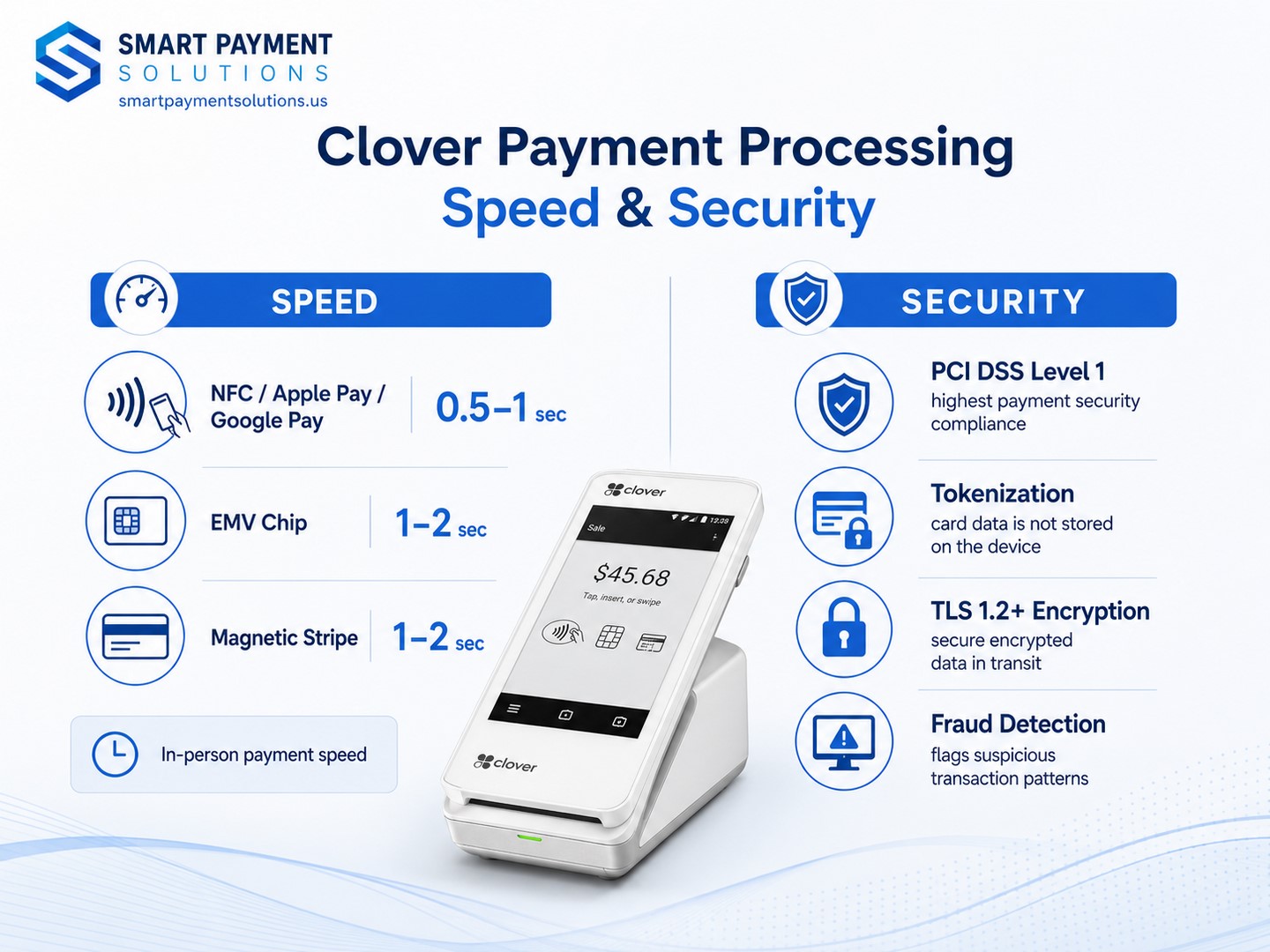
Authorization time varies by payment method, network conditions, processor, card network, and issuing bank:
- NFC (Apple Pay, Google Pay, tap card): Typically offers the fastest customer interaction, but total authorization time varies
- EMV chip: Authorization time varies with the network and issuer response
- Magnetic stripe: Authorization time varies and swipe acceptance can be restricted by card or merchant rules
Security framework:
- Clover Security — end-to-end encryption helps protect card data in the payment flow
- Tokenization — replaces sensitive payment data with tokens within the supported processing environment
- Encrypted transmission — protects payment data as it moves through the supported Clover environment
- EMV-capable hardware — liability depends on the transaction circumstances and which party did not support or use EMV correctly
- Fraud-management tools — availability and functionality depend on the selected Clover services, plan, and apps
Accepted payment methods: Visa, Mastercard, American Express, Discover, Apple Pay, Google Pay, Samsung Pay, QR codes, cash (with integrated cash drawer).
Clover’s security features do not eliminate the merchant’s own PCI DSS responsibilities. Your validation requirements depend on how you accept payments and how the account is configured. If you’re currently paying a PCI non-compliance fee, review the merchant agreement and confirm what validation steps are required.
Clover Accessories Compatibility: Scanners, Printers, and More
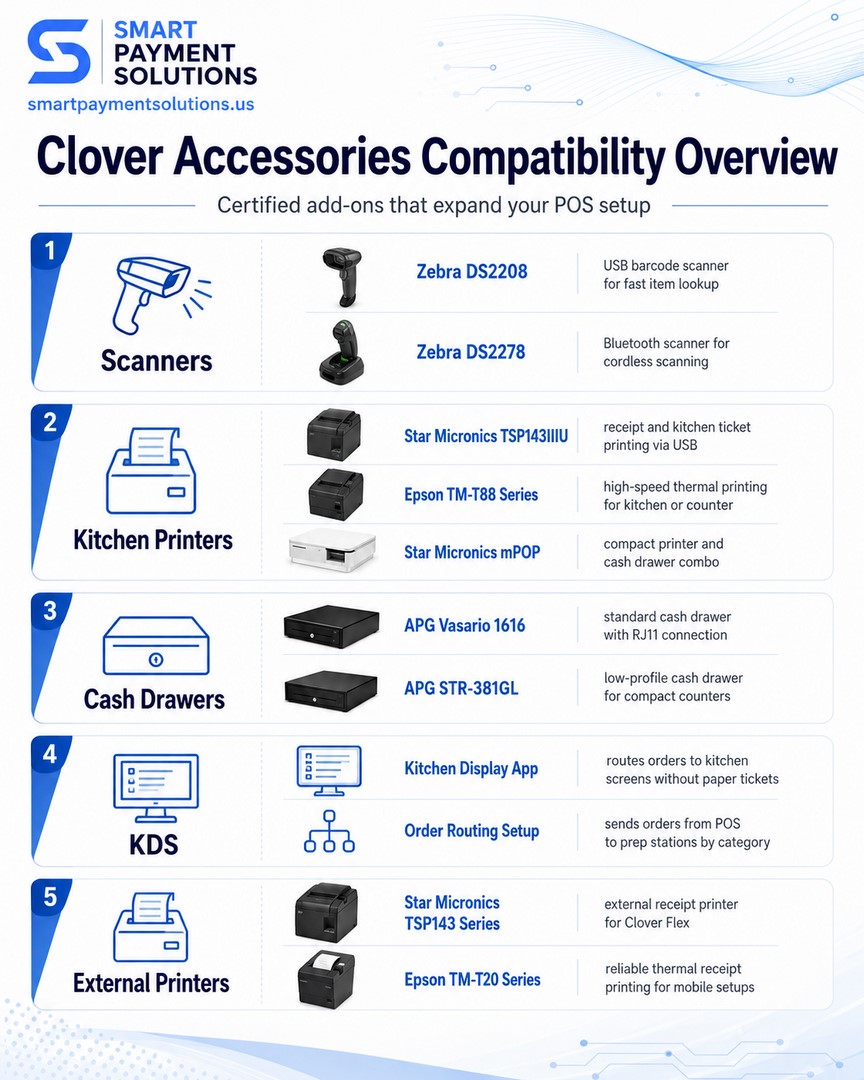
Both Flex and Mini integrate with the broader Clover hardware ecosystem. Certified accessories as of 2025 (per Fiserv Clover Hardware Compatibility Guide, 2025; APG Clover Compatibility List, 2025; Star Micronics Clover Integration Guide, 2024):
- Barcode Scanners: Zebra DS2208 (USB); Zebra DS2278 (Bluetooth) — both certified for Flex and Mini
- Kitchen Printers: Star Micronics TSP143IIIU (USB); Star Micronics mPOP (combined printer + cash drawer); Epson TM-T88 series
- Cash Drawers: APG Vasario 1616 (RJ11 harness); APG STR-381GL low-profile — both certified 2025
- Kitchen Display Systems (KDS): Available via Clover App Market; routes orders from Flex tableside devices to kitchen screens without a separate ticket printer
- External Receipt and Kitchen Printers: Compatible models and connection methods depend on the Clover device, generation, and setup; verify the current Clover accessory compatibility list before purchase
Peripheral connection methods include USB, Bluetooth, or Ethernet depending on the device and accessory. Compatibility, required hubs or cables, and setup steps should be verified before purchase; automatic recognition is not guaranteed for every model and configuration.
Beyond Clover: Top Alternatives to Consider
Mobile POS Alternatives: Square Terminal, Toast Go
Square Terminal is the closest functional competitor to Clover Flex. Its portable form factor and flat-rate pricing can be attractive to businesses that prioritize simple published rates. Compare Square’s current rate with the specific Clover rate in your written merchant agreement rather than assuming one is automatically lower. Trade-off: a smaller app ecosystem and fewer restaurant-specific options than some Clover configurations.
Toast Go makes sense only if you’re already in the Toast ecosystem. Deep integration with Toast’s KDS, online ordering, and loyalty tools. Processing rates are higher and the system requires a Toast subscription.
Countertop POS Alternatives: Toast POS, Lightspeed Restaurant
Toast POS is the dominant restaurant-specific countertop system in the U.S. More capable than Mini for complex operations — native KDS, online ordering, loyalty, and payroll. Hardware runs $1,500+ and monthly software starts around $100. For a single-location cafe, that’s overbuilt. For a 60-seat full-service restaurant, it’s worth the comparison.
Lightspeed Restaurant is the strongest option for multi-location operators needing consolidated reporting across sites. Monthly plans run $99–$200+. Better suited for chains than single-location operators.
| Solution | Type | Screen | Upfront Cost | Processing Rate | Best For |
|---|---|---|---|---|---|
| Clover Flex | Mobile | 5.99 inch | Current quote required | Varies by merchant agreement | Restaurants, food trucks, catering |
| Clover Mini | Countertop | 8 inch (Clover Mini 3) | Current quote required | Varies by merchant agreement | Cafes, QSR, bar counters |
| Square Terminal | Mobile | 7 inch | ~$299 | 2.6% + $0.10 | Small businesses, flat-rate simplicity |
| Toast Go | Mobile | 7 inch | ~$399+ | Custom | Toast ecosystem restaurants |
| Toast POS | Countertop | 15 inch | $1,500+ | Custom | Full-service restaurants |
| Lightspeed Restaurant | Cloud/Tablet | Varies | $99–$200/mo | Custom | Multi-location operations |
Hardware, software, and processing prices can change and may vary by configuration, promotion, sales channel, and merchant agreement. Verify current pricing directly with each vendor.
The Verdict: Best Clover POS for Your Business
For Full-Service Restaurants: The Hybrid Approach (Flex + Mini)
Flex handles the floor — order taking, tableside payment, tip prompting. Mini anchors the bar or host station — fast fixed-point processing, built-in receipt printing, cash drawer integration. Total hardware cost requires a current quote. Calculate ROI from your actual equipment, software, processing, labor, and sales data rather than assuming a fixed 3–4 month payback.
For Food Trucks: Clover Flex
No fixed counter, no problem. Flex with LTE can run payments and POS workflows from a single handheld device. For a food truck doing $8,000–$15,000/month, total processing and software cost depends on the quoted rates, average ticket, transaction mix, monthly plan, and any additional fees.
For Cafes and Coffee Shops: Clover Mini
Counter service and a fixed checkout point are where Mini fits best. Its 8-inch screen, Ethernet option, built-in printer, and continuous-power design support a consistent countertop workflow. Actual authorization time and entry cost depend on the network, issuer response, hardware configuration, promotion, and merchant agreement.
For Bars and Pubs: Flex for Tableside + Mini for Bar Counter
Mini at the bar handles speed and volume. Flex on the floor handles tab management and tableside settlement. The combination also supports age verification workflows and alcohol-specific reporting available through the Clover App Market.
Conclusion: Making the Right Choice for Your Business
Choose Clover Flex if:
- You run tableside service and want payments processed at the table
- You operate a food truck, catering business, or outdoor venue
- Mobility and LTE connectivity are operational requirements
- Increasing tip capture at the point of service is a priority
Choose Clover Mini if:
- Your service model is counter-based and fixed
- You want a built-in printer without an additional peripheral
- You prefer a fixed countertop workflow and the current Mini configuration provides the better complete quote
- Transaction speed at a fixed point is the primary performance metric
Choose the hybrid (Flex + Mini) if:
- You run a full-service restaurant with both floor and counter service
- You’re ready to compare a current hybrid hardware quote with the measurable operational return
- Maximizing table turn speed and tip capture are active business goals
Every restaurant operation is different. The specs above are a starting point — the right configuration depends on your floor plan, your service model, and your transaction volume.
Get Started with Clover POS for Your Restaurant Today
Want to know what your current setup is actually costing you — in real processing fees, not just sticker price? Smart Payment Solutions offers a free payment audit: we look at your current processing costs, your transaction volume, and your service model, then map out exactly what hardware and plan tier gets you the best outcome.
No pitch, no pressure. Just numbers.

What do our customers think about us
Other Articles
KDS vs. Paper Tickets: The Complete Guide to Choosing Your Restaurant Kitchen System

Best POS System for Small Business in 2026

Best Credit Card Machines for Small Business in 2026
