

POS System vs Cash Register: Differences, Costs, and Best Choice

Compare cash registers and POS systems by cost, features, payments, inventory, reporting, and business fit before choosing the right checkout setup.
Most owners don't need more tech. They need fewer blind spots. If your checkout setup can't show where margin leaks, where inventory breaks, or why lines get slow, that setup is costing money. — Max Artemenko, Smart Payment Solutions

If a business owner asks me whether a POS system vs cash register decision is “just about taking payments,” the short answer is no. A cash register records a sale. A POS system runs the sale and feeds the rest of the business. Big difference — and honestly, it’s the kind of difference that costs real money when you pick wrong.
Key takeaways before you read further
- A cash register handles basic sales, stores cash, and prints receipts. It costs $100–$600 upfront and works best for simple, single-location, cash-heavy businesses.
- A POS system manages transactions, inventory, customer data, reporting, and integrations. Hardware bundles start around $1,000–$5,000+, with software from $0–$150+/month.
- A mobile POS (mPOS) runs on a tablet with a Bluetooth card reader — ideal for food trucks, pop-ups, and tableside ordering.
- The right choice depends on transaction volume, payment types, inventory complexity, and growth plans — not marketing labels.
While independent lab studies comparing the two head-to-head are rare, operational data and industry standards provide clear guidance. Where hard comparative data doesn’t exist, this article says so and gives the practical operator view, using standards, vendor documentation, and real implementation logic.
This article provides general operational information for U.S. businesses and does not replace payment processing, legal, tax, or PCI DSS compliance advice specific to your setup. Verify all pricing with your provider before purchasing.
What is a cash register and what is a POS system?
A cash register is a dedicated device for recording sales and holding cash. A POS system is a broader point of sale setup that combines hardware and software to process transactions and support business operations like inventory, reporting, and customer management.
That’s the cleanest way to understand POS system vs cash register without the usual marketing fog. A cash register is mainly there to ring up a sale, open the drawer, and print a receipt. A POS system manages the transaction from item entry through payment and then pushes that data into the rest of the business — as defined by ISO/IEC 24728:2022 (iso.org) for POS system concepts.
The NIST Handbook 44 (2023, nist.gov) frames a cash register as a device built to record and store, while NIST POS Terminal Security Guidelines (2021) describe the POS terminal as the hardware that executes the transaction interface and connects to payment networks. The difference is role, not just shape. One mainly records. The other coordinates.
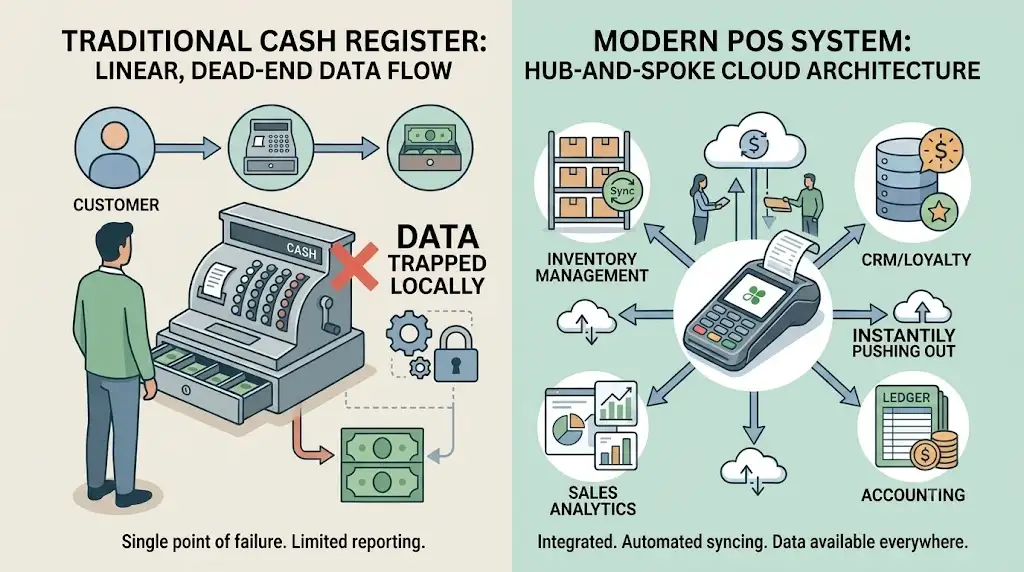
And yes — people blur the terms all the time. That’s part of the mess.
What a traditional cash register does
A traditional cash register handles the basics: accept cash, store it in a secure cash drawer, record sales, and print receipts. It’s built for basic sales, not for advanced workflow automation.
In practical terms, a traditional cash register usually does four things well enough:
- Stores cash in a locked drawer with compartments for bills and coins.
- Lets staff enter prices or quantities via a keypad or basic scanner.
- Totals the sale with tax.
- Prints a paper receipt on a built-in thermal printer.
The hardware model is straightforward: a secure cash drawer that opens only by electronic signal, an input method like a keypad or scanner, internal memory for sale records, and a thermal receipt printer. That’s the DNA of a register.
A cash register is useful when the workflow is simple. One counter. Limited SKUs. Mostly cash transactions. No real need for sales inventory sync, customer profiles, or reporting beyond daily totals.
I’ve seen this play out in small counter-service operations. Situation: a shop had a tiny menu and one checkout lane. Action: they stayed on a simple register because the owner only needed basic sales and end-of-day totals. Result: the setup stayed cheap and stable — but the moment they added more SKUs and card volume, the cracks showed fast.
What a POS system includes beyond the register
A POS system includes both software and hardware for payment processing, inventory management, reporting, and customer management. It goes beyond the register by turning checkout data into operating data.
This is where what is a POS system features vs cash register becomes obvious. A POS system usually includes:
- A POS terminal, tablet, or touchscreen
- POS software
- Payment processing tools
- Card reader or integrated payment terminal (POS hardware components)
- Receipt printer
- Barcode scanners
- Inventory management module
- Sales reporting dashboards
- Customer management or CRM features
A modern point of sale system is an integrated stack, not just a machine. The system can update inventory after every sale, tie purchases to a customer profile, sync data to the cloud, and support different payment types.
That’s why POS system is the more accurate label for modern checkout in most restaurants, retail stores, hotels, and service businesses. It’s not just where payment happens. It’s where data starts moving.
A practical note: in restaurant and retail installs, the biggest jump isn’t “wow, cool touchscreen.” It’s that managers stop chasing three different truths — one number for sales, another for stock, another in the processor report. A decent POS system pulls those into one flow. And honestly? That alone pays for the upgrade in most cases I’ve seen.
Mobile POS (mPOS): the third option many businesses overlook
Mobile POS (mPOS) systems run on tablets — often iPads — and use Bluetooth card readers to process payments. They’re ideal for food trucks, pop-up shops, tableside ordering in restaurants, and any business that needs portability without sacrificing core POS features.
An mPOS setup typically includes:
- A tablet (iPad or Android) with POS software installed
- A Bluetooth or plug-in card reader for chip, tap, and swipe payments
- Optional receipt printer, cash drawer, and barcode scanner
Some processors, like Square, offer new merchants a free mobile card reader. Otherwise, basic readers cost $29–$199 depending on the provider. The software often runs on free or low-cost plans, making mPOS the most accessible entry point for businesses that want more than a register but aren’t ready for a full countertop POS station.
Real-world example: fast-food chains like Chick-fil-A use mPOS tablets in their drive-thru lines to speed up service. Restaurants use tableside mPOS so servers can take orders and process payments without walking back to a fixed terminal. That’s not a gimmick — it’s shaving minutes off every table turn.
The trade-off: mPOS devices rely on consumer-grade hardware that’s more vulnerable to drops and wear, they need reliable Wi-Fi for most features, and they’re not built for heavy cash handling. But for mobility and speed, they fill a gap that neither a register nor a traditional POS terminal covers alone.
POS system vs cash register: the key differences that matter
The key differences come down to scope, flexibility, and control. A cash register handles checkout basics. A POS system handles checkout plus the operational layer behind it.
That’s the real cash register vs POS system comparison. Not “old vs new.” Not “cheap vs expensive.” More like: do you need a machine that records payment, or a system that helps run the business? If you’re also evaluating cloud POS vs legacy systems, that comparison goes even deeper.
POS systems support wider payment methods, integrations, scalability, and stronger security layers than standalone registers. Some of that comes from standards. Some comes from vendor architecture. The honest move is to treat this as an operational comparison, not a lab test.
Functionality, automation, and daily workflow
A cash register supports basic transactions. A POS system automates more of the daily workflow, including sales tracking, item-level records, and routine store operations.
That matters because labor gets burned in weird places. Not the glamorous places. The dumb places — like re-entering numbers from a receipt into a spreadsheet at 11 PM.
POS systems update stock in real time and auto-generate analytics, while a classic register leaves staff doing manual reconciliation and manual reporting. Even if the exact time savings vary by business, the direction is obvious: automation replaces repetitive entry.
Here’s the practical split:
- Cash register: ring sale, open drawer, print receipt, maybe basic end-of-day total
- POS system: manage sales, update inventory, assign items, track employee activity, flag exceptions, sync reports
Situation: one operator had staff manually count inventory drift after shifts. Action: after moving to a POS workflow with item-level sales tracking, the team stopped reconciling from paper notes and scattered receipts. Result: closeout became faster and stock variance got easier to investigate.
Short version? Less chaos.
Data, reporting, and customer management
A POS system captures more usable sales data and customer data than a cash register. That makes reporting sharper and customer management possible in ways a standard register usually can’t support on its own.
A basic register may show total sales or shift totals. Fine. But detailed sales reports by item, hour, category, employee, or customer? Usually not — at least not natively.
POS systems can tie transactions to customer IDs, build histories, and support CRM-style use cases like loyalty tracking and repeat purchase analysis. That lines up with how modern POS software is designed. It stores structured sales data, not just a receipt trail.
So if a business wants to answer questions like these, a POS setup pulls ahead fast:
- Which items sell best by daypart?
- Which employees discount the most?
- Which customers come back twice a month?
- Which products are often bought together?
- Which hours create the slowest checkout?
A cash register may record the sale. A POS system can explain the sale.
One more thing. For operators, customer management isn’t just “marketing stuff.” In restaurants, hospitality, and service businesses, it becomes service recovery, repeat business, and targeted offers. In retail, it becomes loyalty, email capture, purchase history, and better upsells. If customer acquisition costs real money — and it does — then not using customer history is basically paying to forget.
“Once checkout data becomes searchable, decisions get less emotional. You stop guessing what sells and start seeing it.” — Max Artemenko, Smart Payment Solutions
Payment options, integrations, and multi-location growth
POS systems offer broader payment options and better integrations, especially for businesses with online sales, accounting workflows, or multiple locations. Cash registers can work for simpler setups, but they don’t scale cleanly once channels and locations multiply.
This is one of the biggest cash register vs POS system for business decision points. If a business needs cash and cards only, one location, and no deeper connection to e-commerce or accounting, a register might survive. If the business needs mobile payments, online ordering, central reporting, or multi-location sync, POS systems are built for that.
Modern POS platforms can centralize sales, inventory, and reporting across locations. They connect physical storefronts with ecommerce operations, enabling services like Buy Online, Pick Up In-Store (BOPIS) without manual inventory reconciliation. According to Business Wire, the projected CAGR for BOPIS services is 16.5% through 2032 — stores without integrated POS and ecommerce systems will struggle to keep up.
Cloud-based POS tools sync data across all terminals instantly. Whether adding a second location or adding contactless payment options, the architecture supports growth without stitching systems together by hand.
Situation: a growing merchant added a second location while still using fragmented payment and reporting tools. Action: they moved to a unified POS-plus-processing setup so both stores could share cleaner reporting and support. Result: management stopped stitching together data manually from different endpoints.
And yeah — manual stitching is where margin goes to die.
| Criterion | Cash Register | POS System |
|---|---|---|
| Functionality | Basic sales entry, receipt printing, cash storage | Sales, inventory, customer data, employee tools, analytics |
| Payment types | Usually cash and basic card workflows | Cash, cards, mobile payments, split payments, more digital methods |
| Inventory management | Minimal or none | Built-in or integrated real-time inventory tracking |
| Reporting | Basic totals, limited summaries | Detailed sales reports, item trends, staff and customer reporting |
| Integrations | Very limited | Accounting software, e-commerce, online ordering, CRM, more |
| Scalability | Best for one simple location | Better for growing businesses and multiple locations |
| Customer data | Usually none natively | Customer profiles, purchase history, loyalty workflows |
| Offline use | Often strong for local-only use | Varies by system; many support offline mode with sync later |
A quick read on that table:
- Functionality: registers do checkout; POS systems support operations.
- Payment types: the more payment options you need, the more a POS system makes sense.
- Inventory management: if stock accuracy matters, register logic runs out quickly.
- Reporting: daily totals are not the same as actionable reporting.
- Integrations: disconnected systems create manual work. Every time.
- Scalability: multiple locations need centralized visibility.
- Customer data: no customer history means no loyalty logic.
- Offline use: registers are simpler; POS depends on architecture.
Features of a cash register vs features of a POS system
The feature gap is mostly about depth, not just quantity. Cash registers focus on core checkout tasks. POS systems add the advanced features that modern retail POS systems and service businesses use to manage operations.
This is where POS system vs. cash register gets practical. Forget labels. Look at the features that actually affect speed, visibility, and control.
Cash register features and limitations
Cash register features usually cover storing cash, printing receipts, and handling basic sales. Their limitation is that they offer very limited functionality once a business needs inventory tracking, customer tracking, or integrated reporting.
A simple cash register usually includes:
- Keypad for manual entry
- Cash drawer
- Receipt printer
- Tax calculation
- Basic sales totals
- Sometimes a simple barcode input option
That’s enough for basic sales. Maybe enough for a small shop with low complexity.
But the limitation is structural. Most cash registers have limited functionality because they aren’t designed as management software. They don’t usually store meaningful customer data. They don’t manage inventory well. They don’t connect smoothly to other business tools.
While independent retail statistics quantifying manual-entry error rates are scarce, the operational logic is clear: more manual entry means more chances for error. That’s common sense, not a grand theorem. One of the benefits of a register is basic physical cash security — drawers lock automatically and only open via electronic signal — but it offers nothing for digital fraud prevention or audit trails.
Worth noting: cash registers do still have a place. They’re not obsolete for every scenario. But their ceiling is low, and you hit it faster than most owners expect.
POS system features for modern retail and service businesses
POS system features go well beyond checkout. Modern POS systems support inventory tracking, employee management, customer loyalty, digital receipts, and real-time reporting that help businesses run faster and see problems earlier.
Advanced functions relevant to 2024–2025 retail operations include time tracking, loyalty logic, predictive inventory tools, contactless payments, e-commerce integration, and service monitoring. Some of those are more vendor-dependent than universal. Still, the overall point holds: modern POS systems are designed as operational platforms, not just payment boxes.
Features commonly found in a stronger POS setup:
- Barcode scanners and card reader support
- Inventory tracking and stock alerts
- Customer loyalty workflows
- Employee management and permissions
- Time tracking
- Digital receipts
- Sales reporting and analytics
- Accounting and e-commerce integrations
That’s why a POS system can help both a retail store and a restaurant, even though the workflows differ. One business needs SKU control. Another needs table management or kitchen routing. Same idea: the system reduces disconnected work.
“SkyTab POS has been a heaven sent system for us. The system itself is so user friendly and their staff, Maxim and Julian, made the conversion so seamless. I highly recommend SkyTab for anyone looking for a top-notch POS system. They have 24-hour customer service so you have access to getting any issues resolved at any time of the day 7 days a week.” — Client, Smart Payment Solutions (on SkyTab POS)
That matters more than brochure fluff, because complicated systems fail when staff won’t use them. Usability isn’t a nice-to-have — it’s the whole game.
Cost comparison: upfront price, monthly fees, and long-term value
Cash registers usually cost less upfront. POS systems usually have more moving parts and often ongoing software costs, but they can create better long-term value if the business needs visibility, efficiency, and growth support.
Standardized cost comparisons between cash registers and POS systems are rare in independent research. So no, there’s no single fixed formula. Cost depends on hardware, software, payment processing, merchant account setup, support, accessories, and integrations. That’s the real answer.
This article provides general cost guidance for U.S. businesses. Verify all pricing with your provider before purchasing.
Why cash registers usually cost less upfront
Cash registers usually cost less upfront because the hardware is simpler and the feature set is smaller. For low transaction volumes and basic cash management, that lower upfront investment can be enough.
A register has fewer components. Less software. Fewer subscriptions. Fewer integration demands. So the initial spend is usually lighter:
- Low-end registers ($100–$300): Traditional keypad designs with built-in thermal printers and cash drawers. Excellent longevity but fall short on digital integration or reporting.
- Midrange registers ($300–$600): Mostly keypad with some touchscreen options. High-speed printers and industry-specific features. A reasonable starting point for higher-volume businesses that prefer a traditional setup.
- High-end registers ($700–$1,100): Touchscreens with built-in inventory and reporting software, barcode scanners, and credit card readers. At this budget, it’s worth comparing similarly priced POS systems — you often find more intuitive interfaces and stronger feature sets for the same investment.
That makes cash register vs POS system small business a budget question at the very beginning. If the business only needs to accept cash and maybe basic cards, with one counter and minimal reporting needs, a register can be the lower-risk first move.
But here’s the catch. Cheap on day one can get expensive in labor, missed data, and processor inefficiency later. I’ve seen owners save on hardware and then bleed money every month through slower operations or bad processing terms. Different leak. Same margin pain.
Why POS systems can deliver better long-term value
POS systems can deliver better long-term value because they reduce manual work, improve reporting, support more payment methods, and scale with business growth. The real payoff isn’t the screen. It’s the operating leverage.
Here’s what POS costs typically look like:
- Hardware: $1,000–$5,000+ for a full bundle (terminal, display, card reader, printer, cash drawer). Tablet-based setups using off-the-shelf iPads can be more affordable.
- Software: $0–$150+/month depending on features and provider tier. Some processors like Square and Helcim offer free entry-level POS software.
- Payment processing: Typically 2.3%–3.5% + $0.10–$0.30 per transaction, varying by provider and merchant account terms.
- Setup and installation: $200–$1,000 depending on complexity.
- Data migration: $200–$1,500 if moving from another system.
That leverage shows up in a few places:
- Fewer manual reconciliation tasks
- Better inventory visibility
- Better customer tracking
- Cleaner multi-location oversight
- More flexible payment acceptance
- Easier integrations with accounting or e-commerce
The pitch isn’t “more tech.” It’s financial result first: audit the current setup, remove waste, reduce markup drag, and fit the system to the business.
Situation: an operator was paying through a setup that looked simple but hid unnecessary friction and support gaps. Action: the payment architecture and POS stack were reviewed before migration. Result: the business got a cleaner path to support and fewer blind spots in daily operations.
“Max demonstrated strong technical knowledge… His responsiveness and willingness to address concerns helped ensure a smooth transition for us.” — Client, Smart Payment Solutions (on migration to Shift4)
Before you commit to hardware or software costs, see what your processing actually costs today. Smart Payment Solutions provides transparent rate comparisons with no hidden markup. Check our rates →
| Cost Category | Cash Register | POS System |
|---|---|---|
| Hardware | $100–$600 (register unit) | $1,000–$5,000+ (terminal, display, reader, printer) |
| Software | None or minimal | $0–$150+/month depending on provider and tier |
| Payment processing | Varies; basic card processing if supported | Varies; typically 2.3%–3.5% + $0.10–$0.30/txn |
| Maintenance | Low; occasional repair or receipt paper | $50–$200/month for device and software support |
| Upgrades | Accessory or replacement cost as needed | Hardware refresh and software upgrade fees vary |
| Support | Minimal or pay-per-incident | Often included in subscription; 24/7 availability varies |
| Accessories | Drawer, printer, paper, optional scanner | Drawer, printer, scanner, stands, tablets, network gear |
Note: Actual costs must be verified with the provider. Square and Shopify pricing guides both support the point that total POS cost depends heavily on merchant account terms, hardware choices, and integrations. There is no single fixed formula.
How cash registers and POS systems handle payments and transactions
Cash registers and POS systems both process sales transactions, but POS systems usually handle more payment methods with fewer manual steps. Cash registers can work fine for simple cash and card workflows, but they’re narrower and slower in more complex scenarios.
That’s the real system vs cash question at checkout. How many steps does staff need? How many payment processing types does the business want to support? How much reconciliation happens later because the workflow is clunky now?
Cash-only and basic card workflows
A cash register handles cash very well and can support basic card workflows if paired with a card reader. The trade-off is that staff often deal with more manual steps during checkout.
The card workflow through an external terminal typically follows these steps: enter amount, insert or tap card, transmit data, authorize, print receipt. That works. It’s not broken. It’s just less integrated.
So in a basic setup, the flow may look like this:
- Ring sale on register
- Enter or pass total to external card reader (EMV chip card readers handle the secure data exchange)
- Customer pays
- Print receipt
- Reconcile payment records later if systems aren’t tightly synced
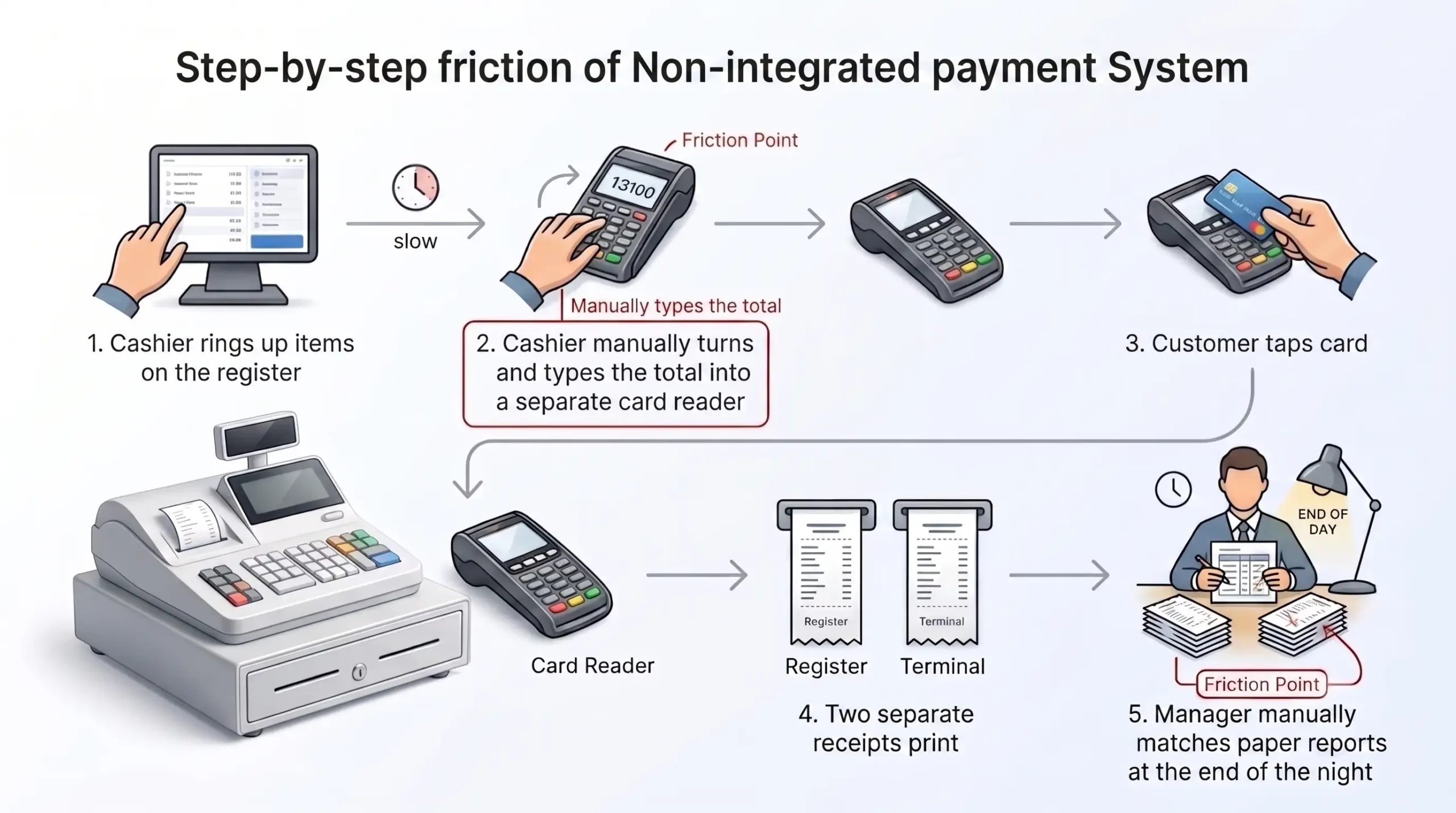
That’s manageable for low volume. Not fun for rush periods. And during a Friday dinner rush? Forget about it.
Flexible payment processing with modern POS systems
Modern POS systems support more payment methods and streamline the checkout flow. They’re built for cash, cards, mobile payments, split payments, and faster processing at the POS terminal.
Modern POS workflows can complete in roughly 2–4 seconds versus 10–15 seconds on more manual register setups. Treat that as a directional estimate, not universal physics. Real speed depends on hardware, network, menu complexity, and staff training. Still, the operational truth stands: fewer disconnected steps usually means faster checkout.
POS systems support NFC tap-to-pay, Apple Pay, Google Pay, split tender, and tokenized mobile credit card payment processing. For U.S. retail, restaurants, and service businesses, this isn’t fringe functionality anymore. It’s table stakes.
If a line builds because staff must bounce between a register and a separate card flow, customers feel it instantly. And customer patience? Real thin these days. I’ve watched people walk out of a coffee shop because the line moved too slow. Not because the coffee was bad — because the checkout was.
Inventory, reporting, and customer data: where POS pulls ahead
POS pulls ahead when the business needs visibility after the transaction, not just during it. Inventory management, sales tracking, reporting and analytics, and customer data are where a cash register usually runs out of road.
This is the part many owners ignore until they hit pain. They think checkout is the job. Nope. Checkout is the trigger. What happens to the data after checkout is the real system value.
Real-time inventory and sales tracking
POS systems track inventory and sales in real time, which improves stock accuracy and gives faster visibility into what’s selling. Cash registers usually don’t provide that level of live control.
Real-time POS inventory tracking can achieve error levels around 1–2% versus much higher error ranges in manual inventory workflows. Since those figures come from vendor and operational materials rather than independent 2024 comparative studies, use them as guidance, not a universal market law. The broader point is solid: automatic sync beats delayed manual entry.
If a business sells from a register and updates stock later, there’s a lag. That lag creates bad reorders, phantom stock, and awkward customer conversations — “Sorry, we actually don’t have that.” A POS system closes that lag.
Situation: a growing retail-style operation was reconciling stock after the fact. Action: sales and inventory were tied together through a POS workflow. Result: management got closer to real-time stock visibility instead of waiting for end-of-day cleanup.
Better reporting and customer relationship management
POS systems provide better sales reporting and customer relationship management because they can store customer data, connect transactions to profiles, and surface buying patterns. Cash registers generally can’t do that without outside tools and extra manual work.
The basic mechanism works like this: a transaction gets tied to a customer_id through a phone number, loyalty account, or similar identifier. That lets the system store purchase history, track visit patterns, and support loyalty programs.
That’s a big leap from a basic register.
A business that can store customer data can do more than market. It can answer service questions, resolve disputes faster, spot repeat behavior, and build better offers. For restaurant POS systems, that can mean better guest recovery. For retail, better retention. For service businesses, cleaner follow-up.
And no, this isn’t just “nice to have.” If customer acquisition costs real money — and it does, especially in 2025 — then not using customer history is basically paying to forget. You spent dollars to get that person through the door. Why throw away the data?
Pros and cons of a cash register
A cash register is simple, reliable, and cost effective for basic transactions. Its downside is that it offers very limited automation, reporting, integrations, and payment flexibility as operations get more complex.
That’s the fair version. No snobbery. No fake nostalgia either.
Main advantages for simple businesses
The main advantages are low upfront cost, ease of use, and reliable operation for simple businesses with low transaction volumes. If the setup is one location, basic transactions, and minimal reporting needs, a register can be enough.
A cash register vs POS system for small business decision often starts here. If a business has:
- One counter
- Few products or services
- Mostly cash transactions
- Low daily volume
- No need for customer tracking
- No need for integrations
…then a simple register can be a rational choice. For a business like that, even a Clover POS entry-level setup may be more than needed. Temporary retail, basic kiosks, cash-heavy stands, and simple service counters are obvious fits.
Cash registers also have excellent longevity. They last a long time, require minimal maintenance, and don’t need software updates. For a startup with a very tight budget, that durability matters. You plug it in, it works, and it keeps working for years. There’s something to be said for that.
Main limitations as operations become more complex
The main limitations are manual work, limited reporting, limited payment options, and poor growth support. Once the business adds staff, SKUs, or channels, the cash register starts creating friction.
Typical pain points include:
- Manual entry errors
- Harder staff tracking
- No customer tracking
- No strong inventory management
- Disconnected card workflows
- Limited flexibility for growth
- Data loss risk (no cloud backup; if the register breaks, data may be gone)
That’s when the register stops being “simple” and starts being a bottleneck. I’ve seen it happen gradually — the owner doesn’t notice until reconciliation takes an hour every night and the stock numbers are basically fiction.
Pros and cons of a POS system
A POS system gives better automation, more advanced features, and stronger scalability, but it comes with more setup, more training, and often higher ongoing cost. So yes, it can be worth more. It can also be overkill if the business is tiny and static.
That’s the blunt answer.
Main benefits for efficiency and growth
The biggest benefits are streamlined operations, better customer experience, stronger reporting, and support for growth across channels or locations. POS systems are built for businesses that need more than a payment box.
This is why cash register vs POS system for business usually shifts toward POS as complexity rises. A business that wants online ordering, card payments, loyalty, inventory control, or multiple locations is usually buying leverage, not just hardware.
Several client testimonials from Smart Payment Solutions emphasize responsiveness, smooth installations, quick issue resolution, and support during transitions. That matters because even a good system fails if migration and support are trash.
“A migration only looks easy when someone already handled the ugly parts: staff training, payment flow, hardware fit, backup scenarios, and processor cleanup.” — Max Artemenko, Smart Payment Solutions
Main drawbacks to plan for
The main drawbacks are higher initial cost, ongoing fees, staff training needs, and some dependence on internet or vendor architecture. These are real drawbacks, not footnotes.
Robust independent numbers on software update costs, training costs, or outage losses across POS systems aren’t available in the public evidence set. So precision won’t be faked here.
But here’s the practical truth:
- Software subscriptions add up
- Bad onboarding slows adoption
- Internet-dependent features need offline planning
- Poor support can turn a good product into a daily headache
That’s why system selection matters more than spec-sheet bragging. And why access to real merchant services support — not just a 1-800 number — makes the difference.
Common mistakes to avoid when choosing
Choosing between cash registers and POS systems is a strategic decision, not just a purchase. Avoid these common pitfalls:
- Choosing based only on price. Focusing only on upfront cost may leave you with limited functionality that slows operations as your business grows. I’ve watched this happen — owner saves $400 on hardware, then loses $400 a month in inefficiency. Not a great trade.
- Ignoring future growth. If you expect to expand locations, add online sales, or increase staff, scalability should be part of the decision from day one.
- Overlooking hardware compatibility. Terminals, scanners, receipt printers, and cash drawers must integrate properly to avoid checkout disruptions. Mismatched gear is a surprisingly common headache.
- Not factoring in payment processing rates. Processing fees vary. Even small percentage differences can significantly impact profit margins over time, so review fee structures carefully before committing. A 0.5% difference on $50K/month in card volume? That’s $3,000 a year. Gone.
Cash register vs POS system for small business
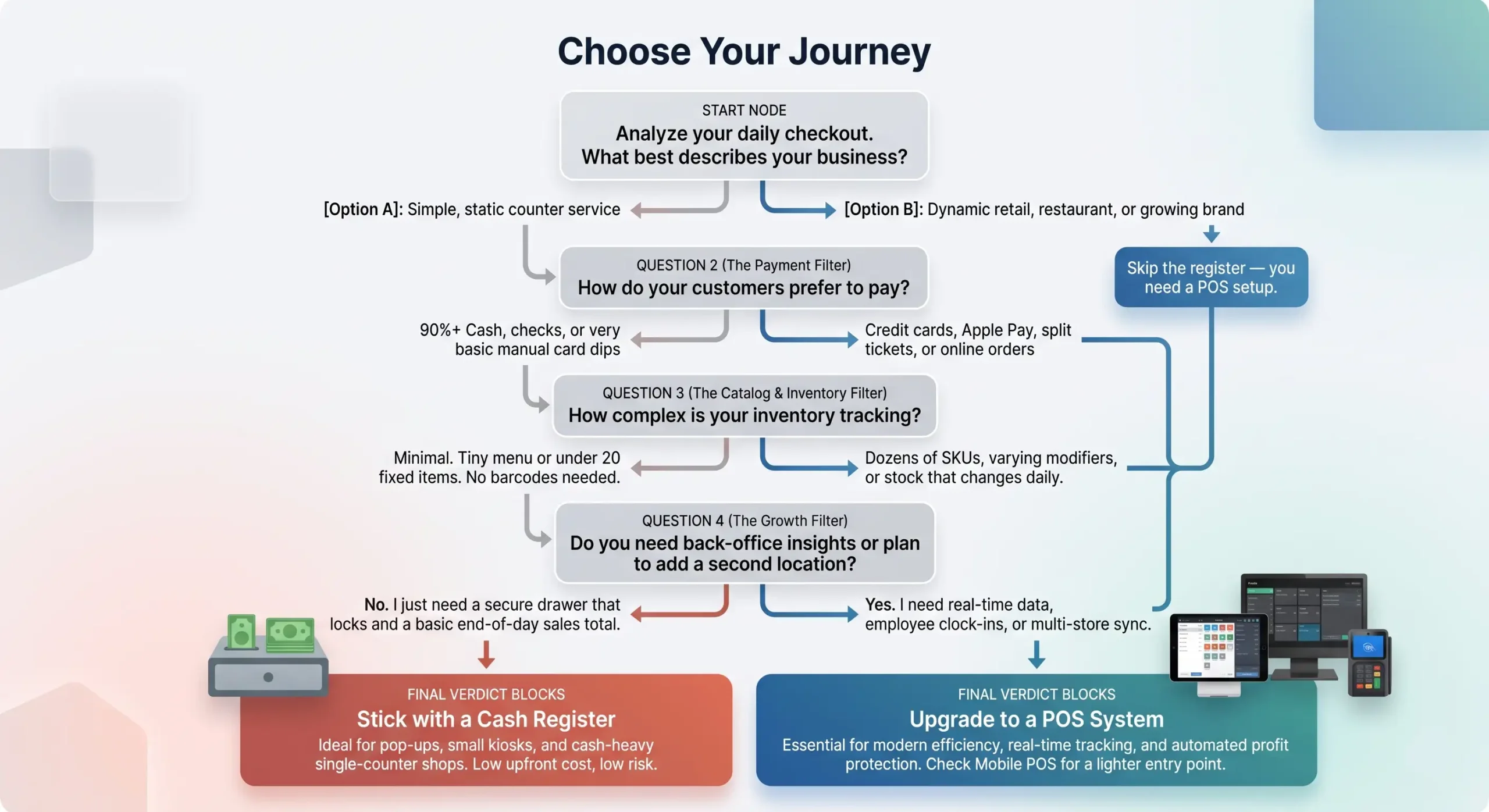
For small business, the right choice depends less on size alone and more on transaction volume, payment types, inventory complexity, and growth plans. A cash register can work for a simple one-location setup. A POS system becomes worth it when the business needs visibility, speed, and flexibility.
That’s the clean answer to cash register vs POS system small business.
When a cash register may be enough
A cash register may be enough when the business has low transaction volumes, one counter, a small catalog, and no need for customer tracking or integrations. In that setup, a basic machine can do the job without loading extra cost.
Think simple:
- One seller
- Limited products
- Mostly cash
- Low SKU count
- No online sales
- No loyalty program
- No multi-location plans
In that world, using a cash register isn’t primitive. It’s proportionate. And there’s nothing wrong with proportionate.
When a POS system is worth it even for a small business
A POS system is worth it for a small business when card payments, inventory management, online ordering, loyalty, or detailed reports start affecting daily decisions. The trigger is usually operational complexity, not ego.
There’s no universal official growth threshold that makes POS mandatory. And those “50 transactions and boom, buy software” rules? Lazy. Real businesses are messier than that.
What matters is whether the current setup creates friction:
- Stock is hard to trust
- Card and digital payments matter more
- Reporting is too shallow
- Customer loyalty matters
- Staff accountability matters
- The business plans to grow
If yes, POS starts making economic sense even before the business looks “big.”
Self-assessment checklist:
- How many transactions happen on a busy day?
- How many staff members use checkout?
- Do customers expect card payments, mobile payments, or split payments?
- How many products or menu items need tracking?
- Does the business need detailed sales reports by item, hour, or employee?
- Does the business want to store customer data or run loyalty programs?
- Are online sales or online ordering part of the plan?
- Is there a plan to open another location?
- Does end-of-day reconciliation take too long?
- Does the current setup make payment processing or support harder than it should be?
If most answers point to complexity, the right system is probably a POS platform, not a basic register.
Which option fits different business types and growth stages?
Different business types need different levels of control. Simple, cash-heavy, low-complexity operations can work with a register. Retail brands, restaurants, and growing multi-location businesses usually fit a POS system better.
No mystery here.
Best fit for simple retail, pop-ups, and cash-heavy stores
A traditional cash register or very simple mobile checkout setup is often the better fit for pop-ups, temporary retail, and cash-heavy stores with low SKU counts. The reason is cost, portability, and simplicity.
Temporary shops and small assortments are cases where complex platforms can be excessive. If inventory is tiny, staff is tiny, and the setup is temporary, advanced back-office tools may add more friction than value. A grocery and convenience store POS might be the right stepping stone for cash-heavy businesses outgrowing a basic register — but only when the volume justifies it.
Best fit for retail brands, restaurants, and multi-location businesses
POS systems are the better fit for retail brands, restaurants, and multi-location businesses because they support staff management, reporting, integrations, and faster high-volume operations. Once operations get layered, a register alone stops carrying the load.
This is especially true in hospitality. Restaurants need order routing, split tickets, modifier logic, maybe kitchen display integration. Retail brands need inventory accuracy, customer experience tools, returns logic, and centralized data.
Real-world example: a large sporting goods retailer uses integrated POS to sync online and in-store inventory across hundreds of locations — something a cash register could never support. Similarly, multi-location restaurant groups use POS to push menu updates, track ticket times, and manage staff permissions across every site from a single dashboard.
That’s why the focus should be on architecture, not just boxes. Lower fees, stable processing, POS fit, and real support. That combination matters more than fancy hardware photos.
When should you upgrade from a traditional cash register to a POS system?
You should upgrade when the register starts slowing down operations, hiding data, or limiting payment flexibility. If the business grows but the checkout stack stays basic, the pain usually shows up in reconciliation, stock visibility, customer experience, and reporting.
That’s the real POS system vs traditional cash register explained moment. Not when someone on LinkedIn says it’s time. When the current setup starts taxing the business every day.
Operational signs you have outgrown a cash register
The main signs are long reconciliation, poor stock visibility, limited payment options, staff control issues, and disconnected systems. If those show up regularly, the business has probably outgrown the register.
Common signs:
- End-of-day reconciliation drags
- Inventory is often wrong
- Customers ask for payment options you can’t support
- Staff activity is hard to track
- Reports arrive too late to help
- Online and in-store sales don’t line up
That’s not a tech problem. That’s an operations problem wearing a tech costume.
What to prioritize when moving to a POS system
Prioritize fit, integrations, support, and migration planning before flashy features. The best POS system is the one your staff can use, your processor can support, and your business can actually grow on.
In transition projects, focus on this order:
- Workflow fit by industry (comparing POS systems by industry fit can help narrow choices)
- Hardware and software compatibility
- Payment processing terms
- Offline behavior
- Integrations
- Staff training
- Support quality
And support quality is not a soft factor. It’s survival.
Several company testimonials hammer the same point: fast response, weekend availability, smooth installs, help with chargebacks, and follow-through. That stuff matters because systems fail at the edges, not in the sales demo.
“Max demonstrated strong technical knowledge… His responsiveness and willingness to address concerns helped ensure a smooth transition for us.” — Client, Smart Payment Solutions (on transition to Shift4)
Ready to upgrade? Smart Payment Solutions handles the full migration: POS selection by industry, hardware setup, payment processing terms, staff training support, and 24/7 follow-up. Talk to Max →
Risks and what to do when things go wrong
POS systems aren’t bulletproof. Understanding the risks helps you prepare, not panic.
Internet outages and offline resilience
Most cloud based POS systems can keep working in offline mode for core tasks like ringing sales and printing receipts, then sync data when the internet returns. The typical model uses local storage on the device, an event queue for transactions, and async sync after connection comes back.
But offline capability doesn’t mean every payment type or every function works the same way. Some card authorizations and cloud features may be limited. Before buying, ask the vendor exactly which features work offline and which don’t. That one question can save you a very bad Saturday night.
Hidden processing costs and fee structures
For many business owners, the biggest hidden cost isn’t the POS hardware — it’s the payment processing terms buried in the contract. Even small differences in interchange rates or monthly markups can eat into margin over thousands of transactions.
A cash discount program can offset some of this by passing processing costs to card-paying customers, but it needs to be set up correctly to stay compliant.
Before signing anything, audit your current processing statement. If you don’t know what you’re paying per transaction today, you can’t evaluate whether a new POS setup will save or cost you money. Seriously — pull that statement out. The numbers might surprise you.
PCI compliance and security differences
Modern POS terminals are required to meet PCI PTS standards, which mandate hardware-level encryption and protection against physical tampering. Traditional cash registers operating with external card readers may only fall under the broader PCI DSS framework, which has fewer hardware-specific security requirements.
For any business handling card payments, PCI compliance isn’t optional. It adds annual costs — Stripe estimates $1,000–$10,000 for small businesses — but the alternative (a data breach, fines, and reputational damage) is far worse. Not a place to cut corners.

What do our customers think about us
Other Articles
SkyTab vs Square (2026): Which POS Is Better for Growth?
SkyTab vs Clover: Which POS System is Better for Your Restaurant?

Heartland vs Revel Systems: Which Restaurant POS System is Better in 2026?
