

Clover vs Square: Which Is Better for Small Business in 2026?

Compare Clover and Square by pricing, processing fees, hardware, features, support, contracts, and business fit before choosing a POS system.
I’ve seen business owners obsess over the swipe rate and miss the real leak: software add-ons, locked hardware, and messy contract terms. The POS that looks cheapest on day one can become the most expensive one by month two. — Max Artemenko, Smart Payment Solutions

Clover vs Square: What Is the Main Difference?
The main difference between Clover and Square is simple: Square sells simplicity, while Clover sells a more customizable POS ecosystem that often depends on the processor and provider behind it. If you want to compare Clover and Square correctly, start with the pricing model, hardware lock-in, software depth, and support structure.
Square is a fast entry point. Clover is a more layered configuration. That is the real difference between Clover and Square.
For a business owner, this is not a brand choice. It is an operating model choice. Square runs on clear flat-rate pricing and a free software entry point. Clover gives you more options for plans and hardware, but that flexibility can come with monthly software fees, processor dependency, and contract complexity — depending on the reseller or ISO.
According to official vendor documentation, Square’s base model is free software plus transaction fees, while Clover combines hardware, software subscriptions, and processing through the Fiserv/Clover ecosystem and its partners. For a detailed breakdown of Clover hardware, setup, and pricing plans, see Clover POS Pricing, Setup & Features.
| Parameter | Clover | Square |
|---|---|---|
| Positioning | POS ecosystem with processor/provider dependency | All-in-one POS and payment solution for fast setup |
| Pricing model | Usually monthly software + processing fees | Flat-rate processing, free basic plan |
| Hardware model | Broad hardware lineup, often tied to the provider | Compact hardware lineup, direct onboarding |
| Software approach | Customizable, app-based, multi-layered | Modular, easier to start with |
| Support structure | Depends on Clover/Fiserv/provider | Centralized Square support |
| Contract | Multi-year terms may apply through resellers | Month-to-month, no early termination fee |
| Merchant account | Dedicated merchant account | Aggregated sub-merchant under Square |
| Offline payments | Configurable offline mode with limitations | Support for up to 24 hours |
| Best first choice | Businesses that need customization | Startups and small operators that need speed |
Both Clover and Square cover point of sale, card payments, reporting, and daily operational tasks. The problem is that owners often compare only the advertised swipe rate and ignore everything else. That is how they end up paying for air.
Clover POS vs Square POS
Clover POS vs Square POS is about control versus simplicity. Square POS is usually easier to deploy and easier to train staff on. Clover POS can cover more complex operational needs, but the quality of the setup depends heavily on who sold and configured the system.
Square uses a modular cloud-based architecture for small businesses and startups — one ecosystem layer for in-person payments, online payments, and business tools. According to Square’s official materials, it offers free software entry and a hardware lineup from a QR reader to Square Terminal and Square Register.
Clover POS runs on a modified Android environment and supports integrations through the Clover Developer Platform. This matters if a business needs deeper workflow customization, order handling, or specific tools from the App Market. Clover’s infrastructure is tied to Fiserv processing rails.
There is one more practical difference that most reviews hide in the footnotes.
Square supports offline payments for up to 24 hours. According to Square’s official documentation, the system stores transaction data locally until the connection is restored. Clover, according to technical specifications, requires a live connection to authorize transactions — although it does offer a configurable offline mode with limited coverage. If your internet connection is unstable, this is not a technical detail. It is an operational risk.
In practice, this is where business owners learn from mistakes. A café with unstable Wi-Fi does not care about abstract POS architecture. It cares whether the lunch rush turns into a line of angry customers.
In one migration project for a multi-terminal food operation, the first problem was not the rate. It was payment flow failure during peak traffic. We rebuilt the acceptance setup around a more stable connection and cleaner terminal logic. The result was fewer payment freezes and less staff chaos during rush periods. That does not show up in marketing materials, but it saves real money.
Clover vs Square vs Stripe: When You Need a Third Option
If your business is mostly online, Stripe may be better than both Clover and Square. If sales happen mostly offline, Clover and Square remain more relevant because they are POS-first ecosystems.
Stripe makes sense when online payments account for more than 70% of volume — it provides a single API for web and mobile, supports 135+ currencies, and supports local payment methods, including Alipay and SEPA, through one infrastructure.
Square vs Clover vs Stripe is not a three-way fight for the same buyer. It is closer to this:
- Square: the best choice for simple small-business POS plus light online sales.
- Clover: stronger when you need a POS setup with processor support, broader hardware choice, and custom workflows.
- Stripe: wins when online checkout, custom billing flows, subscriptions, or platform payments dominate.
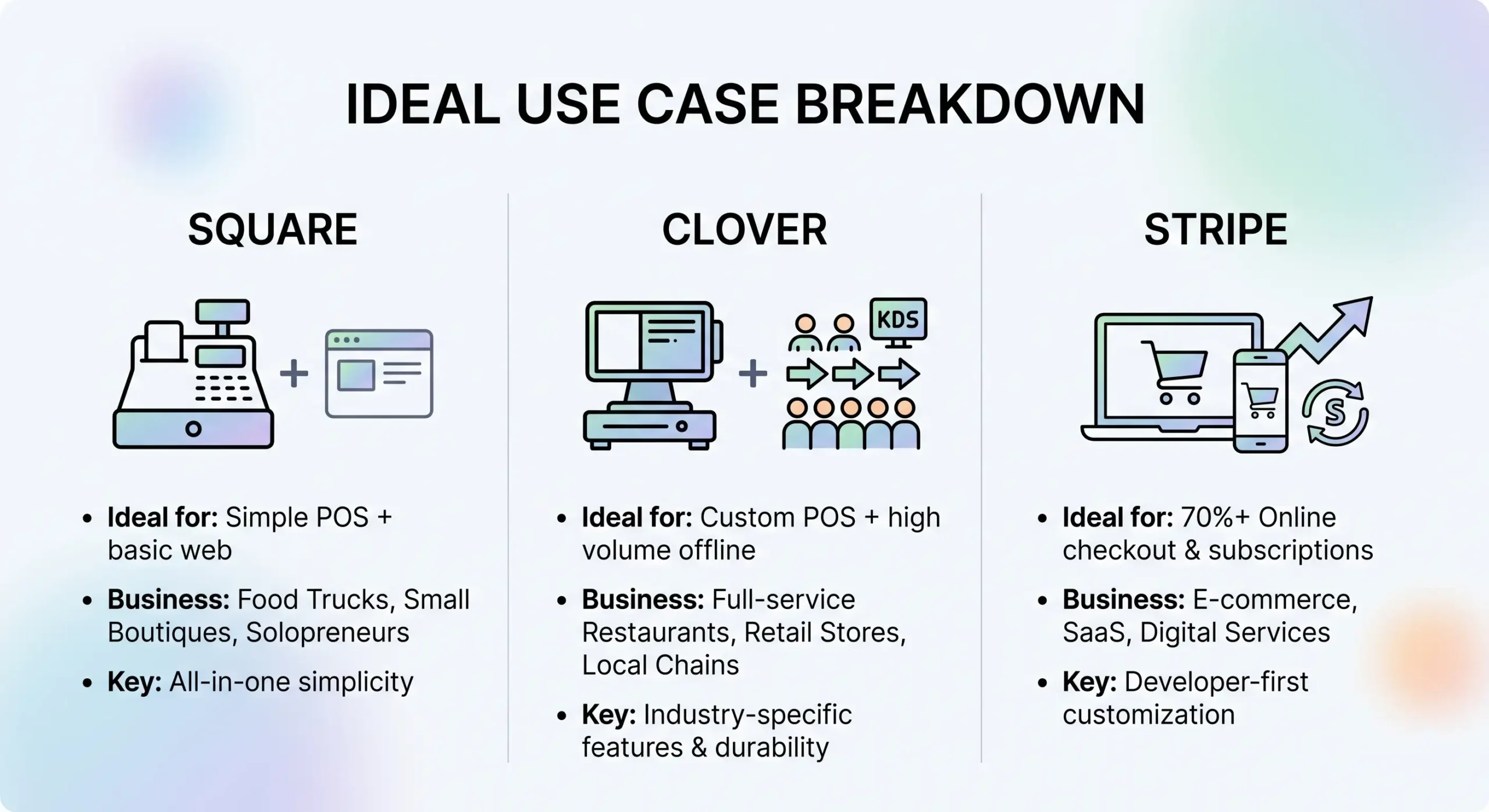
There is no independent comparison of Clover vs Square vs Stripe with transparent methodology for 2024–2025. Any claim about a “winner” beyond vendor documentation is guesswork.
If you run a restaurant, retail store, hotel, or service location in the US, Stripe is usually not the first candidate for an operational comparison unless the online share is very large. Clover and Square are much closer to the reality of the front counter. For an alternative comparison, see SkyTab vs Square: Which POS System Is Best.
Clover vs Square Fees: How Pricing and Processing Fees Work
Clover vs Square fees are not just swipe fees. The real cost includes processing fees, software fees, hardware costs, refund policies, add-ons, and contract terms. That is the only honest way to compare total cost of ownership.
Square is easier to read. Clover can be cheaper in the right configuration, but it can also become confusing fast.
Disclaimer: pricing information is provided for informational purposes only. Final terms depend on business type, transaction volume, and the specific agreement with the processor.
Basic reference points from official vendor data:
- Square: 2.6% + 10¢ for in-person transactions, 3.5% + 15¢ for keyed-in transactions, 2.9% + 30¢ for online transactions — flat-rate, with no required monthly subscription on the basic plan.
- Clover: software from around $4.95/month for Payments Plus to $69.95/month for Table Service Restaurant, processing around 2.3% + 10¢ for restaurants and 2.6% + 10¢ for retail in some configurations, plus possible additional fees depending on provider structure.
About Clover’s minimum cost: several sources point to Payments Plus at $4.95/month, Register Lite at $9.95/month, and full Register at $39.95/month. The $14.95 figure seen in other reviews may reflect specific plan levels or bundled provider pricing. Always verify the current plan structure directly with Clover or your ISO before signing.
Here is what owners usually miss: Clover pricing can vary depending on the ISO, reseller, processor relationship, and selected software package. Square is more predictable. Predictability is not always cheaper, but it is easier to budget. For current market reference points, see our rates.
| Cost item | Clover | Square |
|---|---|---|
| In-person processing | 2.3%–2.6% + 10¢ depending on plan/provider | 2.6% + 10¢ standard flat rate |
| Monthly software | From around $4.95/month for Payments Plus | $0 for the basic POS plan |
| Hardware cost | Higher upfront; devices from $49 to $1,899 | Lower entry cost; from $0 for magstripe reader to $799 |
| Refund fee | Possible depending on provider | Not charged |
| Add-ons | Common through apps and plans | Appear when moving beyond basic functionality |
| Contract complexity | Can be high, especially with multi-year reseller agreements | Usually low, month-to-month |
Real Math: Cost Comparison by Volume
This is what most comparison articles skip. Here is what the numbers look like at different processing volumes. The Clover estimates below assume interchange-plus pricing through a competitive provider and a 50% debit / 50% credit mix. Businesses with a high debit share save even more because debit interchange is often 0.5%–1.5% compared with Square’s fixed 2.6%.
| Monthly volume | Square estimate | Clover with interchange-plus estimate | Monthly savings |
|---|---|---|---|
| $5,000 | ~$140 | ~$120 | ~$20 |
| $10,000 | ~$270 | ~$210 | ~$60 |
| $20,000 | ~$530 | ~$380 | ~$150 |
| $50,000 | ~$1,310 | ~$900 | ~$410 |
| $100,000 | ~$2,610 | ~$1,700 | ~$910 |
The break-even point where interchange-plus Clover starts to beat flat-rate Square is around $5,000–$7,000/month in processing volume. Below that threshold, Square’s zero monthly software fee usually wins on total cost.
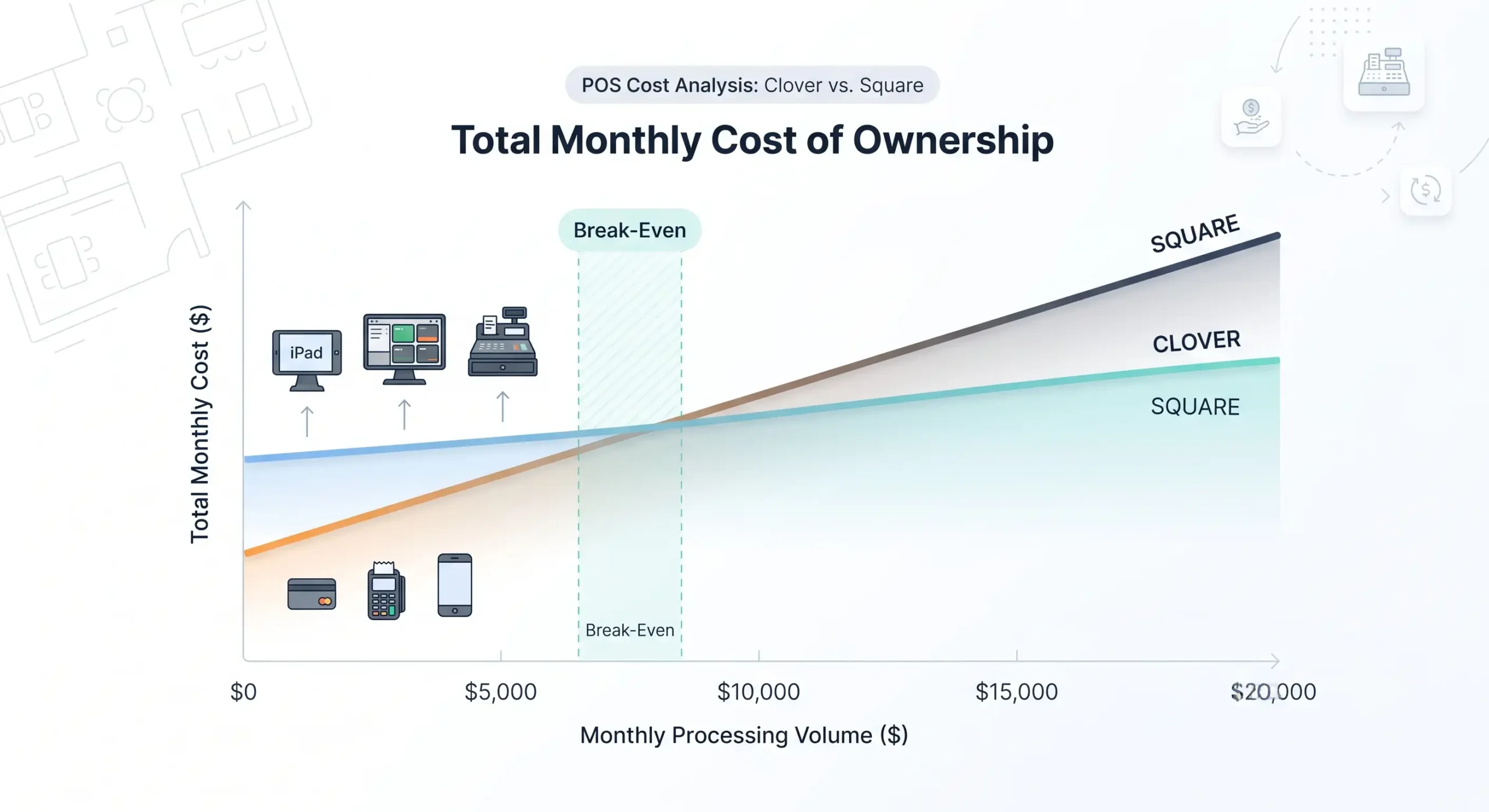
The $100 rule in plain English: on a $10 coffee order, the difference between 2.3% and 2.6% is 3 cents. Not worth a long discussion. On a $200 ticket, that same difference is 60 cents per transaction. Run 500 of those tickets per month, and that is $300 in savings. That is where Clover with interchange-plus can start paying off.
Square Processing Fees: How the Structure Works
Square processing fees are easier to understand because the model is flat-rate. That helps small businesses with budgeting, especially when volume is low or still unstable.
“For 2024–2025, no independent studies with transparent methodology were found that empirically measured the net impact of processing fees on small businesses through controlled experiments.” — Status Report: Clover vs Square Research for Small Business (2024–2025)
What can be said confidently based on official vendor materials:
- Square’s base model is flat-rate and transparent compared with many traditional merchant setups.
- The free entry plan removes monthly software pressure at the start.
- Paid tiers exist for advanced analytics, marketing, and vertical tools: Square for Retail Plus is $60/month, and Square for Restaurants Plus is $60/month.
- Online sales and manually keyed transactions cost more than standard card-present payments. Always check Square’s current pricing pages before signing up.
- Square does not charge a refund fee. Providers connected to Clover/Fiserv often do.
One real scenario is worth understanding: a restaurant owner assumed low-friction flat-rate pricing was a win. A few months later, the pain came from online orders and keyed-in transactions. When we recalculated the payment mix by card-present versus card-not-present volume, the “simple” plan stopped looking cheap. Same POS. Different sales mix. Completely different math.
Clover Rates vs Square Rates
Clover rates vs Square rates is where things get interesting. Clover can beat Square on processing in high-ticket or well-structured merchant setups, but only if the provider terms are clean. Square usually wins on predictability.
Two Clover examples based on official data:
- Interchange-plus style: around 2.3% + 10¢ for restaurants, 2.5% + 10¢ for retail
- Flat-rate style: around 2.5%–2.6% + 10¢
It is also noted that Clover interchange-plus can be cheaper than Square flat-rate on transactions above $100, because the percentage difference becomes meaningful at scale.
The math works. But there is a catch. If your Clover deal includes additional software, integration fees, provider markup, or inconvenient contract terms, the lower headline rate may stop being lower in practice.
Another critical point: Clover hardware is tied to the provider you bought it from. Unlike Square hardware, which also has its own limitations, Clover devices are programmed for the specific processing company that opened the account. If you leave that provider, your $1,000+ Clover Station cannot simply be reprogrammed to a new processor. In most cases, the device becomes unusable. Attempts to reflash or repurpose the hardware yourself usually end in a bricked device. This is a hardware lock-in risk every Clover buyer needs to understand before signing.
Data freshness note: pricing examples in this article are based on official vendor materials from 2024–2025. Actual fees in 2026 may vary depending on US region, provider, card mix, industry risk, business volume, and negotiated terms. Always check the current rate sheet and merchant agreement before signing.
Clover vs Square Pricing Model: Monthly Fees, Software, and Hidden Costs
The pricing model is often the main deciding factor. Square is cheaper at the start. Clover can be better structured for a business that needs deeper configuration or better negotiated processing. But hidden costs show up quickly if you do not map the full stack.
A “free” POS is not free if add-ons pile up. A “low-rate” processor is not cheap if the monthly stack gets out of control.
Clover Pricing and Plan Tiers
Clover pricing usually includes recurring software costs. That makes Clover less attractive for very lean startups, but it can work well for operators that actually use deeper workflows.
According to Clover’s official documentation, plan tiers look approximately like this:
| Plan | Monthly fee | Best use case |
|---|---|---|
| Payments Plus | ~$4.95 | Basic card acceptance only |
| Register Lite | ~$9.95 | Small counter setup with basic inventory |
| Register | ~$39.95 | Full retail or service setup |
| Counter Service Restaurant | ~$39.95–$54.95 | QSR operations |
| Table Service Restaurant | ~$69.95 | Full-service dining |
Figures from cited sources may vary by provider. Clover also offers plan bundles that combine hardware and software into one monthly payment under a 36-month contract, with a separate option to buy hardware outright and pay a lower monthly software fee.
Typical Clover cost layers include monthly software subscription, processing fees, hardware purchase, App Market add-ons, integration costs, and possible refund-related fees.
Square Pricing and the Free Plan
Square pricing is simpler at the entry level. The free plan covers basic POS operations, payment acceptance, standard reporting, and basic inventory without a monthly POS subscription.
Paid tiers and add-ons still exist:
- Transaction fees apply to all plans
- Hardware costs money if you need more than a basic reader
- Square for Retail Plus: $60/month, lowers in-person rate to 2.5% + 10¢
- Square for Restaurants Plus: $60/month
- Square Appointments: free for solo operators, $29–$69/month for teams
- Square Payroll: around $35/month + $5/employee
- Square Loyalty: around $45/month
This is exactly why Square vs Clover for small business often leans toward Square at the early stage. If you are just starting, testing a concept, or running one location with simple workflows, reducing fixed monthly cost matters more than having a huge feature stack.
Clover Hardware vs Square Hardware
Clover hardware vs Square hardware is a question of how fixed or mobile your operation is, how much peripheral equipment you need, and whether you want an all-in-one counter setup or lightweight mobile acceptance. Square hardware is easier to understand. Clover gives you more formats: handheld, countertop, and station-style.
| Device | Best use case | Screen | Built-in printer | Barcode scanner | Price estimate |
|---|---|---|---|---|---|
| Clover Go | Mobile / backup reader | — | No | No | ~$49 |
| Clover Flex | Portable full-featured device | 5.0" | Yes | Yes | ~$499–$749 |
| Clover Mini | Small countertop POS | 7" | Yes | Via front-facing camera | ~$749–$849 |
| Clover Station Solo | Full POS station | Large | Yes | External | ~$1,349–$1,799 |
| Clover Station Duo | Full POS + customer display | Large | Yes | External | ~$1,649–$1,899 |
| Square Reader | Basic mobile use | — | No | No | $0 for magstripe / $59 for chip+NFC |
| Square Terminal | Portable all-in-one | 5.5" | Yes | No | $299 |
| Square Register | Full counter POS with dual screen | Large | No, external | No, external | $799 |
The key hardware difference: Clover Flex includes a built-in barcode scanner. Square Terminal does not. For any retail environment where staff scan items at the counter or line-bust during peak hours, that one specification has operational value. Clover Mini also includes a front-facing camera for scanning QR codes and barcodes — a built-in capability Square Stand lacks without extra accessories.
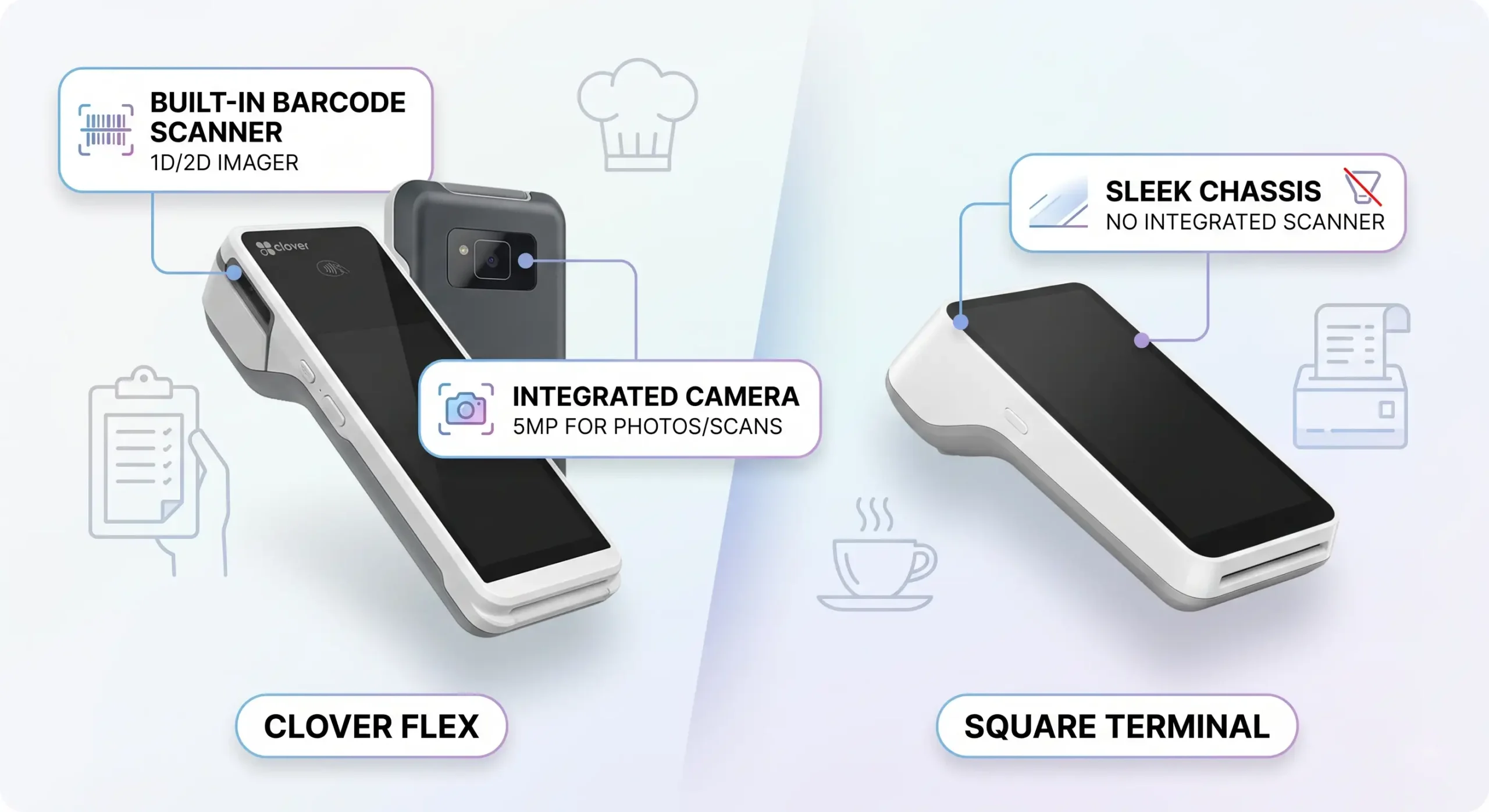
On connectivity: Clover Station supports USB and Bluetooth peripherals such as cash drawers, scanners, and receipt printers, and it can work in a dual-screen configuration. Square Register includes a native customer-facing display but has more limited external peripheral support.
Clover also supports scale integration, which matters for grocery stores, delis, and any business selling by weight. Square does not have native scale integration, making Clover the obvious choice for those scenarios.
Clover Go vs Square Mobile Reader
For mobile payments, Square Mobile Reader is usually simpler. Clover Go works well, but its setup path is not as universally clean.
Device comparison based on official data:
- Clover Go: Bluetooth 4.0, around 2-second delay, accepts magstripe + chip + NFC in one device, and supports NFC for Apple Pay, Google Pay, and Samsung Pay.
- Square Reader: Bluetooth 5.0, around 1.5-second delay, NFC and contactless payments including Apple Pay and Google Pay. Important: Square requires two separate readers to cover all three payment methods: magstripe + chip/NFC. Clover Go covers all three in one device.
The exact delay figures are estimates, and no independent benchmark study was found in the available data. Practical takeaway: Square Reader is the simpler path for a mobile card reader, but Clover Go wins on the convenience of all-in-one payment method acceptance.
If you need a backup mobile reader for curbside, pop-ups, field service, or trade shows, Square usually wins on low friction. If that mobile reader needs to be part of a broader Clover ecosystem, Clover Go makes more sense.
Station, Mini, Flex, and Square Register
For fixed locations, Clover offers more formats. Square keeps its lineup more compact and easier to understand.
Clover Station supports broader peripheral expansion and dual-screen workflows, while Square Register is more self-contained. This matters for restaurants, hotel desks, and high-volume retail counters.
Plainly:
- Want a more packaged, easy-to-explain register path? Look at Square Register.
- Want more ability to shape the checkout environment, add peripherals, or line-bust with handhelds? Clover Station, Mini, and Flex deserve a closer look.
Critical reminder: Clover hardware is proprietary. If you leave your Clover provider, the hardware does not automatically move with you to another processor. Know that before you sign.
Features: What Clover and Square Can Do for Sales and Business Management
A feature comparison only makes sense if the feature is used every day. Square wins on straightforward built-in tools for small operators. Clover wins when a business needs more advanced workflows or app-driven customization.
A feature you never use is not a feature. It is a line item on the bill.
“What owners use every day is boring stuff: speed at the register, clean shift closeout, inventory that does not break, and support that answers. Half of a fancy feature list usually never pays for itself.” — Max Artemenko, Smart Payment Solutions
There are no independent studies proving the revenue impact of inventory, loyalty, or employee-management features for Clover or Square. The only honest approach is a functional comparison.
Square's Features for Small Businesses
Square’s features are built for small businesses that want to launch without setup drama. The strength is simplicity: payments, basic inventory management, standard reporting, online store tools, and business add-ons under one brand.
Key Square tools:
- Square Appointments: scheduling, automatic reminders, online booking — a strong choice for salons, spas, consultants, and any appointment-based service business. Free for solo operators.
- Square Marketing: email campaigns from around $15/month, SMS marketing from around $15/month.
- Square Loyalty: customer rewards program for around $45/month.
- Square Payroll: around $35/month + $5/employee.
- Square Online: free online store builder included in all plans. Syncs inventory between in-person and online sales. No additional charge for online ordering pages.
That is why Square for small business is popular — it covers a lot before third-party software is needed. In one migration project for a service business, the owner needed appointments, invoices, card payments, and simple reporting. We reduced the tool stack and simplified front-desk actions. The result: less training, fewer support requests, and cleaner shift closeout.
Clover's Features for More Advanced Workflows
Clover’s features make more sense when a business needs a deeper operational setup. That can include more customization options, more layered hardware and software roles, and expansion through the App Market for niche workflows.
According to official vendor documentation, Clover supports:
- Shift and employee management, included in basic plans with no extra charge
- App Market with 300+ integrations: payroll, appointment booking, QuickBooks, loyalty programs, online ordering through DoorDash/Uber Eats/Grubhub, inventory, CRM
- EBT acceptance, supported on Clover Flex, Mini, and Duo — critical for grocery stores, food markets, and convenience stores participating in SNAP. Square does not natively support EBT.
- PLU code support and scale integration — necessary for delis, grocery stores, and any business using weight-based pricing. Square does not have native scale integration.
- Gift cards and loyalty programs, built into plan tiers rather than treated as a separate cost at the basic level
- Custom refund handling: split payments, restocking fees, and more complex return scenarios
Important nuance: table management for restaurants is usually handled through third-party apps in the Clover App Market, such as OpenTable integrations, rather than as a native built-in feature. Owners who buy based on marketing phrases like “restaurant POS” and assume every feature is native may run into unexpected app costs.
Clover vs Square for Small Business: Which Option Fits Your Format?
The right answer depends on the business model. There is no universal winner. There is only fit.
Square for Retail and Restaurants
Square for retail and restaurants works best when ease of use matters more than deep customization. It is a strong fit for small retail counters, fast-launch food concepts, pop-ups, and businesses that need online store support without a heavy IT layer.
Square makes sense for:
- Single-location retail stores
- Coffee shops, food trucks, kiosks, and service counters
- Early-stage restaurant concepts
- Salons, spas, and appointment-based businesses using Square Appointments
- Parallel online and in-person sales without extra setup
- Environments with high staff turnover where training simplicity matters
Clover for Retail and Restaurants
Clover for retail and restaurants makes more sense when a business needs a more developed operating environment. That may include multiple device types, more customized workflows, deeper App Market use, and optimization at the processor level.
Clover is a stronger candidate when:
- The business wants more hardware choice
- The average ticket is high enough for processing optimization to matter
- Workflows go beyond basic checkout
- The operation uses or needs barcode scanners, scales, EBT acceptance, or PLU codes
- The owner is ready to manage a more layered setup and carefully review the contract
Specific niche fit:
- Grocery stores and markets: Clover wins. Built-in scale compatibility, PLU code support, EBT acceptance through Clover Duo/Flex/Mini, fast barcode scanning, and the ability to organize a checkout lane. Square can work for small markets, but it does not have native scale integration.
- Full-service restaurants: Clover Dining offers QR ordering, kitchen printers, table-side service, and integration with delivery platforms such as DoorDash, Uber Eats, and Grubhub. Square for Restaurants also covers table management and kitchen display, but Clover’s app ecosystem is generally deeper for complex dining operations.
- Service businesses such as salons, spas, and consultants: Square Appointments was built specifically for this segment — online booking, client reminders, and no-show protection. Clover covers scheduling through third-party apps.
- Mobile vendors: Square wins on entry cost and phone integration. Clover Flex wins on functionality: LTE connectivity, built-in printer, and barcode scanning for higher-volume mobile operations.
Support, Setup, and Long-Term Considerations
Support and contract terms matter almost as much as rates. Square is usually easier to set up and easier to understand at the start. Clover can work very well, but the support experience and long-term obligations may depend more heavily on the provider relationship.
It is not exciting. It is also what hurts most after installation.
Customer Support and Service Providers
Square and Clover both provide support resources, but the structure is very different.
Square support: phone, chat, and knowledge base. The free plan includes phone support only for the first 90 days. Plus subscribers receive phone support on weekdays from 6:00 a.m. to 6:00 p.m. PT. Premium subscribers receive 24/7 phone support. Square’s support model is centralized — you go directly to Square.
Important structural note: because Square acts as the merchant of record for all users through an aggregated merchant account, the system is more cautious with flagged transactions. Account holds and freezes are a known friction point, especially for businesses with sudden volume spikes or unusual transaction patterns.
Clover support: 24/7 phone line, knowledge base, plus support through the provider via Fiserv/Clover channels. Many Clover customers also have a local contact through the reseller or ISO that sold the account. That can be a serious advantage when something breaks at 7:30 p.m. on a Friday.
If you have a dedicated merchant account through Clover, rather than an aggregated sub-merchant account under Square, you may have more stability and fewer risks of sudden account holds.
“Business owners care less about the name of the support brand and more about the quality of the answer. We make sure specialists are available even on weekends.” — Max Artemenko, Smart Payment Solutions
Customer reviews consistently reflect this pattern: fast response, help with chargebacks, weekend availability, and real technician involvement during transitions. The service structure changes the result.
Contracts, Fees, and Long-Term Commitments
Square has less contract friction — month-to-month with no early termination fee. That is a real advantage for businesses that need flexibility.
Clover depends entirely on who you buy from. When purchased directly from Clover, terms are often reasonable. But many resellers require multi-year contracts, usually 36 months, with early termination fees that reviews report at $500 or more. This is one of the most common complaints about Clover setups.
⚠️ Before signing any Clover agreement: ask directly about contract length, early termination fees, hardware ownership terms, and what happens to the device if you change providers. A reliable provider will answer clearly. If the answers are vague, walk away.
Before choosing Clover or Square, ask:
- Is the hardware tied to this provider?
- Is processing tied to only one provider?
- Is there an early termination fee, and how much is it?
- Are software fees separated from processing fees?
- What happens if you outgrow this setup in 12 months?
⚠️ Warning: final terms may vary depending on provider, region, business type, risk profile, and signed merchant agreement. Do not choose Clover or Square based only on a marketing page. Review the merchant agreement, hardware ownership terms, software subscription structure, and cancellation language before signing.
Which Is Better, Square or Clover? How to Make the Final Choice
Square is better for simplicity, a low-friction start, and predictable pricing. Clover is better when you need deeper configuration, better negotiated processing, or a hardware setup that fits a more complex operation.
Use Square if you want speed, fewer fixed costs, and fewer moving parts. Use Clover if you are ready to manage a more layered system because the upside truly matters for your operation — and only if you have reviewed the contract terms like someone who cares about protecting margin.
When Square Wins
Square wins when a business values simplicity over customization. It is usually the better choice for:
- New single-location businesses processing less than $5,000–$7,000/month
- Pop-up and temporary businesses that need zero commitment and instant setup
- Service businesses using Square Appointments
- Operations where online and in-person sales need to sync without extra setup
- Businesses with high staff turnover that need fast onboarding
- Any operator that values flat pricing that is easy to budget and hard to manipulate
When Clover Wins
Clover wins when a business needs a more customized hardware and software structure. It may be the better fit when:
- Monthly card volume exceeds $5,000–$7,000 and interchange-plus pricing produces real savings
- There is a high share of debit cards, where debit interchange is often 0.5%–1.5% compared with Square’s fixed 2.6%
- The operation needs EBT acceptance, scale integration, or PLU codes, such as a grocery store, deli, or food market
- You need the built-in Clover Flex barcode scanner for line-busting or inventory scanning
- You want a dedicated merchant account instead of a Square sub-merchant account
- You need 24/7 phone support without conditions
- You are a restaurant, franchise, or multi-location retailer with complex workflows
But only if the contract is clean. That last line is the whole game.

What do our customers think about us
Other Articles
Heartland vs Clover: Which POS Is Better for Restaurants and Retail?

PAX A920 Pro vs Clover Flex: which handheld payment terminal is better?
SkyTab vs MICROS (2026): An Honest Restaurant POS Comparison
