

How Much Does a Credit Card Machine Cost in 2026?

Break down the real cost of a credit card machine, including hardware, monthly fees, transaction rates, hidden charges, contracts, and total monthly cost.
Most owners look at the terminal price first. That's the cheapest mistake in the whole deal. The expensive part is what keeps billing you after install. — Max Artemenko, Smart Payment Solutions

How much does a credit card machine cost: what you actually pay
What you actually pay is a mix of upfront cost + monthly fees + per-transaction fees + extra charges. If you only compare the machine cost, you miss the expensive part.
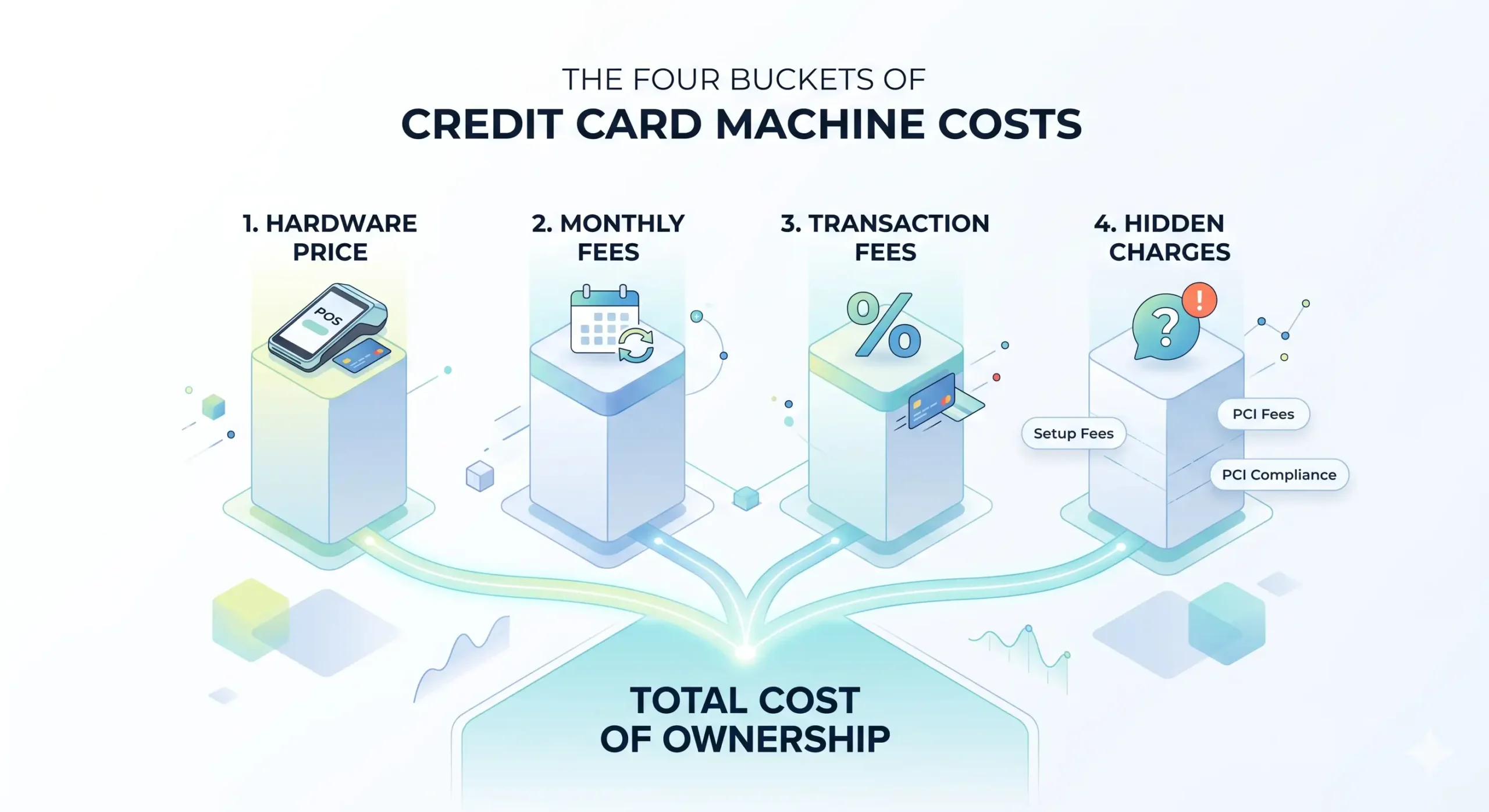
In plain English, credit card machine cost has four buckets:
- hardware price
- monthly platform or service fee
- transaction fees on every sale
- hidden fees or contract charges
That’s why two merchants can use similar card machines and have very different total cost.
According to the NACHA Payment Industry Trends and Fee Analysis Report 2024, the hardware sticker price is often a small slice of the 3-year expense, while fees do most of the damage:
«While the hardware sticker price is $350, the average merchant pays $1,800 in fees over three years, making
the hardware cost only 16% of the total expense.» — NACHA, Payment Industry Trends and Fee Analysis
Report 2024
https://nacha.org/research/2024-payment-trends-report
Additionally, PayPal’s Merchant Cost Guide 2025 notes that the average countertop terminal costs $350, with monthly data transmission fees of $15–$25, bringing the 3-year total cost of ownership to approximately $1,200 for hardware alone — before processing fees are factored in.
Source: PayPal, Merchant Cost Guide 2025 — https://www.paypal.com/us/webapps/mpp/merchant-cost-guide
| Cost component | Typical U.S. range | What it means |
|---|---|---|
| Upfront hardware | $0–$5,000+ | Reader, terminal, or full POS equipment |
| Monthly fee | $0–$100+ | Software, support, data, platform access |
| Per-transaction fee | 1.5%–3.5% + $0.10–$0.30 | Paid every time a customer taps, dips, or swipes |
| PCI / compliance / misc. | $0–$30 monthly or extra annual charges | Security and admin costs that may not appear in the headline quote |
| Early termination / setup | $0–$500+ | Contract-related charges and activation costs |
There’s no single universal credit card machine price because pricing depends on both the equipment and the merchant services contract behind it.
In my experience, this is where owners get burned. They ask, “How much is a credit card machine?” when the real question should be, “What is my all-in monthly cost to accept card payments?”
Upfront cost vs. monthly payments
Upfront cost is what you pay to buy the machine now. Monthly payments spread the expense out, but often raise the final cost.
A basic mobile card reader may be free or cheap upfront. A smart terminal or full POS system can run much higher. But a low upfront cost often means the provider makes money somewhere else — monthly software, higher processing, or a longer contract.
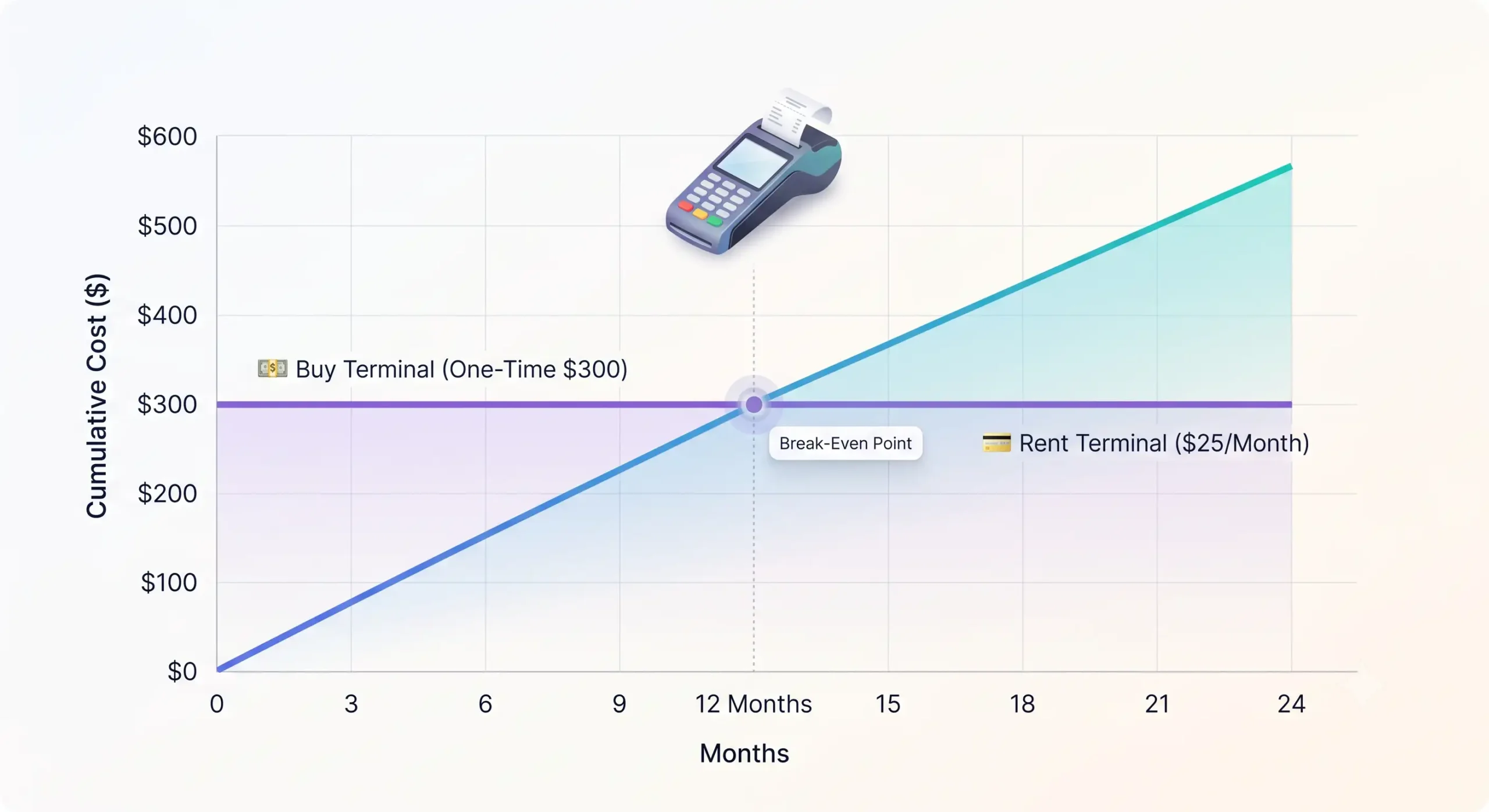
The break-even logic is simple: if total rental payments over time exceed the purchase price, buying wins. That method lines up with general cost-benefit guidance from the European Commission’s ICT project analysis framework and cost allocation logic used by NIST for ownership decisions.
Sources: European Commission Guidelines on Cost-Benefit Analysis of ICT Projects 2023 — https://ec.europa.eu/Files/ICT/Guidelines-Cost-Benefit-Analysis-ICT-Projects-2023.pdf ; NIST SP 800-171 Rev. 2 — https://csrc.nist.gov/Files/800/800-171/Rev2/800-171-Rev2.pdf
Simple example:
- buy terminal: $300 one-off
- rent terminal: $25 per month
Break-even hits around 12 months.
After that, rent keeps eating margin.
In one restaurant transition project, the old setup looked cheap because the terminals were “included.” Then the statement showed recurring equipment, gateway, and support charges tied to the bundle. We replaced the structure with owned hardware and clearer pricing. The owner stopped paying for air by month 13. Yes, that’s the part processors don’t lead with.
Transaction fees and processing fees
Transaction fees are usually the biggest cost. Not the machine.
Most U.S. merchants pay a percentage plus a fixed amount per transaction, and the range commonly lands between 1.5% and 3.5% + $0.10 to $0.30, depending on card type, channel, and provider model. That range is reflected in the source package and reinforced by NACHA 2024, Stripe Pricing, and industry research.
Sources: NACHA Payment Industry Trends and Fee Analysis Report 2024 — https://nacha.org/research/2024-payment-trends-report ; Stripe Pricing — https://stripe.com/pricing
Here’s the part many owners don’t love hearing: a $49 card reader with a bad fee structure is more expensive than a $300 terminal with better rates.
According to the Nilson Report Fee Analysis 2024, interchange fees can make up 70–80% of the total processing fee, with the processor markup sitting on top. One critical factor that affects your interchange rate is your Merchant Category Code (MCC) — a four-digit code assigned by your acquiring bank that classifies your business type. Hospitality businesses, travel companies, and financial services often carry higher MCC-based interchange rates than grocery or utility merchants. This is a variable most owners never think to ask about, but it can meaningfully shift your processing costs.
Source: Nilson Report Fee Analysis 2024 — cited in research brief; Square Credit Card Processing Fees and Rates — https://squareup.com/en-us/merchant-survey/2024/
If your average ticket is low, the fixed per-transaction fee matters more. If your tickets are high, percentage rate matters more.
Restaurant example:
- average ticket: $18
- rate: 2.9% + $0.30
- effective fee: $0.82 per sale
Now multiply that across a busy month. That’s where “cheap terminal” math dies.
What determines the cost of a credit card machine
The cost depends on hardware class, software features, payment capabilities, support model, and contract structure. One machine is more expensive than another because it either does more, bundles more, or locks you into more.
Some pricing factors are straightforward. Bigger screen, built-in printer, battery, POS software, inventory, loyalty, better connectivity — price goes up. Some are less obvious. Support level, onboarding, merchant account model, and contract length also change what you pay.
| Factor | Lower-cost setup | Higher-cost setup |
|---|---|---|
| Device type | Mobile reader | Smart terminal or full POS |
| Connectivity | Bluetooth / Wi-Fi | 4G / multi-network / failover |
| Features | Tap, dip, swipe only | POS apps, reporting, loyalty, inventory |
| Printing | No printer | Built-in receipt printer |
| Software | Basic acceptance | Subscription software + integrations |
| Support | Self-service | Dedicated onboarding and live support |
| Contract | Month-to-month | Long-term bundled agreement |
In other words, the card machine is not just hardware. It’s a pricing container.
Hardware and features
Hardware costs rise when the device does more than just take payments. If it also runs POS software, prints receipts, tracks inventory, or connects with other systems, expect a higher credit card terminal cost.
PayPal’s Merchant Cost Guide 2025 notes that smart terminals with integrated POS software cost materially more upfront than basic countertop terminals — roughly $850 average for smart terminals vs. $300 for basic countertop hardware.
Source: PayPal Merchant Cost Guide for Small Business 2025 — https://www.paypal.com/us/webapps/mpp/merchant-cost-guide
Features that usually push price up:
- built-in printer
- larger touchscreen
- cellular backup
- barcode scanner support
- inventory management
- employee permissions
- CRM or loyalty integrations
- restaurant workflows like split checks or tips
If you need those features, pay for them. If not, don’t let somebody upsell a mini spaceship to run a sandwich shop.
One retail client wanted two sleek smart terminals because the sales rep sold the dream. Their actual workflow was simple counter checkout with no inventory complexity. We switched the design to basic terminals tied to a lighter POS flow. Hardware spend dropped, and staff training got easier on day one.
Payment capabilities and accepted cards
The machine also costs more when it supports more payment types, but the tech alone is not the main issue. The bigger cost difference usually comes from the card network and transaction type, not from whether the customer tapped or dipped.
You want a machine that accepts:
- credit and debit cards
- EMV chip cards
- tap to pay / contactless payments
- mobile wallets like Apple Pay
- Visa, Mastercard, American Express, Discover
Source-level evidence shows that contactless and chip transactions are often priced similarly within the same network, while American Express can run materially higher than Visa or Mastercard in some markets. For U.S. merchants, the practical lesson holds: network mix matters.
Sources cited in brief: UK Payment Systems Regulator 2023, Visa Europe 2024, UK Finance 2023
And yes, this matters in real life. If your customer base skews toward premium rewards credit cards or American Express, your effective fee rate can climb significantly even with the same machine and the same provider. This is a cost variable most merchants never model in advance.
How much do different credit card machines cost
Different credit card machines cost very different amounts because they solve different problems. A mobile reader is built for low-cost entry. A full POS is built to run operations.
The usable 2024–2025 pricing ranges from the research package:
| Device type | Typical upfront cost | Typical monthly fee | Typical use case |
|---|---|---|---|
| Mobile card reader | $0–$150 | $29–$50 | Microbusiness, mobile, pop-up |
| Countertop terminal | $200–$600 | $15–$25 | Retail counter, simple front desk |
| Smart terminal | $600–$1,200 | $50–$100 | Higher-service retail, hospitality |
| Full POS system | $1,500–$5,000+ | $100+ | Restaurants, multi-station retail, hotels |
Source summary: Square 2024, PayPal 2025, Stripe pricing
references, compiled in the research package.
https://squareup.com/en-us/merchant-survey/2024/
; https://www.paypal.com/us/webapps/mpp/merchant-cost-guide
; https://stripe.com/pricing
Decision Matrix — which device fits your business:
| Monthly card volume | Recommended setup | Reasoning |
|---|---|---|
| Under $3,000/mo | Mobile reader ($0–$50 upfront) | Flat rate pricing keeps it simple at low volume |
| $3,000–$15,000/mo | Countertop or smart terminal ($200–$600) | Fixed counter, steady flow, needs reliability |
| $15,000–$50,000/mo | Smart terminal or light POS ($600–$1,200) | Fee structure optimization starts to matter |
| Over $50,000/mo | Full POS + interchange-plus pricing | At this volume, 0.3% rate improvement = real money |
Mobile card readers
Mobile card readers are the cheapest way to start. They work best for low-volume, on-the-go, or simple checkout setups.
Square’s public product and help materials show that entry cost can start at $0 for a promo reader or around $49 for purchase, with support for iOS and Android devices through Bluetooth-connected hardware. The Square Go product is a popular all-in-one option around $209 that includes receipt printing and accepts all major payment types — a good fit for food trucks, market vendors, and mobile service providers.
Sources: Square Card Reader — https://squareup.com/products/card-reader ; Square Help — https://help.squareup.com
Mobile readers make sense for:
- food trucks
- market vendors
- home service businesses
- seasonal pop-ups
- low-volume startups
What they usually don’t do well is handle heavier restaurant or multi-lane retail workflows without friction. Cheap to start. Not always cheap to scale.
Countertop terminals, smart terminals, and full POS systems
Countertop terminals, smart terminals, and full POS systems cost more because they do more and support higher transaction volume. They fit businesses where speed, staff workflow, reporting, and uptime actually matter.
The research package places countertop hardware around $200–$600, smart terminals around $600–$1,200, and restaurant-grade full POS systems around $1,500–$5,000+ depending on bundle size and software. The Clover Station Duo, for example, sits at the $799 range and is a widely-recognized benchmark for smart terminal functionality in retail and food service — it’s more than a payment device, it’s a hub for sales, inventory, and customer management.
Sources: PayPal Merchant Cost Guide 2025 — https://www.paypal.com/us/webapps/mpp/merchant-cost-guide ; source package summary of Toast and Square for Restaurants vendor pricing
For restaurants and hotels, the decision is rarely about terminal price alone. It’s about whether the setup handles tips, speed of service, offline contingencies, printer routing, and staff mistakes without creating chaos on Friday night.
One hospitality client came in after dealing with a laggy front-desk flow and clunky payment routing. The hardware upgrade mattered, but the bigger win was cleaning up the payment architecture and support path. Staff stopped babysitting terminals. Guests stopped waiting. That’s the kind of “feature” owners actually feel.
«Max is always available to answer any questions and keeps you up to date with all important information.» — Client review, Smart Payment Solutions
Looking for transparent pricing without hidden fees?
Smart Payment Solutions offers modern Clover and SkyTab terminals with honest total-cost-of-ownership calculations. We help match equipment to your transaction volume and provide 24/7 support. No surprise fees. No mystery bundles.
Card machine rates: transaction fees, monthly fees, and rental costs
Card machine rates are what keep charging after setup. This is where the real economics live.
If you ask how much does a credit card machine cost per month, the honest answer is usually a combination of:
- monthly software or service fee
- terminal rental, if leased
- data or connectivity fee
- per-transaction fixed fee
- percentage-based processing fee
- possible PCI or admin charges
The source package shows ongoing monthly fees commonly ranging from $0 to $100+, while processing commonly ranges from 1.5% to 3.5% + $0.10–$0.30.
Sources: Square 2024 — https://squareup.com/en-us/merchant-survey/2024/ ; PayPal 2025 — https://www.paypal.com/us/webapps/mpp/merchant-cost-guide ; NACHA 2024 — https://nacha.org/research/2024-payment-trends-report
Fee structures: flat rate, interchange plus, and blended pricing
These fee structures change the final bill more than the terminal model does. Same machine, different pricing structure, different margin damage.
Here’s the short version:
- Flat rate: same fee for every card transaction (e.g., Square’s 2.6% + $0.15 for in-person). Predictable. Easy to budget. Can carry hidden markup at scale.
- Interchange plus: actual interchange cost plus processor’s fixed markup. Transparent. Usually better for higher volume merchants.
- Blended pricing: one averaged rate that mixes costs together. Simpler billing, but actual cost structure is obscured.
Stripe’s pricing page is a clear flat-rate example. NACHA and industry benchmarks position interchange-plus as more transparent, especially for merchants processing above $10,000–$20,000 per month. Visa-style blended models simplify billing but often hide real cost detail.
Sources: Stripe Pricing — https://stripe.com/pricing ; NACHA 2024 — https://nacha.org/research/2024-payment-trends-report
If you process real volume, interchange plus usually deserves a serious look. The difference between interchange-plus and blended pricing can create a 20–40% cost gap for high-volume merchants processing above $20,000 per month, based on NACHA 2024 benchmark data. At lower volumes, the simplicity of flat rate often wins on practical grounds.
Source: NACHA Payment Industry Trends and Fee Analysis Report 2024 — https://nacha.org/research/2024-payment-trends-report
When to switch from flat rate to interchange-plus:
A useful rule of thumb: if you’re processing consistently above $20,000 per month in card volume, run a side-by-side comparison of your current flat-rate bill against an interchange-plus quote. The math often favors the switch, especially if your card mix skews toward standard Visa/Mastercard debit.
Monthly fees, rental costs, and service charges
Monthly fees are normal. The issue is whether they match real value.
A monthly fee might cover:
- software access
- customer support
- analytics
- terminal connectivity
- chargeback tools
- PCI support
- reporting
A rental charge is different. That’s just paying every month for the hardware itself.
If the provider says “no monthly fees,” read the fine print. There is rarely a truly free setup without the provider recovering margin through transaction fees or bundled services.
Sources: Square 2025 pricing references ; research brief
In one small business setup, the owner was focused on avoiding a monthly fee. Fair instinct. But the alternative quote had a noticeably higher per-transaction rate and weaker support. After modeling both options against volume, the “free” plan would have cost more by month two. Math beats headline pricing. Every time.
Hidden fees and extra charges to watch for
Hidden fees are real, common, and usually buried where owners don’t look until the first statement lands. That’s why the final cost often blows past the quoted card machine price.
The FTC’s Consumer Financial Protection Report 2024 found that nearly 40% of small business merchants reported unexpected fees totaling over $300 in the first year, with PCI-related charges and early termination penalties among the biggest offenders.
Source: FTC Consumer Financial Protection Report 2024 — https://www.ftc.gov/news-events/reports/consumer-financial-protection-2024
Alert: common hidden charges to check before signing
- Setup fee — often $0–$150
- Activation fee — can be bundled or separate
- PCI compliance fee — often monthly or annual ($2–$30/month)
- Statement fee — paper or even digital reporting charge ($5–$15/month)
- Minimum monthly fee — charged if processing volume is too low ($5–$25)
- Gateway fee — separate from terminal fee ($10–$20/month or per-transaction)
- Batch fee / Batch header fee — charged when closing out daily transactions ($0–$1.50)
- AVS fee — Address Verification System fee on keyed-in transactions
- Early termination fee — penalty if you leave early ($150–$500+)
- Equipment replacement fee — if leased hardware is damaged or not returned
- PCI non-compliance fee — charged monthly if you haven’t completed your PCI validation (often 0.3% of volume or a flat fee)
- Wireless access fee — for cloud-based or cellular-enabled terminals
That expanded list is what separates a decent-looking quote from a processing horror. Most competitors show you five of these. The full picture has twelve.
Setup, activation, and compliance fees
Setup, activation, and compliance fees can be valid, but they should be explained clearly. If they show up late in the deal, that’s a red flag.
Setup and activation fees often range from $50 to $500 depending on provider and complexity, while PCI-related charges can also appear as monthly or annual line items.
Important distinction: PCI DSS itself is a security standard, not a retail price tag. It’s the industry’s baseline for protecting cardholder data — not optional, not negotiable. The cost comes from validation, scanning, tools, support, or provider pass-through charges. For small businesses, the practical question is not “Is PCI real?” It is “Who is charging what, and why?”
Sources: FTC Consumer Financial Protection Report 2024 — https://www.ftc.gov/news-events/reports/consumer-financial-protection-2024 ; PCI Security Standards Council — https://www.pcisecuritystandards.org/
5 Red Flags: When to walk away from a provider
Some sales pitches are warning signs. Stop the conversation if you hear:
- “The terminal is completely free — no strings attached.” There are always strings.
- “Don’t worry about the contract details — everyone signs the same thing.” Read every line.
- “We’ll lock in this rate forever.” Rates change. Get it in writing with specifics.
- “There are no cancellation fees.” Confirm this in the written agreement, not verbally.
- “Your monthly bill will never be more than [X].” Ask for a full itemized fee schedule before signing.
Early termination and contract-related charges
Early termination charges are where a cheap deal can turn into a bad breakup. If there’s a long-term contract, you need to know the exit price before day one.
Early termination fees vary widely in the U.S. FTC-based summaries and private contract reviews place many penalties in the $150–$500+ zone, with some commercial agreements much higher.
Sources: FTC — https://www.ftc.gov ; Visa Core Rules 2024 — https://usa.visa.com/dam/VCOM/download/usa/en/visa-core-rules.pdf ; Federal Reserve payment systems references — https://www.federalreserve.gov
Read the term length. Read the cancellation clause. Read the auto-renewal clause.
Yes, all of it.
Because “month-to-month” and “three-year term with auto-renew” are not the same planet.
Credit card machine costs for small business
For small business, a realistic credit card machine for small business price can be low upfront but still expensive over time. The right choice depends on volume, ticket size, and workflow.
If sales are light and simple, low upfront hardware with simple pricing may be fine. If volume is higher, or if the business runs multiple terminals, hidden markup and fee structure matter more than the device sticker.
Data currency note: Prices, rates, and fee examples in this article reflect the best available U.S. source set for 2024–2025 and are presented for 2025–2026 buying decisions. Last updated: 2026.
Best value options for small businesses
Best value usually means low upfront cost, transparent pricing, and no nonsense contract traps. Not the cheapest-looking reader.
For low-volume businesses, mobile readers can make sense. For growing stores or restaurants, a more stable terminal or light POS with better support often wins.
Merchants under roughly $5,000 monthly volume are often best served by all-in flat-rate mobile setups. Merchants above that threshold should start comparing fee structures more carefully and consider interchange-plus as volume grows toward $20,000+.
Sources: Square Annual Merchant Survey 2024 — https://squareup.com/en-us/merchant-survey/2024/ ; NACHA 2024 — https://nacha.org/research/2024-payment-trends-report
A few practical filters:
- month-to-month beats long contracts
- transparent pricing beats mystery bundles
- live support beats ticket limbo
- lower total monthly cost beats lower sticker price
That’s also where Smart Payment Solutions tends to be blunt with clients. We break out markup, equipment, software, support, and contract terms before install. No poetry. Just math.
How transaction volume affects your final cost
Transaction volume changes everything. The more you process, the more fee structure matters.
NACHA’s 2024 benchmark summary indicates that merchants processing above $10,000 per month may negotiate lower rates, and higher-volume merchants can sometimes get down near 1.2% + $0.10 depending on risk, card mix, and setup.
Source: NACHA Payment Industry Trends and Fee Analysis Report 2024 — https://nacha.org/research/2024-payment-trends-report
Low volume business:
- prioritize low fixed cost
- avoid heavy monthly fees
Higher volume business:
- prioritize lower rate structure
- push for transparent interchange-plus style pricing
- audit markups hard
Example: if one provider charges 2.9% and another lands near 2.3%, that 0.6% spread on $80,000 monthly card volume is $480 a month. That’s not a rounding error. That’s payroll money.
Buy vs lease: which card machine option costs less
Buying usually costs less over the long run. Leasing or renting can make sense when cash is tight, the business is seasonal, or the setup is temporary.
Over multi-year use, buying tends to beat leasing, and the research brief summarizes lease arrangements as potentially 30–50% higher in TCO over three years versus purchase.
Sources: Square Leasing vs. Buying Analysis 2024 — cited in research brief ; supporting framework references from NIST and EC in the brief
When buying makes more sense
Buying makes more sense when you expect to keep the machine for 24–36 months or longer. After that, monthly rental tends to become dead weight.
Buying is usually better when:
- stable location
- predictable volume
- long-term use
- no need for constant hardware swaps
- cash flow can handle upfront spend
If you’ve got one store, steady traffic, and no plan to change systems in 12 months, purchase is usually the sane move.
When renting or leasing can be better
Renting or leasing can be better when preserving cash matters more than long-term savings. That’s common in seasonal businesses, short-term activations, new concepts, and businesses still validating demand.
Sources cited in brief: SBA 2024 — https://www.sba.gov ; U.S. Department of Commerce 2024 — https://www.commerce.gov
Rent can make sense if:
- you’re opening with thin cash reserves
- your operation is seasonal
- you need a short-term bridge
- you expect to upgrade soon
- you want to test a provider before committing
Just don’t confuse lower upfront pain with lower total cost. Banks love that confusion.
How to calculate the true cost of accepting card payments
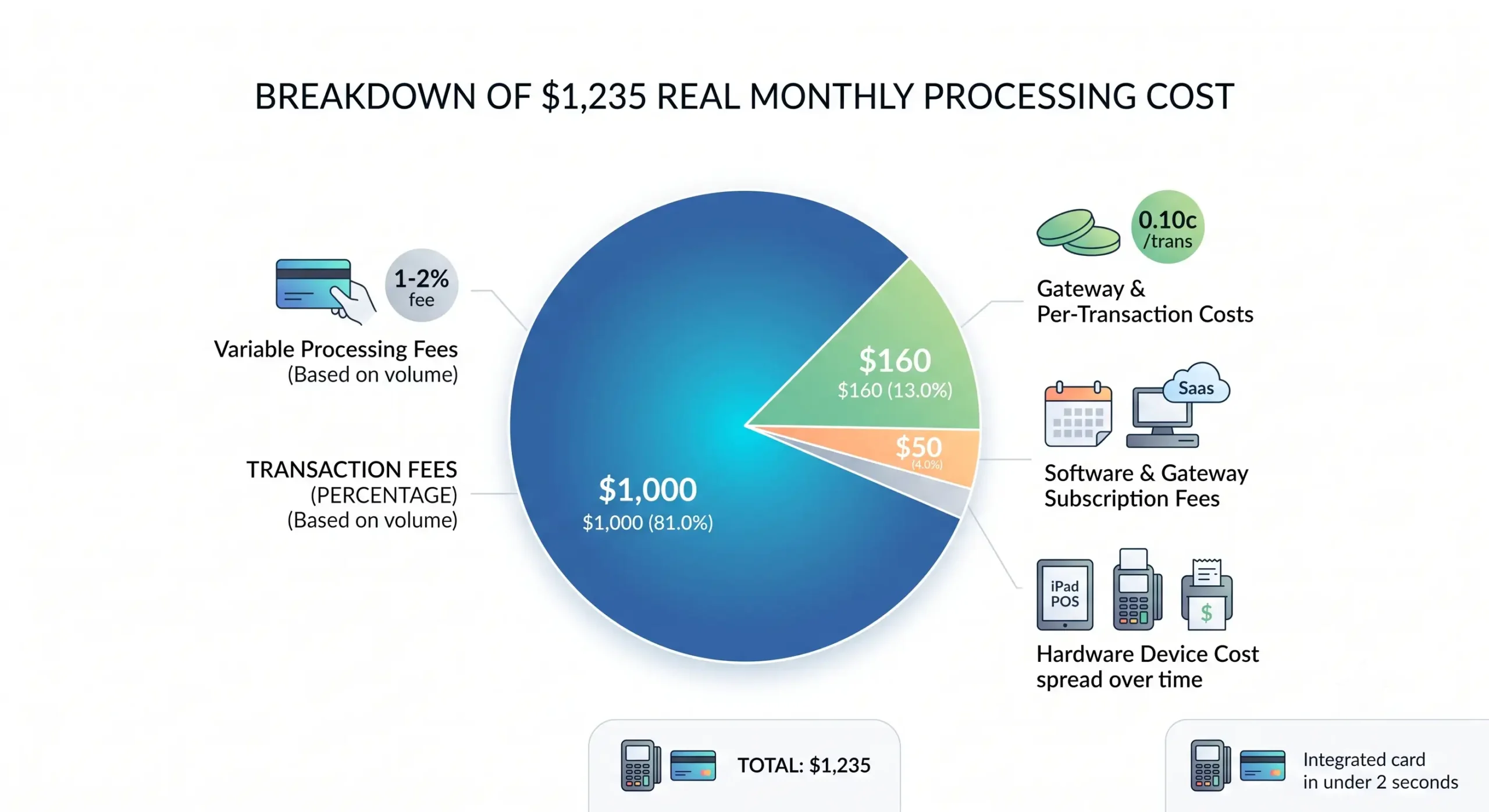
The true cost is your hardware cost spread over time, plus monthly charges, plus transaction fees, plus hidden extras. That is the number that matters.
True monthly cost = hardware amortization + monthly fees + percentage fees + per-transaction fixed fees + hidden monthly charges
That matches the calculator logic provided in the brief and the cost structure shown across the research sources.
Build your monthly cost from hardware, fees, and volume
Start with a simple build:
- hardware cost ÷ useful months
- add monthly software / support / rental
- add transaction percentage cost
- add fixed fee per transaction
- add PCI or other recurring charges
Example:
- hardware: $600
- useful life: 24 months
- monthly fee: $35
- monthly card volume: $40,000
- rate: 2.5%
- fixed fee: $0.10
- 1,600 transactions
- extra monthly charges: $15
Math:
- hardware monthly = $25
- monthly fee = $35
- percentage fee = $1,000
- fixed fee total = $160
- extra charges = $15
Total monthly cost = $1,235
That’s your real number. Not “terminal only $49.”
«While the hardware sticker price is $350, the average merchant pays $1,800 in fees over three years, making
the hardware cost only 16% of the total expense.» — NACHA, Payment Industry Trends and Fee Analysis
Report 2024
https://nacha.org/research/2024-payment-trends-report
Compare providers before you sign up
Compare providers on total cost, not sales pitch energy. The quote needs to show the full fee structure.
Use this checklist before signing:
| What to compare | Why it matters |
|---|---|
| Transaction rate | Drives ongoing cost every day |
| Fixed fee per transaction | Hurts low-ticket businesses fast |
| Monthly fee | May be worth it or may be fluff |
| PCI / compliance charges | Often hidden until after signup |
| Contract length | Controls your exit pain |
| Equipment ownership | Decides long-term cost |
| Funding speed | Cash flow issue, not cosmetic |
| Support access | Matters when terminals fail at rush hour |
| MCC classification | Affects your interchange base rate |
| Card mix (debit vs. credit) | Higher credit/AmEx mix = higher effective rate |
From the brief, a good processor review should also check security posture, payout timing, SLA, and provider transparency. For most owners, the top three killers are still rate, markup, and contract.
Pre-signing checklist — questions to ask every provider:
- What is the complete list of monthly fees I will be charged?
- What is the early termination fee and contract length?
- Is there a PCI non-compliance fee and how do I avoid it?
- What is the rate for swiped/tapped vs. keyed-in transactions?
- Is pricing flat rate, blended, or interchange-plus?
- Does the monthly fee auto-renew, and with how much notice?
- What is the hardware ownership structure — do I own it or lease it?
- What is the support SLA if my terminal goes down during business hours?
“A low sticker price on the terminal means nothing if the fee structure is bloated. Merchants need the all-in monthly number before they sign.” — Max Artemenko, Smart Payment Solutions

What do our customers think about us
Other Articles
KDS vs. Paper Tickets: The Complete Guide to Choosing Your Restaurant Kitchen System
How to Clean and Maintain Your Credit Card Terminals and Touchscreens

Aloha POS Pricing Guide: Costs, Fees, and What to Expect
