

Best Credit Card Machines for Small Business in 2026

Compare the best credit card machines for small business by device cost, processing fees, POS fit, support, contracts, and payment workflow.
Most businesses don't need the fanciest terminal. They need the setup that keeps payments fast, support responsive, and markups under control. The machine is just one part of the math. — Max Artemenko, Smart Payment Solutions

Quick Picks: Best Credit Card Machines by Use Case
- 🚀 Best for Startups & Low Volume: Square Terminal ($299, 2.6% + $0.15)
- 🍽️ Best for Restaurants: Toast Go 3 (24-hour battery, pay-as-you-go option available)
- 🛠️ Best for Service Businesses & Full POS: Clover Flex ($749, 4G + Wi-Fi, built-in printer)
- 📊 Best for High Volume / Transparent Pricing: Helcim Smart Terminal (interchange-plus, auto volume discounts)
- 💰 Best Budget Option: SumUp Solo ($99, free unlimited data, no monthly fees)
Disclaimer: This article is educational and operational — not legal, tax, or compliance advice. For regulated questions, card data rules, or contract review, consult your processor, CPA, attorney, or compliance specialist. Pricing information is based on provider-published rates and may change; always verify directly with the provider before signing any agreement.
What Is a Credit Card Machine for Business?
A credit card machine for business is the hardware used to accept card payments in person. It reads card data, sends the transaction through a payment processor, and moves approved funds into the merchant account tied to the business.
That is the clean definition. In practice, it gets messier.
In 2026, the machine is not just a swipe box. It sits inside a larger payment processing setup that includes the payment terminal, payment processor, merchant account, network connection, and often a point of sale system. Modern terminals rely on EMV chip flows, NFC for contactless payments, and encrypted transport such as TLS 1.3. The underlying standards include EMVCo EMV Chip, NFC Forum, ISO 8583, and PCI DSS v4.0.
“Definitions are boring until they cost you money. If your terminal, processor, and POS are mismatched, you get delays, duplicate entries, or support ping-pong. That’s where the pain starts.” — Max Artemenko, Smart Payment Solutions
A card machine for business does five jobs:
- captures card or wallet data;
- sends payment details securely for authorization;
- returns approved or declined status;
- records the sale inside the POS or payment log;
- triggers settlement into the merchant account.
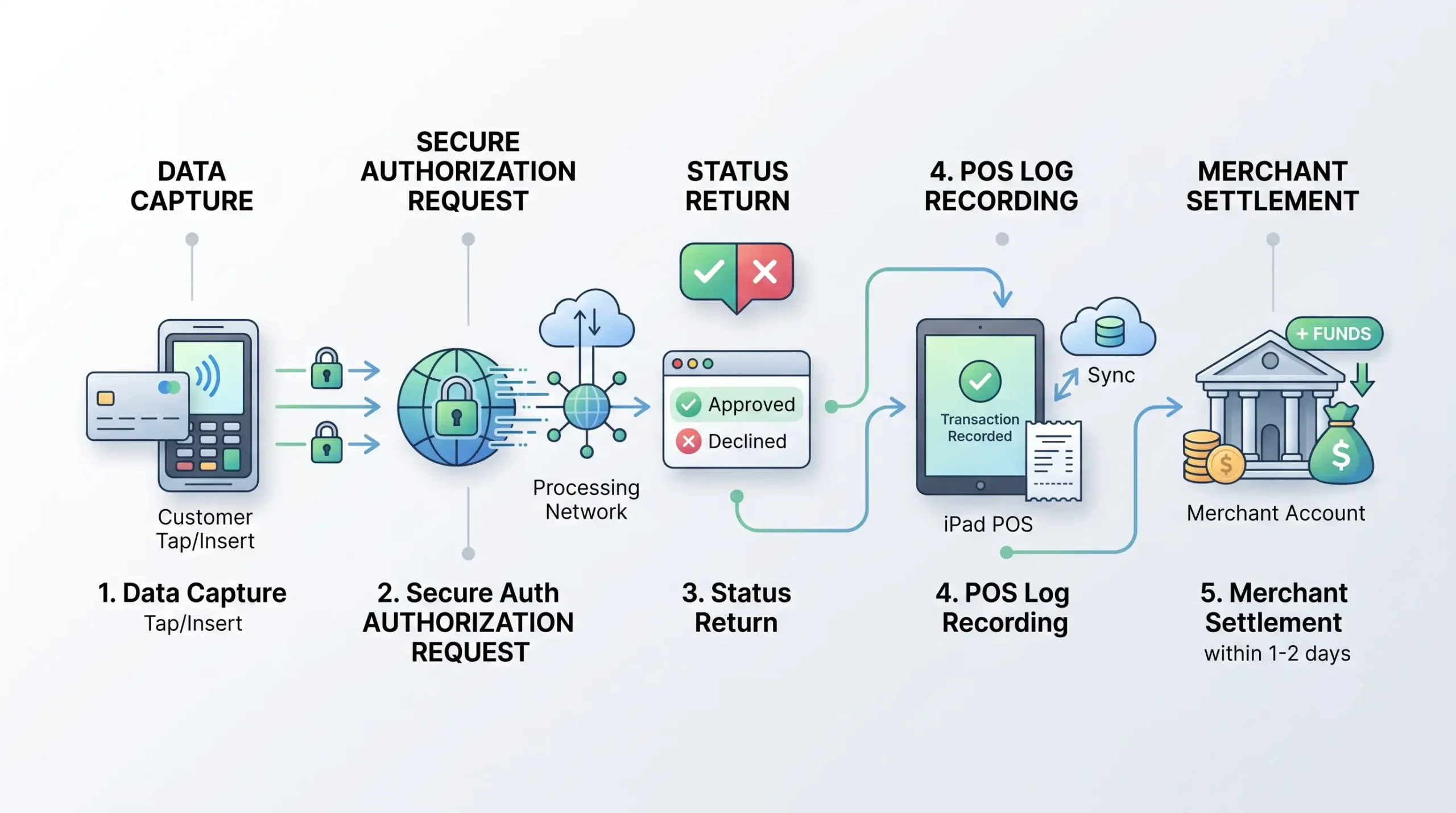
Simple enough on paper. The messy part is what sits behind it: rate structure, markup, hardware lock-in, software fees, and support when the line is ten people deep and the terminal freezes.
In one retail transition project, the old setup used a terminal that was technically working but not properly synced with the POS. Staff had to key totals twice. We replaced the flow so the amount pushed directly from POS to terminal and payment status came back automatically. Result: fewer cashier errors, faster checkout, and less daily cleanup at close. Not glamorous. Just useful.
Card Machine, Card Reader, and Payment Terminal: What's the Difference?
They overlap, but they are not the same thing. A card reader is usually the simplest device. A payment terminal is more complete. A countertop terminal is the fixed, full-time version used at a checkout station.
Here is the plain-English split:
- Card reader: compact hardware, often paired with a phone or tablet, good for mobile payments or low-complexity setups.
- Payment terminal: standalone device with screen, PIN support, chip, tap, and usually receipt or digital receipt handling.
- Countertop terminal: desk-based payment terminal for stores, cafés, hotel desks, and other fixed checkout environments.
Explore payment terminals for your business to compare specific models before committing.
Sales reps throw these words around like they all mean the same thing. They don’t.
If a pop-up shop needs to accept payments anywhere, a basic credit card reader for small business may be enough. If a busy quick-service restaurant needs stable counterside flow, tipping, receipt handling, and integration with kitchen or order logic, a fuller terminal card setup makes more sense. If a retailer wants barcode workflows and richer sales data, the device alone is not enough — the POS stack matters more than the shell.
| Term | What it usually means | Best use case | Trade-off |
|---|---|---|---|
| Card reader | Small accessory that reads chip/tap, often app-connected | Mobile services, events, low-volume sellers | Fewer built-in POS features |
| Payment terminal | Full payment device with screen and standalone logic | General small business checkout | May have extra software or monthly fees |
| Countertop terminal | Fixed terminal at a checkout counter | Retail stores, cafés, front desks | Less mobility |
From experience: owners usually overbuy hardware and underbuy workflow. The right terminal is the one staff can use half-asleep on a Saturday rush without creating chargeback bait.
How a Card Machine Helps Accept Credit Card Payments
A card machine helps accept payments by making in-person card transactions fast, secure, and trackable. It lets customers pay by credit and debit, chip, tap, and in many cases mobile wallets like Apple Pay and Google Pay.
That matters because customer behavior already moved. Modern devices lean on EMV chip authentication and NFC contactless methods. EMVCo explains that chip transactions generate dynamic cryptographic data per transaction, making cloned card fraud far harder. The NFC Forum describes how contactless exchanges work over short range, typically under 4 cm. Online authorization through ISO 8583 messaging targets response times under two seconds in modern systems.
In operator terms, here’s what the machine changes:
- faster checkout;
- fewer keyed transactions;
- support for credit and debit;
- better acceptance of mobile wallets;
- more reliable payment records;
- lower friction at the counter.
This affects revenue indirectly — not because a terminal magically grows sales, but because if customers can pay how they want, if staff make fewer mistakes, and if lines move faster, fewer sales get lost for operational reasons.
In one restaurant-side rollout, the issue was not volume — it was abandoned tabs and slow closeouts during rush. We moved them to a cleaner terminal flow with tap and chip as default, plus better staff prompts. The shift close became faster and cleaner because there were fewer manual corrections to chase down at end of day.
Top 5 Credit Card Machines for Small Business (2026)
Before diving into cost structures and selection criteria, here is what the market actually looks like in 2026 for operators who need a concrete starting point. These five devices represent different business environments and budget levels. Prices reflect direct purchase from providers and may vary through resellers or merchant service providers.
1. Clover Compact — Best Overall Countertop Terminal
Price: $349 (or $16/mo for 36 months) | Processing: 2.6% + $0.10 in-person
The Clover Compact is the only standalone terminal on this list with a built-in tactile PIN pad, making it especially practical for debit-heavy businesses. It has a splash- and scratch-resistant 3.6″ touchscreen, a built-in receipt printer, offline mode, and LTE + Wi-Fi connectivity.
Pros: Built-in printer and PIN pad; durable screen; integrates with Clover ecosystem
Cons: Smaller screen than competitors; no full POS inventory management in base plan
Best for: Retail, service, and food-based environments that need a durable, no-fuss checkout station.
2. Clover Flex — Best for Full POS in a Handheld
Price: $749 (or $40/mo for 36 months) | Processing: 2.6% + $0.10 (Payments plan)
The Clover Flex packs a built-in receipt printer, barcode scanner, camera, inventory management, 4G LTE + Wi-Fi, and offline mode into a 6″ touchscreen handheld. One of the most capable standalone devices on the market for businesses that need to move around.
Pros: Full POS in handheld format; 4G + Wi-Fi; offline mode; built-in printer and scanner
Cons: Higher upfront cost; higher processing fees than some competitors; 3-year contract on
promotions
Best for: Service businesses, retail, and fast casual restaurants where staff need to move around.
Compare SkyTab vs Clover for restaurant environments before making a final decision if you are in food service.
3. Square Terminal — Best for New and Simple Businesses
Price: $299 (or $27/mo for 12 months) | Processing: 2.6% + $0.15 in-person
Square Terminal is the go-to entry point for businesses that want a clean, reliable checkout without complexity. It has a 5.5″ touchscreen, built-in receipt printer, offline mode, inventory management, and long battery life. No long-term contract required.
Pros: No contracts; built-in printer; easy ecosystem integration; transparent flat-rate
pricing
Cons: No 4G (Wi-Fi only); no built-in barcode scanner; can take 4+ hours to charge
Best for: New businesses, solopreneurs, and simple retail or café setups.
4. Toast Go 3 — Best for Restaurants
Price: $0 (pay-as-you-go) or $749 (standard) | Processing: 3.09% + $0.15 (pay-as-you-go) / 2.49% + $0.15 (hardware upfront)
Toast Go 3 is purpose-built for food service. Restaurant-grade durability means it handles spills, drops, and grease. The 24-hour battery life is confirmed by multiple reviewer sources — it genuinely lasts a full service day. It integrates natively with Toast’s kitchen display systems, online ordering, and team management.
Pros: 24+ hour battery; spill/drop resistant; tableside ordering; KDS integration; 24/7
support
Cons: No built-in receipt printer (add-on required); two-year contract; setup fee; offline mode
requires backup router (hidden cost)
Best for: Full-service restaurants, bars, cafés, and any food business doing tableside service.
5. Helcim Smart Terminal — Best for Transparent, Low-Cost Processing
Price: $349 (or $32/mo for 12 months) | Processing: Interchange + 0.40% + $0.08 (up to $50k/mo), automatically discounted as volume grows
Helcim is the only major provider on this list offering true interchange-plus pricing with automatic volume discounts — no renegotiation required. It has a built-in receipt printer, inventory tracking, employee log-ins, tipping, and a surcharging option. No monthly fees, no long-term contracts.
Pros: Interchange-plus pricing saves money at scale; auto volume discounts; no monthly fees;
surcharging option
Cons: No offline mode; limited hardware ecosystem (no larger countertop registers); rates can
increase if volume drops
Best for: Fee-conscious small and mid-sized businesses processing $20k+ per month who want total pricing transparency.
| Device | Price | Processing (in-person) | Monthly Fee | Best For |
|---|---|---|---|---|
| Clover Compact | $349 | 2.6% + $0.10 | $0 (Payments plan) | Countertop checkout |
| Clover Flex | $749 | 2.6% + $0.10 | $0–$49.95 | Mobile + full POS |
| Square Terminal | $299 | 2.6% + $0.15 | $0 | New businesses |
| Toast Go 3 | $0–$749 | 2.49–3.09% + $0.15 | $0–$89 | Restaurants |
| Helcim Smart Terminal | $349 | Interchange + 0.40% + $0.08 | $0 | High-volume, fee-sensitive |
Prices are provider-published rates as of 2025–2026. Always verify directly before purchase. Reseller pricing may differ.
What Kinds of Credit Card Machines for Small Business Are Available?
There are three practical buckets: mobile card readers, countertop terminals, and smart terminals. Then there is a fourth decision layer: whether the device is part of a POS system, a standalone terminal, or an all-in-one setup. That last choice is the one that actually matters.
The market for 2026 breaks into:
- mobile readers tied to phone or tablet apps;
- smart terminals with screens and onboard software;
- all-in-one POS systems that combine payment hardware and software in one unit.
| Device type | Mobility | Screen | Connection | POS depth | Best for |
|---|---|---|---|---|---|
| Mobile card reader | High | Usually none or minimal | Bluetooth / phone connection | Light | Pop-up shops, field services, low counter space |
| Countertop terminal | Low | Yes | Wired / Wi-Fi / networked | Medium | Retail checkout, front desk, stable counter flow |
| Smart terminal | Medium to high | Yes | Wi-Fi / mobile data | Medium to high | Restaurants, service businesses, mobile staff |
| All-in-one POS | Low to medium | Full register-style | Networked | High | Retail and restaurant operations with reporting and inventory |
Battery life, 5G specs, and printer availability vary model by model. If a vendor pitch leans hard on those details, verify before you buy. Don’t assume all smart terminals are equal.
Mobile Card Reader, Countertop Terminal, or Smart Terminal
Choose based on where the payment happens. If payment moves, the device should move. If checkout stays fixed, the terminal can stay fixed too.
That sounds obvious. People still get it wrong.
A mobile card reader works when the staff member moves around — think food trucks, contractors, market stalls, or tableside service. A countertop terminal works when the customer comes to one payment point — think liquor stores, hotel desks, bakeries, or standard retail. A smart terminal sits in the middle: it can move, but it also handles more logic on the device itself.
What to check before choosing:
- Does it support chip, tap, and digital wallets?
- Does it fail over cleanly if Wi-Fi gets flaky?
- Is the battery enough for a real shift, not brochure life?
- Can staff reverse, tip, refund, and reprint without manager drama?
- Does it pair cleanly with POS software or work standalone?
In one handheld replacement project, the old mobile device looked fine on paper but the battery died before the dinner rush ended every night. We swapped to a better-fit handheld. Result: fewer station handoffs, fewer payment interruptions, fewer angry looks from servers.
Yes, battery life matters. But workflow matters more.
POS System, Standalone Terminal, and All-in-One Solutions
A standalone terminal is enough if all you need is to take payments. A POS system or all-in-one setup is better when the business needs sales data, item-level reporting, tips, staff controls, or inventory management.
This is where many small business owners get upsold into nonsense.
- Standalone terminal: lower complexity, fewer moving parts, limited reporting.
- POS terminal: payment plus sales workflow inside one setup.
- All-in-one: useful when checkout, reporting, staff, receipts, and catalog all need to live together.
A restaurant cares about ticket flow, modifiers, split checks, and tip handling. A retailer cares about barcode scanner support, returns, and SKU-level stock visibility. A service business may care more about mobile payments, invoices, or customer history.
That is why “best credit card terminals for small business” is a bad question unless you attach a use case. Best for what?
How Much Does a Credit Card Machine for Business Cost?
The total cost has three parts: device cost, monthly fees, and processing fees. If you only compare the hardware price, you can easily choose the more expensive setup by accident. That happens all the time.
Since there is no complete 2026 independent market audit, we base this section on published provider rates and the cost structure experience of Smart Payment Solutions.
Published rate examples:
- Square in-store: 2.6% + $0.15 per transaction — Square Pricing, squareup.com/pricing/in-store
- Clover: 2.6% + $0.10 (Payments plan) / 2.3% + $0.10 (Register plan) — clover.com/pricing
- Helcim: Interchange + 0.40% + $0.08 (up to $50k/mo) — helcim.com
- Revolut Business: 1.7% example — revolut.com/business/pricing
These are provider-published rates, not peer-reviewed research. Use them as directional examples, not universal truth.
| Cost layer | What it includes | What to watch |
|---|---|---|
| Upfront costs | Device purchase, accessories, setup hardware | Locked hardware, replacement cost, printer docks |
| Monthly fees | Software, support, POS subscription, terminal rental | Hidden add-ons, long contracts, feature bundling |
| Per transaction fees | Percentage + fixed fee, markup, interchange model | Qualified vs non-qualified pricing, AVS, keyed entry premiums |
| Extra charges | PCI fees, chargeback fees, statement fees, gateway fees | Buried in the agreement |
From experience, the real cost problem is not the advertised rate — it’s the stack. One restaurant group can pay a fair percentage and still lose money because the setup includes bloated software fees, bad terminal rental, duplicate gateway services, or a markup nobody questioned for years. Another business can pay a slightly higher visible rate and still come out ahead because support is real, downtime is low, and the hardware matches the operation.
Fee Calculation Example: What a 0.4% Difference Actually Costs
Here’s real math using published rates.
Retail shop — $25,000/month in sales:
- At 2.9%: $725/month → $8,700/year
- At 2.5%: $625/month → $7,500/year
- Difference: $1,200/year
Service business — $150,000/year in sales:
A 0.4% rate difference = $600 saved annually.
That’s enough to cover an extra technician visit, a week of supplies, or a staff bonus. Run this math at your actual volume before choosing a processor.
Upfront Cost vs Monthly Fees vs Per Transaction
If the business will use the setup for years, buying can be better. If the operation is short-term or uncertain, monthly rental or low upfront entry can make more sense.
Purchase reduces total cost of ownership over longer periods; rental makes sense for short projects under 12 months. Flexibility comes at a TCO premium over time.
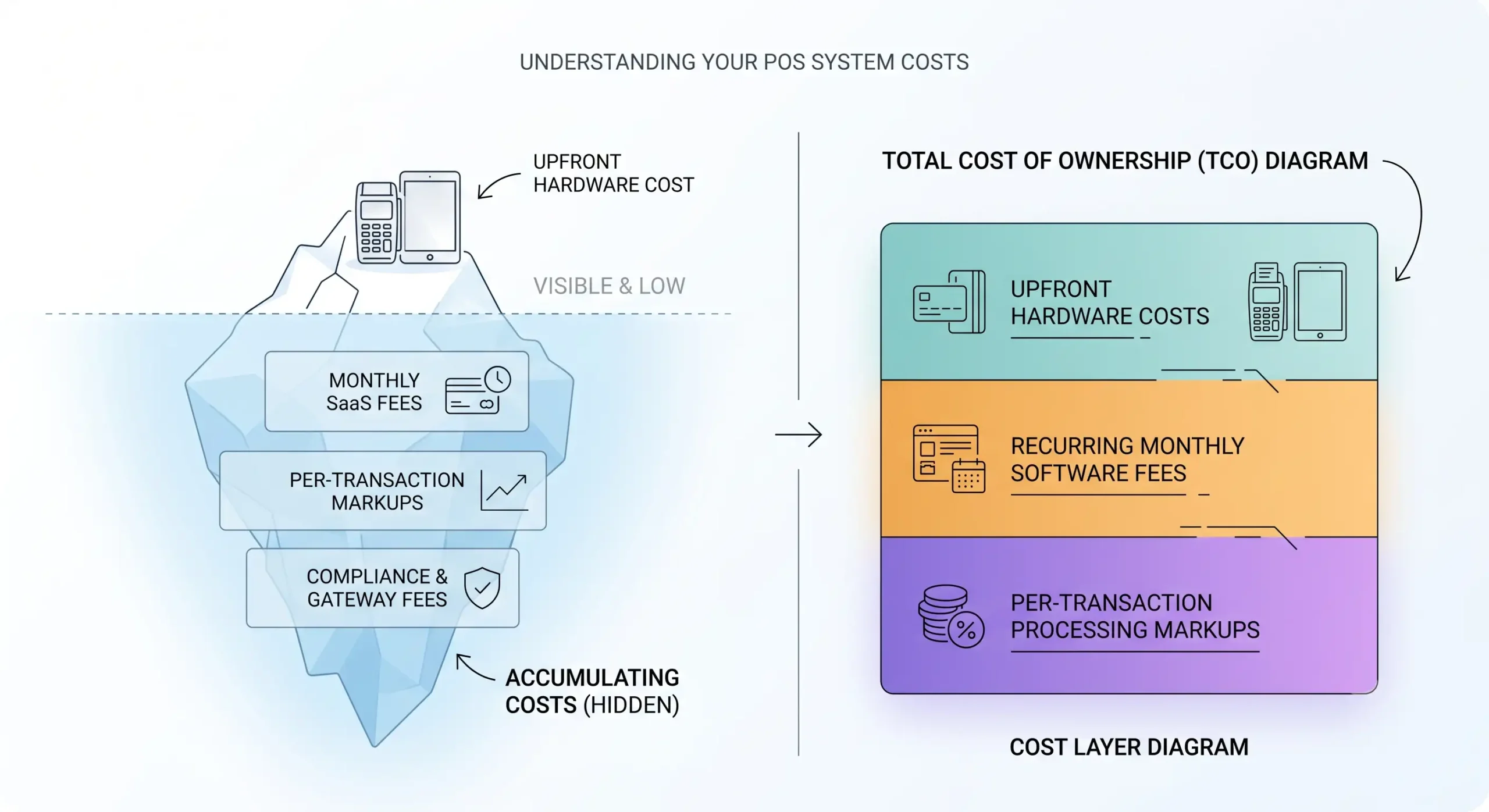
Decision framework:
- Buy hardware if the business is stable, the location is long-term, and the workflow is already known.
- Use lower upfront options if cash is tight, the concept is new, or the location is temporary.
- Don’t decide from hardware price alone if processing fees and software fees dominate the spend.
One situation from my experience: a small multi-location food operator wanted “free terminals.” The catch was a sticky agreement with expensive processing and ugly exit terms. We modeled the full spend instead of staring at the zero-dollar hardware pitch. Result: they skipped the free toy, chose a cleaner pricing structure, and saved more over time than the hardware was ever worth.
Free equipment is often expensive equipment wearing makeup.
What Processing Fees and Transaction Rates Usually Include
Processing fees usually include interchange, card network assessments, and processor markup. On top of that, some providers layer gateway fees, monthly platform fees, PCI-related fees, statement fees, chargeback fees, or extra charges for keyed transactions. This is where pricing gets slippery.
“Transparent pricing beats ‘cheap’ pricing. Cheap on the front page and ugly on the statement is how owners get burned.” — Max Artemenko, Smart Payment Solutions
What a business owner should ask before signing:
- Is this flat-rate or interchange-plus?
- Is there a separate gateway fee?
- Are PCI compliance or non-compliance fees charged?
- Are chargebacks billed separately?
- Are keyed or card-not-present transactions priced higher?
- Are there statement fees, batch fees, or annual fees?
- What is the contract length and what are the exit terms?
- Who owns the hardware?
For fee verification, start with the provider pages and compare against the processing statement — not the pitch deck:
- Square In-Store Pricing: squareup.com/pricing/in-store
- Clover Pricing: clover.com/pricing
- Revolut Business Pricing: revolut.com/business/pricing
Tired of hidden fees and confusing statements? At Smart Payment Solutions, we provide a transparent markup breakdown with no buried surprises. Our clients consistently highlight seamless transitions and 24/7 support from a team that actually answers. Get a clear rate comparison for your business — no obligation.
How to Get a Credit Card Machine for Small Business
To get a credit card machine for small business, choose a payment processor or service provider, complete underwriting or onboarding, connect the merchant account or aggregated account structure, and set up the device with your POS or standalone flow.
The process is mostly commercial, not statutory. There is no universal U.S. regulator-published step-by-step playbook because the path is vendor- and processor-driven, with compliance standards sitting underneath.
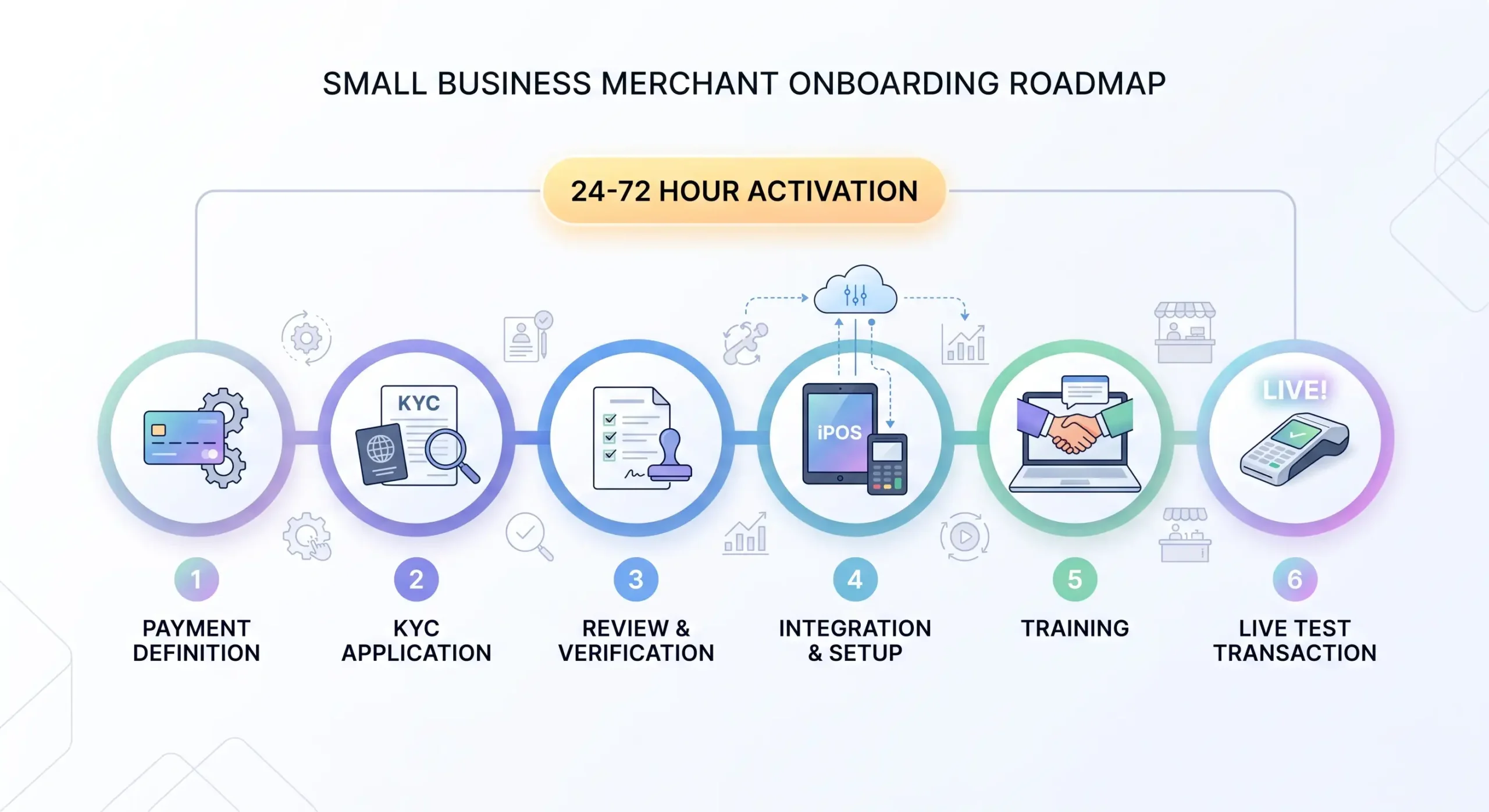
Steps to Set Up Credit Card Processing for a Small Business
The setup path is usually six steps. Miss one, and you get delays.
-
Define how the business takes payments.
Countertop, mobile, tableside, front desk, multi-lane, pop-up, or mixed. -
Choose the payment processor and pricing structure.
Flat rate, interchange-plus, or custom enterprise pricing. -
Complete application and KYC.
Typical KYC inputs: legal business name, EIN, license details, owner ID, address proof, and sanctions screening. The framework draws from FATF guidance and ISO 20022-related references. -
Get approved and map the funding account.
Link the business bank account and settlement path. -
Set up hardware and software.
Connect the card machine, load the app or POS settings, test receipts, tax, tips, and user permissions. -
Run a live test transaction.
Then test refunds, voids, end-of-day close, and fallback scenarios.
Activation timelines typically land in the 24–72 hour range after KYC approval, depending on provider and risk review.
In one new-location setup, the terminal arrived on time but the bank account mapping was incomplete. Funding would have gone to the wrong place. We caught it during test transactions, fixed the settlement settings, and avoided the classic “where did yesterday’s money go” panic. Boring work. Necessary work.
What You Need Before You Start Accepting Card Payments
At minimum, prepare:
- legal business name and DBA if used;
- EIN or tax ID;
- business address and contact details;
- owner ID and basic KYC documents;
- business bank account for deposits;
- expected processing volume and average ticket;
- MCC or business category details;
- refund and chargeback handling process;
- hardware plan and internet fallback plan.
PCI DSS v4.0 is the active baseline security framework in 2026, with the full transition completed by the end of 2024 per the PCI Security Standards Council:
- PCI DSS document library: pcisecuritystandards.org/document_library/
- PCI DSS 4.0 transition page: pcisecuritystandards.org/pci-dss-4-0-transition/
If the business accepts only in-person through managed terminals, the compliance burden is usually simpler than for custom e-commerce flows. Still, don’t wing it. And if a rep says, “You don’t need to think about PCI at all,” that is a bad sign.
Best Credit Card Terminals for Small Business: What to Look For
The best credit card terminals for small business are the ones that fit the workflow, keep total costs predictable, and don’t create support chaos. “Best” is not a brand badge. It is a fit test.
Evaluate based on total cost of ownership, scalability, support responsiveness, and security baseline. The standards that underpin a sane evaluation model include UX logic from ISO 9241, support responsiveness concepts via NIST SP 800-63B, and security through ISO/IEC 27001 and PCI DSS v4.0.
Key Features to Compare Before You Choose
Compare the feature set against the business job, not the demo script. A pretty terminal that slows down staff is a bad buy.
What matters most:
- chip, tap, and wallet support;
- easy refunds, voids, and tipping;
- stable receipt handling;
- user-friendly screen flow;
- role permissions for staff;
- reporting and sales data access;
- inventory management if relevant;
- barcode scanner support for retail;
- offline or fallback behavior;
- integration with POS software and accounting tools;
- support quality and replacement process.
| Criterion | Why it matters | Good sign | Red flag |
|---|---|---|---|
| Pricing structure | Protects margin | Clear rate sheet and full fee list | “Custom” with no written detail |
| Ease of use | Reduces staff errors | Short checkout flow | Too many taps for common tasks |
| Payment features | Matches customer habits | Chip, tap, wallets supported | No contactless or awkward tipping |
| POS integration | Cuts manual work | Sale amount sync and payment status return | Double entry or weak reporting |
| Support | Limits downtime | Fast live help and clear escalation | Ticket queues and vague ownership |
| Security features | Reduces risk | PCI-aligned device, updates, encryption | Old hardware and no update policy |
Situation from my experience: a retailer chose based on screen size and ignored reporting and support. After install, refunds took too many steps and the owner couldn’t track staff actions cleanly. We reworked the setup around workflow and permissions. Result: less cashier confusion, cleaner end-of-day control, fewer owner headaches. That’s the stuff that matters after week one.
Which Business Needs Match Which Terminal Type
- Restaurants: smart terminal or restaurant-ready POS with tip flow, split checks, modifier support, and fast support. Toast Go 3 is the purpose-built option; Clover Flex works well for tableside mobility.
- Retail stores: countertop terminal or POS system with barcode scanner support, returns flow, and inventory visibility. Clover Compact or Clover Mini are strong fits.
- Pop-up shops: mobile card reader or lightweight smart terminal that accepts payments anywhere. SumUp Solo or Square Handheld work well.
- Hotels/front desks: countertop or smart terminal with stable connectivity and reliable receipt options.
- Field services: mobile card reader for small business or SoftPOS path if the volume and risk fit.
Our evaluation method:
- match device type to payment environment;
- estimate total cost of ownership, not just device price;
- check integration depth;
- check support response and replacement path;
- verify security and update policy.
Best Credit Card Machine Options for Small Business by Use Case
The brief names these devices and ecosystems as relevant: Square Terminal, Clover Flex, SumUp Solo, Helcim Smart Terminal, Square POS, and Clover ecosystem. Below is how they play out in real operating contexts.
Best for Restaurants, Retail Stores, and Pop-Up Shops
For restaurants, a smart terminal or POS-first setup usually wins. For retail stores, countertop or POS-integrated terminals often fit better. For pop-up shops, portability matters more than deep back-office features.
Restaurant priority: quick tipping flow, stable handheld or counter behavior, split-check capability, and support when the dinner rush is on fire. Toast Go 3 is the strongest restaurant-specific device on the market, with 24+ hour battery life and native integration with kitchen display systems.
Retail priority: barcode scanning, item-level returns, inventory visibility. Clover Flex handles this well for mobile retail; Clover Compact or Clover Mini for fixed counters.
Pop-up/mobile priority: SumUp Solo at $99 is the most affordable standalone option with free built-in data. Square Handheld adds a barcode scanner for inventory-based selling.
Case Study: A SkyTab POS client noted “24-hour customer service” and a “conversion so seamless” after switching systems with Smart Payment Solutions’ help. Another merchant commented: “Max has done a great job from the C/C transition and our Sky Tab POS install.” A third added: “He helped me install the equipment in my store and everything is working fine.” These are not academic studies. They are operational experience signals — and in payments, response speed is half the product.
Best for Mobile Payments and Accepting Payments Anywhere
For accepting payments anywhere, mobile readers, handheld smart terminals, and SoftPOS are the practical options.
SoftPOS is the strongest source-backed option for microbusinesses: it references EMVCo EMV Contactless / SoftPOS standards, with platform examples including Tap to Pay on iPhone and Android SoftPOS paths. It can eliminate the need for separate hardware in very small businesses and low-volume scenarios.
Providers supporting Tap to Pay on mobile include: Square (Android and iPhone), Stripe (Android and iPhone), Clover (Android and iPhone), SumUp (Android and iPhone), PayPal Point of Sale (Android and iPhone), and Helcim (iPhone only).
What to ask before using phone-based acceptance:
- Does the processor support the phone and OS version?
- Are receipts easy to send?
- Can staff use it without touching personal apps?
- Is the acceptance environment stable enough for NFC every time?
- What happens if the phone dies mid-shift?
From my experience, phone-based payments are great until the phone turns back into a phone. Calls, battery drain, app permissions, and staff confusion can make a dedicated device worth it fast.
Best for Transparent Pricing and Low Transaction Fees
Transparent pricing beats low headline pricing. Low transaction fees only help if the rest of the agreement is not stuffed with extra charges.
Published provider examples (2024–2026):
- Square: 2.6% + $0.15 in-store
- Clover: 2.6% + $0.10 (Payments plan) / 2.3% + $0.10 (Register plan)
- PayPal POS Terminal: 2.29% + $0.09 in-person (lowest flat-rate among major options)
- Helcim: Interchange + 0.40% + $0.08, scaling down automatically as volume grows
- Revolut Business: 1.7% example
For fee-sensitive businesses processing $50k+ per month, Helcim’s interchange-plus model almost always beats flat-rate pricing. For simpler, lower-volume operations, Square or SumUp flat-rate models are easier to manage and budget.
One of the strongest themes in Smart Payment Solutions’ client base is exactly this: markup breakdown, no hidden contracts, and pricing transparency down to the cent. Clients repeatedly note “always getting us the best rates” and “very honest, responsive and reliable.”
POS Features That Matter in a Credit Card Machine Business Setup
The POS features that matter are the ones that remove manual work and give useful control over daily operations. Everything else is decoration. A terminal can process payments fine and still be weak for the business if the surrounding POS tools are bad.
Inventory Management, Sales Data, and Barcode Scanner
For retail:
- barcode scanner support speeds checkout;
- item-level sales data helps reorder planning;
- return tracking protects margin and visibility.
For restaurants:
- menu management matters more than barcode workflows;
- modifiers, tips, and ticket accuracy matter more than SKU counting;
- reporting by shift, staff, and station saves time.
For service businesses:
- simple catalog, invoice links, or customer notes may be enough;
- a giant full POS can be overkill.
If the owner never opens the reporting dashboard, don’t pay for a monster back office. If the owner has three locations and no clean sales data, then yes — pay for visibility.
Hardware and Software Integrations for Business Operations
Integrations matter because disconnected systems create manual labor. A good payment solution should reduce duplicate entry.
That includes:
- POS to terminal amount sync;
- accounting export;
- online ordering or invoice flow if relevant;
- loyalty or customer tracking if actually used;
- employee permissions and reporting;
- kitchen or order display in restaurant environments.
If a salesperson cannot explain how the payment terminal talks to the rest of the stack, stop the conversation there. Because then you are buying a box, not a system.
Security, Support, and Customer Service When Choosing a Card Machine
Security and support are not side topics. They are core purchase criteria. A cheap terminal with weak support can cost more than an expensive one with real uptime protection.
Security begins with standards. PCI DSS v4.0 remains the active baseline in 2026. It also mandates AES-256 encryption, tokenization, and EMV/NFC standards for protecting contactless and mobile reader flows through NIST SP 800-38D, EMV 3.0, and ISO/IEC 14443-4.
The business side is simpler: if a device stops taking payments on Friday night and nobody answers, the rate you saved does not matter.
Regular software updates are a security requirement, not a nice-to-have. If a provider is vague about update policy or device certification timeline, that is a problem — not just an inconvenience.
For ongoing maintenance and care of your hardware, practical guides like how to clean and maintain credit card terminals can extend equipment life and prevent contactless read errors from dirty NFC sensors.
Security Features to Look For in Card Readers and Terminals
Core security features to check:
- EMV chip acceptance;
- contactless payments with NFC;
- tokenization for sensitive payment data;
- encrypted communication paths (TLS 1.3);
- software update process and update schedule;
- device tamper resistance;
- PCI DSS v4.0 alignment across the payment environment.
If a business takes larger tickets, keyed fallback and manual entry controls matter too. Chargeback and fraud pain often starts where sloppy exceptions begin.
Why Customer Support Matters for Small Businesses
Customer support matters because payment problems are operational emergencies, not feature requests. Small businesses do not have time for slow ticket queues when they need to accept payments now.
A restaurant cannot survive a dead terminal on a Friday dinner rush. A hotel desk cannot tell arriving guests to wait for Monday support. A retail store cannot keep rebooting a card machine while a line builds.
“When payments break, owners don’t care about brand slogans. They care who answers, how fast, and whether the fix sticks.” — Max Artemenko, Smart Payment Solutions
Real support scenarios to ask about:
- What happens if the terminal dies on a Saturday evening?
- Is there next-day hardware replacement available?
- Can issues be diagnosed remotely?
- Is there 24/7 live phone support — not just a ticket system?
Client experience at Smart Payment Solutions consistently reflects: rapid response, weekend help, next-day technician assistance, 24/7 customer service, and hands-on transition support. Multiple clients specifically note: “I really love that they have real technicians that come to assist next day” and “He even answers emails on weekends. Who does that? Max does.”
That is not cosmetic trust. That is product value.
One situation from my experience: a merchant had recurring chargeback paperwork delays and terminal confusion after a processor handoff. We took over the communication, cleaned up the document flow, and simplified who the merchant calls for what. Result: less support ping-pong, faster issue resolution, better confidence on the floor.
Contract Checklist: 10 Questions to Ask Before You Sign
This is the most-saved section for a reason. Before signing any processing agreement:
- What is the exact processing rate for in-person chip/tap transactions?
- What is the rate for keyed or card-not-present transactions?
- Are there monthly minimum processing fees?
- What are the PCI compliance or non-compliance fees?
- Are chargebacks billed separately, and how much per incident?
- What are the contract length and early termination fees?
- Do I own the hardware outright, or is it leased?
- What happens to my hardware if I switch processors?
- What is the support process — hours, channels, escalation path?
- What is the next-day or emergency replacement process for failed hardware?
If you cannot get written, specific answers to all ten questions, slow down. A rep who cannot answer them clearly is either uninformed or the answer is unfavorable.
The Blunt Version
If you want it short, here it is.
A credit card machine business setup should do three things:
- accept payments fast;
- keep fees visible;
- fail as little as possible.
Everything else is secondary.
If you’re still choosing based only on the sticker price of the terminal, you’re basically paying for air.
The device is one part of the equation. The processor, the agreement, the support, and the total monthly cost are the rest of it. Get all five right, and the machine stops being a problem and starts being invisible — which is exactly what it should be.
Want a custom markup breakdown and honest rate comparison for your specific business volume? Contact Max Artemenko at Smart Payment Solutions — the team that answers on weekends.

What do our customers think about us
Frequently Asked Questions

Other Articles
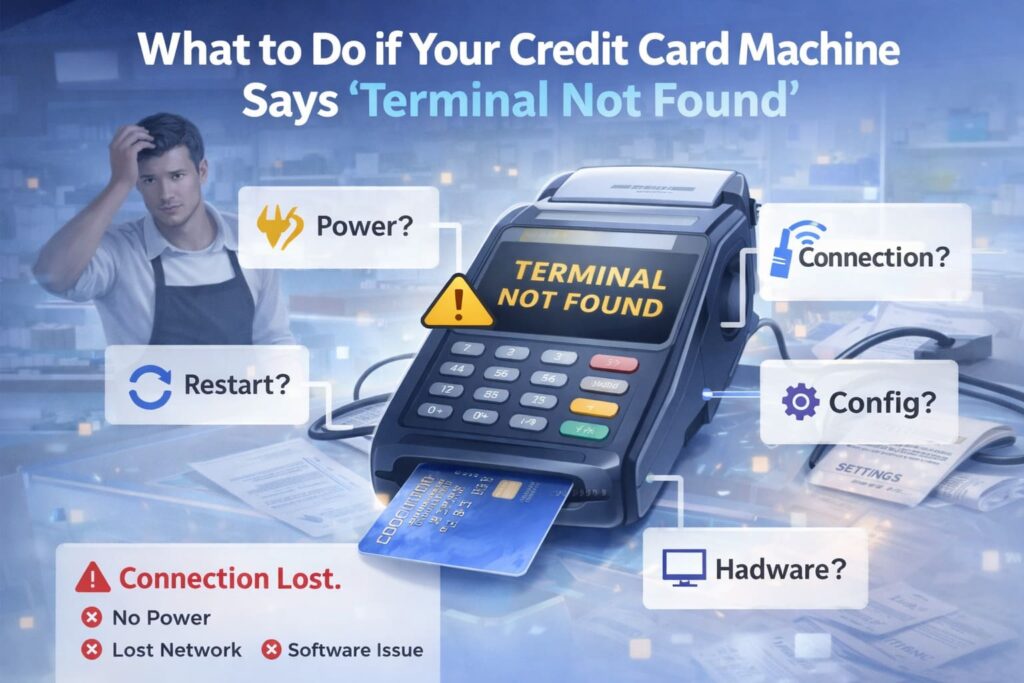
What to Do if Your Credit Card Machine Says “Terminal Not Found”
SkyTab POS for Food Trucks: Essential Features and Setup Guide
The Ultimate Directory of Credit Card Decline Codes for Merchants
