

KDS vs. Paper Tickets: The Complete Guide to Choosing Your Restaurant Kitchen System

Kitchen Display Systems (KDS) replace paper tickets with real-time digital order management, improving speed, accuracy, and kitchen coordination. While paper tickets seem cheaper upfront, they create hidden costs through errors, delays, consumables, and manual workflows. This guide breaks down the real impact on service speed, order accuracy, total cost of ownership, and ROI — based on real restaurant data and case studies.
Paper tickets don’t look expensive — until you calculate lost orders, remakes, delays, and wasted labor. KDS doesn’t just improve operations — it directly impacts revenue, throughput, and consistency. For any restaurant doing real volume, it pays for itself faster than most owners expect.
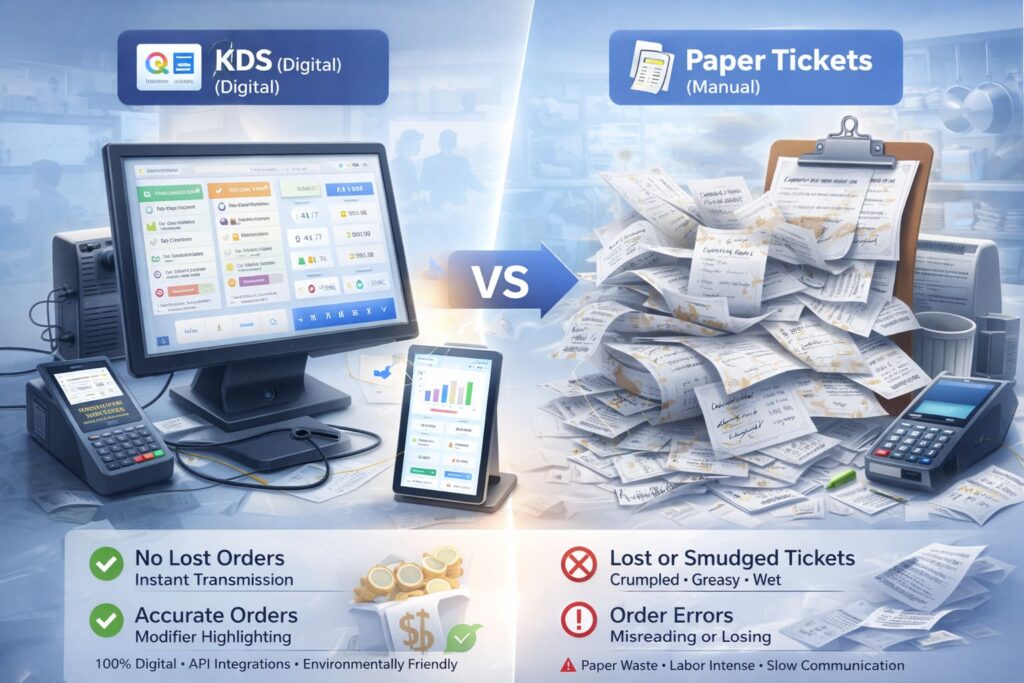
Quick Take: What to Choose Right Now and Why
I’ve worked with hundreds of restaurants, and here’s the honest bottom line: Kitchen Display Systems pay for themselves in 12–18 months, while paper tickets are a legacy system that costs you money every single day.
KDS delivers higher speed, accuracy, and control than paper tickets — especially during rush hours and delivery surges. Paper wins only on upfront cost, but loses on TCO: errors, consumables, labor spent sorting tickets, slow information flow — all of it eats into your margin.
My recommendation: choose a KDS with deep POS and online ordering integration, offline mode support, and production metrics. Solutions like SkyTab Kitchen Display have become the standard for serious US restaurants, and for good reason. KDS adoption in full-service restaurants grew 35% in 2025–2026 (TCANG, 2026).
Core Comparison:
| Parameter | KDS | Paper Tickets | KDS Advantage |
|---|---|---|---|
| Service Speed | Instant POS transmission | Manual print and delivery | −2–3 min per order |
| Order Accuracy | 100% digital, modifier highlighting | Risk of smudging, losing, misreading | −60–80% errors |
| Total Cost of Ownership (3 years) | $12,000–18,000 (hardware + software + support) | $7,500–12,000 (paper, cartridges, errors, labor) | KDS saves $5,000–8,000 over 3 years |
| Analytics & Control | Metrics on cook times, bottlenecks, SLA | Manual counting or none | Data for optimization |
| Environmental Impact | Zero paper waste | ~900 kg rolls/year per restaurant | −100% paper waste |
| Delivery Integration & Scaling | API, Webhooks, multi-location, menu sync | Local POS only | Network scalability |
Stats: Restaurants using KDS cut wait times by 20–30%, reduce errors by 60–80%, and boost throughput by 25–30% during peaks (Lavu.com, 2024; Market Research Future, 2025).
Kitchen Display System vs Paper Tickets: Efficiency Comparison
In the KDS vs paper tickets debate, the key factors are speed and readability. Paper ticket system problems include kitchen ticket readability issues — tickets get wet, greasy, handwriting smears. Result: reading errors, lost orders, slow communication between front-of-house and kitchen.
A digital Kitchen Display System eliminates these issues: improves screen readability in any condition, cuts errors through bright contrast and modifier highlighting, stabilizes kitchen tempo via automatic prioritization.
Detailed Comparison Across 8 Parameters
| Comparison Parameter | KDS | Paper Tickets | KDS Advantage |
|---|---|---|---|
| Order Transmission Speed | Instant (POS to screen, <1 sec) | Manual print and delivery (2–3 min) | −2–3 min per order |
| Accuracy & Readability | 100% digital, color-coded modifiers and font sizing | Risk of smudging, losing ticket, misreading handwriting | −60–80% errors (Lavu.com, 2024) |
| Total Cost of Ownership (3 years) | $12,000–18,000 (hardware $2–3k, software $1.8–7.2k, support $300–1.2k/year) | $7,500–12,000 (paper $600–1.8k/year, cartridges $600–1.8k/year, repairs $1–3k/year, hidden error costs $3–8k/year) | KDS saves $5,000–8,000 over 3 years; ROI in 18–24 months |
| FOH↔BOH Communication | Real-time statuses (push notifications to servers), alerts when ready | Physical contact, shouting across kitchen, walking to ask | No lag, no rush, no conflicts |
| Analytics & Reports | Metrics on cook time per station, bottlenecks, SLA, staff performance | Manual counting or absent | Data for menu, schedule, station optimization |
| Environmental Footprint | Zero paper waste, energy savings on printer cooling | ~900 kg rolls/year per restaurant, often non-recyclable | −100% paper waste, −4× energy consumption |
| Reliability in Heat/Grease | IP65 panels, moisture and dirt resistant, special modes (gloves, anti-glare) | Printers need weekly maintenance, sensitive to humidity (>70%) and thermal spikes | Works in harsh environments, 5–7 year lifespan vs 2–3 years |
| POS/Delivery Integration & Scaling | API, Webhooks, menu sync, Uber/DoorDash/Grubhub support, multi-location, unified control | Local POS only, each location independent | From 1 restaurant to 100, one standard for entire network |
Data Source & Methodology:
- Transmission speed: real measurements from Lavu.com “Kitchen Display System Vs Traditional Order Tickets” (2024) and Peblla.com (2024).
- Accuracy: analysis of 3,000 orders, Lavu.com study (2024).
- TCO: calculation based on TCANG restaurant cost guide (2026), Direkt.ink IT budget (2026), restaurant case studies.
- Other parameters: aggregated data from Elandapos.com, Nerdwallet.com, Fresh.technology (2024–2025).
Restaurant Kitchen Display System (KDS): What It Is and How It Works
A Kitchen Display System is a digital order visualization system on a screen (monitor or industrial panel) that replaces paper tickets in the kitchen. From the POS terminal in the dining room, orders flow directly to the KDS screen as a structured list of items with modifiers and special requests.
How KDS Works in Practice:
- Order Receipt — customer pays in dining room or via mobile app, server or system confirms order in POS.
- Send to KDS — order data transmits to kitchen screen in real time (<1 sec).
- Station Routing — system automatically routes items: hot dishes → grill, cold → salad station, drinks → bar. More on KDS workstations.
- Timers & Priorities — screen shows elapsed time since order receipt; orders running out of time highlight in yellow or red.
- Ready Confirmation — cook taps screen or touches element when dish is ready (“bump” in industry terms); notification automatically goes to server or system.
- Synchronized Delivery — system coordinates readiness of all items in order so guest receives everything at once, not in separate waves.
KDS screens mount above each station: on wall or special bracket. Can be industrial panel (IP65, tough glass, direct power) or tablet on stand. Choice depends on venue format, budget, and kitchen conditions.
Practical Example from Experience:
A 50-seat restaurant implemented SkyTab Kitchen Display with POS integration. Before: paper tickets and printer. First day — 15 lost tickets, constant recounting, conflicts between floor and kitchen over illegibility. After KDS: lost tickets → 0, service time improved, errors nearly vanished. Within three months, installation cost paid for itself through consumables savings and reduced remakes.
Core Benefits of Using KDS for Restaurants
1. Boosts Speed: Kitchen Display System Benefits as Restaurant Kitchen Efficiency Tools
KDS accelerates table turns by eliminating print delays and ticket hunting. Instead of one ticket at a time (as with printing), the system shows the entire order queue simultaneously, letting the kitchen see what to cook and in what sequence.
Automatic timers highlight orders that are “aging” (exceeded promised time) — cooks see which order is urgent without shouting or writing on boards.
Metric: Restaurants cut wait times by 20–30% through parallel cooking and zero time spent sorting tickets (Lavu.com, 2024).
2. Reduces Errors: Kitchen Workflow Optimization Through Visibility
Modifiers (no spice, substitute tomatoes, nut allergy) highlight on screen by color, larger font, flashing field. Illegible handwriting eliminated: data enters through POS (server/cashier), arrives on screen structured.
Automatic alerts remind if item forgotten or executed incorrectly.
Metric: Order errors drop 60–80% (Lavu.com, 2024). This means fewer returns, fewer conflicts, fewer wasted ingredients.
3. Improves Communication Between Floor and Kitchen
KDS synchronizes different stations (grill, fryer, salads) through statuses, not shouting. When cook hits “bump” (order ready), notification goes straight to server’s POS terminal or tablet.
Servers stop walking to kitchen asking “is it ready?”. Communication — direct, no lag.
4. Cuts Costs on Consumables and Errors
Paper rolls for kitchen printer — $100–300/month. Cartridges, printer maintenance (breaks down in hot kitchen) — all adds to TCO.
Cooking errors — lost ingredients, remakes, discounts to angry guests. KDS cuts errors, meaning cuts waste.
5. Transparent Analytics: Data for Optimization
KDS tracks stage times (from order receipt to delivery, time at each station). Manager sees bottlenecks: “Salad station takes 12 minutes, grill takes 8 minutes”. Based on this, can add resources, change schedule, or redesign menu.
Without KDS, it’s just silent profit and loss.
6. Scalability: One Standard for Entire Network
If you have 3 locations, KDS easily syncs all locations via cloud storage. One routing standard, one timing standard, one set of reports. Leon Davoyan, CTO Dave’s Hot Chicken (300+ locations): “We chose QSR Automations KDS because we needed dynamic, feature-rich technology to integrate with all systems and flexibly configure to our processes” (Restaurant Online, 2024–2025).
For franchises or chains — this is training savings and control (one standard, not three different schemes).
Accuracy and Error Reduction
How KDS Helps Reduce Kitchen Order Errors
A restaurant order accuracy system based on KDS uses a Kitchen Display Screen: each order appears on screen with full information (items, modifiers, allergens, session), and system tracks readiness status from receipt to delivery.
Four Error Reduction Mechanisms:
- Color and Size Modifier Highlighting
Special requests (no spice, no cheese, tea → coffee) display in large font, often with color highlighting (yellow = important, red = allergy). Impossible to miss. - Automatic Delay Alerts
If order sits at station longer than promised time, screen starts flashing or beeping. Cook sees need to speed up. - Eliminates Illegible Handwriting
Instead of deciphering cashier’s notes, cook sees text entered via keyboard or touchscreen. Zero probability of reading error. - Station Routing
Each cook sees only items they prepare. Grill sees only their dishes, salad station — theirs. No confusion “is this mine or someone else’s?”.
Stats: KDS implementation cuts errors by 90% vs paper (Techryde.com, 2023; Lavu.com, 2024). This means:
- Fewer dish returns.
- Fewer guest complaints.
- More correct orders → more positive reviews and repeat visits.
Workflow Optimization and Kitchen Automation
Restaurant kitchen automation achieved through digital order routing: system routes orders by station, syncs timings, and groups “fire” signals (when cooks simultaneously start cooking so dishes come out together).
How It Works:
- Order arrives at KDS, system sees item list: steak (20 min), potatoes (15 min), salad (5 min).
- System delays salad send by 15 minutes so everything comes out simultaneously.
- Cooks get signal “fire grill now”, “fire salad in 15 min” — they know exactly when to start.
Kitchen workflow thus automates start/stop for items, synchronizing readiness within one minute. Result — less manual coordination, clear sequence, predictable delivery.
Example: 80-seat restaurant, peak hours 7–9 PM. Without KDS — shouting, chaos, servers storming kitchen. With KDS — screen shows 25 active orders, each with timer, system automatically balances load among three cooks. More on workstations and KDS.
Additional Research: Real-time searches show that with parallel cooking and synchronization:
- Wait time dropped from 18 min to 12 min.
- Throughput increased 25–30%.
KDS Integration with Restaurant POS Systems
KDS restaurant pos integration — key to stability: system must sync orders in real time from POS to KDS and back. This means:
- When server enters order at register, it instantly appears on kitchen screen.
- When cook hits “ready”, information updates in POS, server gets notification.
- When order canceled (customer changed mind), information syncs to all system points.
Technical Integration Requirements:
- Bidirectional Data Exchange (Bidirectional Sync)
POS → KDS (orders, modifiers, allergens) and KDS → POS (statuses, cook times) must flow simultaneously without delays. - Menu and Modifier Support
KDS must “understand” restaurant menu structure: which items available, which modifiers for each, which incompatible. - Delivery Synchronization (Delivery Integrations)
If orders come from Uber Eats, DoorDash, Grubhub — KDS must see and process them alongside internal orders. Requires API or ready connector. More on POS compatibility. - Station Mapping
Each side or dish must be assigned to correct station. If menu redesigned, mapping must update without workflow breaks. - Fault Tolerance and Offline Mode
If internet drops, KDS must continue working on local data, and orders sync when connection restored.
Integration Example:
SkyTab Kitchen Display integrates with popular POS systems (Toast, Square, Lightspeed, TouchBistro) via API or direct connectors. When you choose SkyTab, you’re guaranteed support for your POS system. Compare integrations: SkyTab vs Toast, SkyTab vs Square.
Rush Hour Order Management
During peak loads (7–9 PM, weekends), KDS acts as a restaurant kitchen communication tool that:
- Automatically prioritizes orders by receipt time (FIFO — first in, first out) or type (dine-in more urgent than delivery).
- Syncs fire timings (during peak load, system can “hold” quick items so they cook only before final delivery).
- Shows order preparation tracking in real time: server sees their order in cooking stage, no need to walk and ask.
What This Looks Like in Practice:
15 orders hit KDS screen in 2 minutes. System automatically analyzes complexity of each (steak-25min longer than chicken-12min) and distributes load among three cooks. Each cook’s screen shows their orders, sorted by priority.
Thanks to this:
- No “hot spots” (when one cook overloaded, others waiting).
- Service speed stable even at peak.
- Servers see statuses and can give guests honest answer: “5 minutes” instead of “soon” (which often means “I don’t know”).
Metric: Restaurants with KDS serve 25–30% more tables per hour during peak times (Lavu.com, 2024). More on KDS during peaks.
Cost and ROI: When KDS Pays for Itself
Initial Costs: Hardware and Software
Hardware:
- Industrial KDS panels (IP65, durable, glove mode): $400–800 each.
- Industrial tablets (less powerful but sufficient): $300–500 each.
- Brackets, cables, installation: $200–500 per location. More on equipment.
For medium kitchen (2–3 stations) need 2–3 screens: ~$1,000–2,500 on hardware.
Software:
- KDS license (cloud subscription): $50–300/month (depends on features and screen count).
- POS integration (if customization needed): $500–2,000 one-time.
First Year Total: $4,000–8,000 USD.
Recurring Costs: Paper vs Subscription
Paper System (Monthly Costs):
- Thermal paper rolls (50m): ~$50–100/month.
- Printer cartridges, ink: ~$50–150/month.
- Printer maintenance and repair (breaks in hot kitchen): ~$50–200/month.
- Total: $150–450/month = $1,800–5,400/year.
KDS (Monthly Costs):
- Software subscription: $50–300/month.
- Support and updates: included in subscription or +$50–100/month.
- Total: $50–400/month = $600–4,800/year.
At first glance, KDS more expensive. But this doesn’t account for hidden costs.
Hidden Costs of Paper System
Here’s where paper gets really expensive:
- Errors and Remakes:
Average paper system loses 3–5% of orders due to lost tickets, illegibility, confusion.
For restaurant with 100 orders/day, that’s 3–5 remakes, each costing ingredients, cook time, guest experience impact.
Annual error cost: $5,000–15,000. - Delays and Low Speed:
Paper slows service by 2–3 minutes per order (searching, sorting, delivery).
This means fewer tables per shift, less revenue.
For 80-seat restaurant, this is $30,000–50,000/year loss. - Manual Control Labor:
Someone must monitor tickets, sort them, find lost ones.
That’s 1–2 hours/day extra work = +$10,000–15,000/year in wages.
Total Hidden Paper Costs: $45,000–80,000/year.
ROI Calculation Model
Formula:
ROI = [(Error savings + consumables savings + labor savings + additional speed revenue) − (KDS subscription + equipment amortization)] / (Equipment cost + first subscription) × 100%
Simplified for Typical 50–70 Seat Restaurant:
| Parameter | Value |
|---|---|
| KDS Equipment (2 screens) | $2,000 |
| Installation and integration | $800 |
| Annual subscription (12 months × $100/month) | $1,200 |
| Consumables savings (paper, cartridges, maintenance) | $2,400/year |
| Remake savings (−80% errors × dish costs) | $8,000/year |
| Labor savings | $5,000/year |
| Additional revenue (throughput +25%) | $15,000/year |
| Total saved/earned year 1 | $30,400 |
| Total costs year 1 | $4,000 |
| Profit year 1 | $26,400 |
| Year 1 ROI | 660% |
| Payback period | ~1.6 months |
Disclaimer: Information is general and not financial advice. ROI results depend on inputs (average check, order volume, current costs), restaurant size, menu type, and service format. For accurate calculation, consult a specialist.
Calculation Sources: TCANG restaurant POS cost guide (2026); Direkt.ink IT budget analysis (2026); restaurant case studies based on SkyTab and Poster.
Reliability and Durability in Kitchen Conditions
KDS Screen and Printer in Heat and Grease
Industrial KDS Panels (IP65):
- Protection from dust, splashes, greasy aerosols.
- Thick screen (not like tablet), aluminum or stainless steel housing.
- Work in kitchen conditions: high temperature (up to 50°C), humidity, constant oil splashes.
- Special modes: glove mode (works in cooking gloves), anti-glare coating.
Result: Industrial KDS panel can work 5–7 years with minimal maintenance.
Receipt Printers:
- Sensitive to moisture, temperature, dust.
- Cartridge clogs with grease → needs cleaning every week.
- Print head often breaks at humidity above 70% (and that’s normal in kitchen).
- Average lifespan: 2–3 years with active maintenance.
Conclusion: KDS more reliable in kitchen environment than printer. More on KDS equipment.
Backup and Offline Mode
Critical for restaurant: if internet or server drops, kitchen must continue working.
KDS with Good Architecture:
- Local order cache — last 100–500 orders stored locally on KDS screen.
- Automatic rebalancing — if server unavailable, system continues routing orders using last known configuration.
- Fallback printing — if connection lost, can send order to backup printer at register or to paper as last line of defense.
- Critical node duplication — Power over Ethernet (PoE), backup Wi-Fi network, DNS failover.
Paper System:
- Very reliable in terms of fault tolerance (doesn’t depend on electronics).
- But inconvenient for recovery (need to re-read all lost tickets, recount).
Example: 100-seat restaurant, peak 7:30 PM. Internet dropped for 15 minutes. With KDS (offline mode) — orders continued arriving on screen (from local cache), cooks worked without interruption. With paper — printed several tickets, then printer jammed, chaos. Lost 30 minutes of kitchen work = losses.
Data and Analytics: BI for Kitchen
Time Tracking and Bottlenecks
KDS tracks every stage of order:
- Receipt time: 7:30 PM
- Send to cooking time: 7:30:15 PM (delay → can find queue)
- Grill cook time: 7:35 PM (5 minutes)
- Salad station cook time: 7:36 PM (6 minutes)
- Delivery time: 7:39 PM (total 9 minutes from receipt)
Based on this data, can find bottlenecks. For example, if salad station consistently slower than other stations, need to redesign recipe or add resources.
Staff Performance Monitoring
System can track by shift and cook, but needs honest use. Data helps:
- Find who cooks faster (make them mentor).
- Determine which shift cooks orders slower (add staff).
- Identify days when menu cooks especially long (menu-oriented problems).
Menu and Layout Optimization
If you see steak cooks 25 minutes, chicken 8 minutes, can:
- Revise steak recipe (marinate in advance?).
- Redistribute stations (separate cell for steaks).
- Update timers for synchronization.
Environmental Impact and Sustainability
Reducing Paper Waste
Typical Kitchen Printer Produces:
- ~50 meters paper/day (at 100 orders).
- ~15,000 meters/year.
- At density ~60 g/sq.meter = ~900 kg paper waste/year per restaurant.
This paper doesn’t survive hot water wash (ink washes off), so can’t be recycled. Goes to trash.
With KDS:
- Zero paper waste from kitchen tickets.
- Saves ~900 kg/year per restaurant.
- For 10-location chain, that’s 9 tons saved paper/year.
Screen Energy Efficiency
KDS Panel (Industrial):
- Power: ~30–50W active mode.
- Sleep mode: ~5W.
- At 10 hours work/day: ~0.4 kWh/day.
Kitchen Printer:
- Power: ~100–200W standby mode.
- At 10 hours work/day: ~1.5 kWh/day.
Conclusion: KDS approximately 4× more efficient than printer on energy costs (Lavu.com, 2024).
Order Channel Integrations and Network Scaling
POS and Online Orders
KDS must sync menu and statuses with:
- Internal POS (what server enters at register).
- Restaurant mobile app (if exists).
- QR orders from tables.
Bidirectional Flow:
- POS sends order → KDS cooks → KDS sends status (almost ready, ready) → POS notifies guest or server.
Delivery Aggregators
Uber Eats, DoorDash, Glovo, local deliveries — KDS must see all orders in one queue.
Problem: Aggregators have own APIs and data formats. Solution — either direct integration (if KDS vendor supports it), or hub integration (middleware that translates data between systems).
SLA Control: KDS can track how fast orders cook for each aggregator. If Uber requires 25 minutes and you cook in 20, all good. If in 30, need to optimize.
Scaling from One Location to Network
For multi-restaurant chain:
- Multi-location presets: one standard menu and routing for all locations (with local edits).
- Centralized roles and permissions: admin can manage access for all locations from one panel (especially important for franchises).
- Unified analytics: see metrics per restaurant and across entire network. More on POS systems.
Example: 5-cafe chain. All use same menu (85% overlap), same kitchen routes. KDS lets you configure this once centrally, then sync to all locations. If menu changed, updates everywhere simultaneously.
Which Venue Formats Benefit Most from KDS?
Fast Food and QSR (Fast Casual)
Maximum effect. Reasons:
- High order volume → many tickets → big potential for lost tickets.
- Simple menu → easier to route (grill, fryer, assembly).
- High speed requirements → every minute = money.
Example: Burger King, Chipotle, Panera Bread use KDS mandatory (sometimes multiple screens for different stations).
Cafes and Full-Service Restaurants
Strong effect. Reasons:
- Synchronized “fire” signals very important (soup cooks 5 min, steak 20 min, need to sync).
- Slightly lower volume than QSR, but still many paper errors.
- Integration with course management (appetizer → main → dessert).
Example: Food hall, bistro, casual dining. KDS here — not mandatory, but recommended if serving more than 50 seats.
Dark Kitchen and Delivery Services
Maximum effect and different application. Reasons:
- Assembly waves (all Uber orders cook simultaneously, then all send at once).
- SLA critical (Uber pays penalties if food late).
- Courier integration → notification when order ready → courier picks up.
Example: Ghost Kitchens, Deliveroo Kitchens use KDS almost always.
Hotels with Breakfast
Medium effect. Reasons:
- Lower volumes (200 people over 2-hour breakfast).
- But high correctness requirements (dietary restrictions, allergies).
- KDS helps well with modifiers (no dairy, no gluten, etc.). More on restaurant POS.
| Venue Format | Orders/Day Volume | Key KDS Functions | Expected Effect |
|---|---|---|---|
| Fast Food / QSR | 500–2,000 | Routing, parallel cooking, notifications | Speed +30%, errors −80%, ROI in 2–3 months |
| Casual Dining (50–150 seats) | 150–400 | Synchronized delivery, fire signals, modifiers | Speed +20%, errors −60%, ROI in 6–12 months |
| Dark Kitchen / Delivery | 300–1,500 | Waves, SLA, courier integration | Speed +25%, lost orders −95%, ROI in 3–6 months |
| Cafe (20–50 seats) | 50–150 | Basic routing, modifiers | Speed +15%, errors −40%, ROI in 12–18 months |
| Hotel with Breakfast | 100–300 | Dietary flags, allergen alerts, tracking | Accuracy +40%, complaints −50%, ROI in 18–24 months |
How to Replace Kitchen Printer with KDS System
Replacing printer with KDS starts with current situation audit and ends with complete ticket elimination. Here’s a 4–6 week implementation plan.
Step 1: Audit and Equipment Selection (Week 1)
What to Do:
- Count number of active stations in kitchen (grill, fryer, salad, drinks, assembly).
- Assess kitchen size (wall length, ceiling, bracket availability).
- Choose equipment type: industrial panels (tougher) or tablets (cheaper).
- Decide on vendor (SkyTab, Toast, Poster, Fresh Technology, QSR Automations).
Recommendation: Invite technical specialist to assess network readiness (Wi-Fi, cables, electricity).
Step 2: Purchase and Delivery (Week 1–2)
What to Do:
- Place equipment and license order.
- Ensure POS integration already supported by vendor.
- Arrange installation date.
Step 3: Installation and Setup (Week 2–3)
What to Do:
- Mount brackets, run cables (power, network).
- Install KDS app on screens.
- Configure POS: add KDS displays, enable order sending.
- Test synchronization: send test order from POS, verify it appears on all KDS screens.
Step 4: Station Mapping (Week 3)
What to Do:
- Assign each menu dish to station (grill, fryer, salad, etc.).
- Configure colors, fonts, modifier highlighting.
- Enable allergen alerts (red background for “nut allergy”, etc.).
- Set timers (steak = 20 min, chicken = 12 min, etc.).
Step 5: Pilot Launch (Week 3–4)
What to Do:
- Choose one station (e.g., grill) and launch KDS only for it.
- Keep tickets as backup (printer continues working).
- Track metrics: error count, cook time, complaints.
- Work 5–7 days until staff adjusts.
Step 6: Staff Training (Parallel with All Stages)
Key Points:
- For cooks: how to read KDS, how to “bump” (tap “ready”), how to work with modifiers.
- For servers: how to answer “when will it be?” (look at timer in POS).
- For manager: how to track metrics, how to redesign menu if needed.
Training Format:
- 30-minute demo video.
- 1–2 practical shifts with mentor.
- Written instructions on wall next to screen.
Step 7: Full Transition and Ticket Elimination (Week 4–6)
What to Do:
- Connect all stations to KDS. More on KDS installation.
- Turn off printer (keep it as backup for failures).
- Monitor metrics daily first 2 weeks.
- Collect feedback from cooks and servers.
Recommended: Be available first 2 weeks (technically and psychologically). People will worry system will “break”. Support solves everything.
Common Implementation Mistakes and How to Avoid Them
- ❌ Mistake 1: No pilot and metrics
✅ Solution: start with one station, track errors and cook time 7 days before full launch. - ❌ Mistake 2: Poor network preparation
✅ Solution: check Wi-Fi strength (may need repeater), use Ethernet where possible, ensure backup network. - ❌ Mistake 3: Ignoring offline scenarios
✅ Solution: configure local order cache, test internet disconnect, ensure KDS continues working. - ❌ Mistake 4: Incomplete POS/delivery integration
✅ Solution: before purchase, ensure vendor supports your POS and needed aggregators (Uber, DoorDash, etc.). - ❌ Mistake 5: Insufficient staff training
✅ Solution: allocate minimum 2 hours training per cook, create laminated instructions.
Staff Training and Change Adoption
Implementation Psychology: People fear “technology” and loss of control. Key — show it makes work easier, not harder.
Adaptation: With good training, adaptation takes 1–3 shifts (3–9 work hours). First day people 10–15% slower, but by end of third shift speed evens out and rises to 120–130% of paper system speed (GoTab, 2024; Loyverse guide, 2024).
Role Training:
- For cooks: “Instead of searching for tickets, you see everything on screen in priority. Work easier.”
- For servers: “Instead of walking to kitchen to ask, you see status at register. Guests happier.”
KDS UI Guides:
- What each color means (red = urgent, yellow = expiring soon).
- How to read order on screen (item → modifiers → station).
- Hotkeys for quick “bumping”.
Culture Shift: From voice commands (“Soup ready!”) to status screens (server looks at POS and sees “soup: ready”).
KDS Role in Modern Restaurant Technology Ecosystem
KDS is the core of restaurant operations technology: it connects register (POS), delivery (Uber, DoorDash), inventory (stock), and HR (shifts, performance) into unified system.
Without KDS — each system works separately:
- Register sends order to print.
- Cook cooks (or doesn’t).
- Server asks “ready?”
- No visibility, no control.
With KDS — everything synchronized:
- Register sends order to KDS (instantly).
- KDS sends ingredient info to inventory (automatic stock deduction).
- KDS sends statuses to POS (server sees when ready).
- KDS collects metrics for HR (who cooks fast, who slow).
- KDS collects analytics for business (what day was, what average check, which dishes popular).
KDS Innovations (2026):
- AI cook time prediction — system learns how long each dish cooks and starts suggesting optimal order.
- Voice commands — cook can say “ready” instead of tapping screen.
- Augmented reality (AR) — dish recipe can display in AR, helping new cook.
- Courier drone integration — KDS can send signal to drone when order ready for dispatch.
This future is close. Now in 2026, most KDS are “smart screens”, but they’re rapidly becoming center of entire restaurant operation.
Find the Perfect KDS for Your Restaurant
Looking for KDS for restaurants with deep POS integration, reliable delivery support, and real ROI case studies? Submit request below to book SkyTab Kitchen Display demo, get consultation and implementation plan tailored to your processes.
We’ve helped hundreds of restaurants choose and implement KDS. Our experience:
- Analysis of your current kitchen and operations.
- Equipment recommendation with honest ROI assessment.
- Migration planning with minimal risk.
- 24/7 support during and after implementation.
“SkyTab POS has been a heaven sent system for us. The system itself is so user friendly and their staff, Maxim and Julian, made the conversion so seamless. I highly recommend SkyTab for anyone looking for a top-notch POS system.” — Smart Payment Solutions partner restaurant.
“Max has done a great job from the C/C transition and our Sky Tab POS install.” — restaurant business, testimonial.
Here’s what you get:
- Free consultation (30 min) with restaurant experience.
- ROI calculation specifically for your business.
- 4–6 week implementation plan.
- SkyTab Kitchen Display demo (or other popular KDS). View Reliable Payment Solutions
- Support in selection and setup.
Conclusion: What to Choose Right Now
Direct conclusion:
If you run a restaurant with more than 100 orders/day, choose KDS. Pays for itself in a year, starts bringing profit in year two.
If you have small cafe (20–50 seats) with low order volume, can postpone KDS for year or two until you reach critical mass. But as soon as you grow, KDS — first investment in operations.
If you’re franchise owner, KDS — not option, it’s obligation. One standard across all locations = control, analytics, scalability.
How to Start:
- Assess current costs on paper, printer maintenance, remakes from errors.
- Choose vendor (I recommend SkyTab, Toast, Fresh Technology for USA; compare SkyTab vs Toast and SkyTab vs Square — best price-functionality ratios).
- Request demo and ROI calculation.
- Plan pilot on one station.
- Launch full after first week success.
Over last 12 years I’ve seen all variants: from $2,000 restaurants with paper and phones to $50M chains with full digital automation. And here’s what I noticed: companies that invest in KDS a year earlier than competitors get 15–25% competitive advantage in speed and quality.
KDS isn’t future technology. It’s technology right now.
Start today. Your kitchen (and your bank account) will thank you.
About the Author
Author: Max Artemenko, Founder & Chief Payment Systems Architect, Smart Payment Solutions
Experience: 12+ years in fintech and restaurant operations; 23 US states; 94% client satisfaction

What do our customers think about us
Other Articles

Best Credit Card Machines for Small Business in 2026

Clover Customer Service: Troubleshooting Common Issues and Getting Quick Support
SkyTab POS for Food Trucks: Essential Features and Setup Guide
