

Cash Discount vs. Surcharge Programs for Restaurants: Which Saves More on Processing Fees?

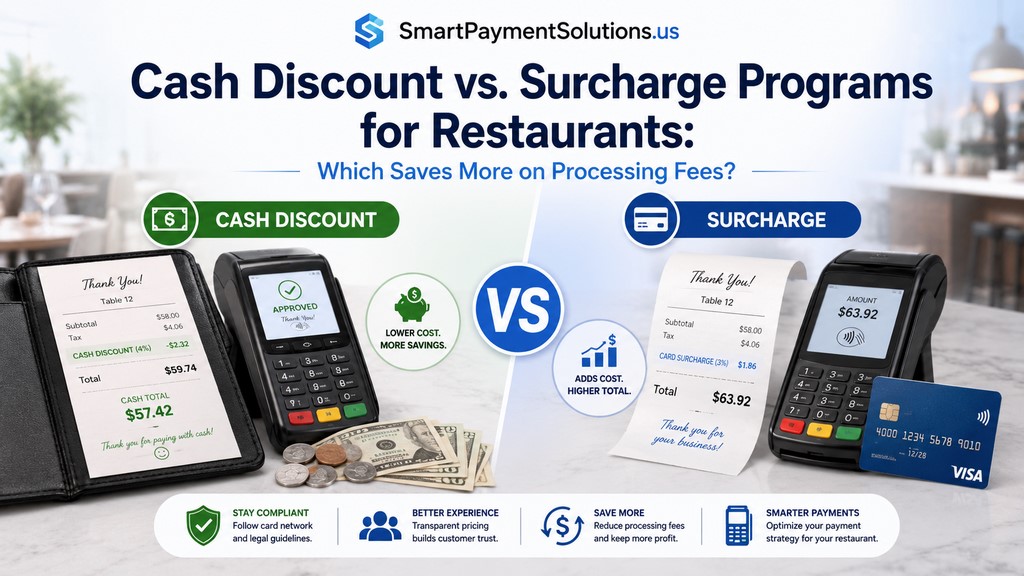
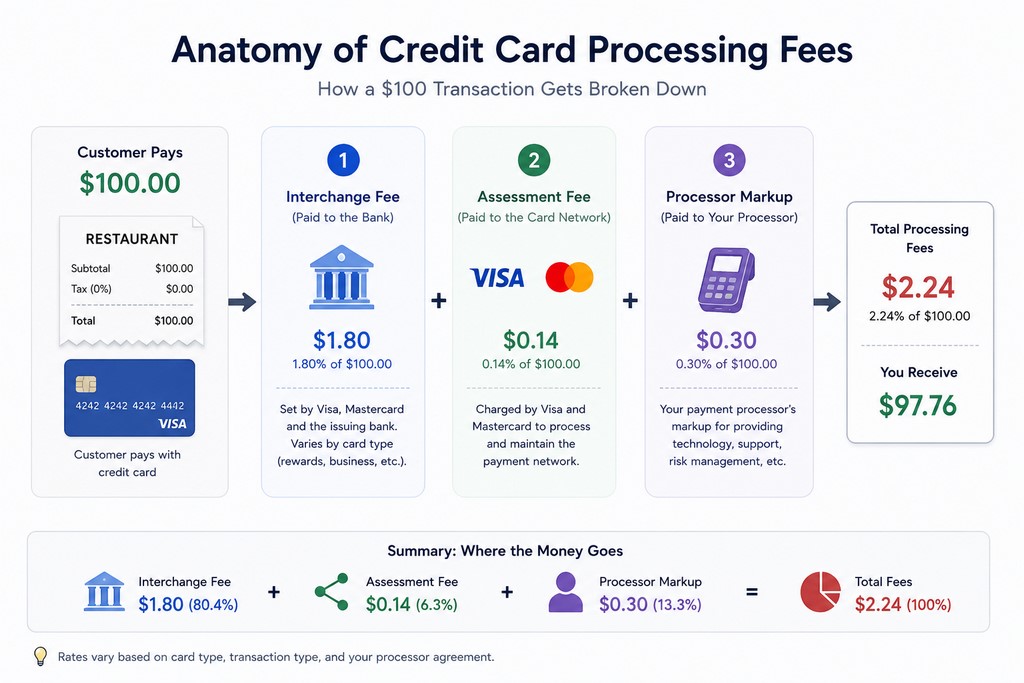
Processing fees are one of the largest controllable costs in restaurant operations. Most owners treat them like a utility bill. Fixed. Unavoidable. Wrong. Every credit card transaction hits your merchant account with three charges: interchange fees (set by Visa and Mastercard, typically 1.5–2.0% on rewards cards), assessment fees (roughly 0.13–0.15% for Visa, 0.1375% for Mastercard), and your processor's markup. Combined: 2.2% to 3.5% per transaction.
I've sat across the table from hundreds of restaurant owners who had no idea their payment processor was quietly taking 3% off every dollar they earned. That's not a fee — that's a business partner who never shows up but always gets paid. The good news: there are two legal ways to stop it. The bad news: most owners pick the wrong one.
Why Restaurant Owners Are Losing Money to Payment Processing Fees
TL;DR: A properly structured cash discount generally has fewer card-network restrictions because the displayed price is already the card price and cash customers receive a real discount. A surcharge is an additional fee applied only to eligible credit cards — never debit or prepaid cards — and it must comply with the applicable card-brand rules, processor requirements, and state law. Neither option automatically saves more: the result depends on your credit/debit mix, cash adoption, processing agreement, customer behavior, and tax treatment.
Processing fees are one of the largest controllable costs in restaurant operations. Most owners treat them like a utility bill. Fixed. Unavoidable. Wrong.
Card-processing costs commonly include interchange, card-network assessments, and processor or platform charges. The effective rate varies by card type, transaction method, average ticket, pricing model, and merchant agreement. Many restaurants see an all-in effective rate in the 2.2% to 3.5% range, but the only reliable figure is the total fees divided by total card volume on the restaurant’s own statements.
On $50,000 in monthly card volume, that’s $1,100–$1,750 gone every month — $13,200–$21,000 per year — before a single food cost or labor hour.
According to the Federal Reserve’s 2025 findings, credit cards accounted for 35% of U.S. consumer payments by number in 2024. The figure describes the number of payments, not their total dollar value. Federal Reserve Financial Services: 2025 Findings from the Diary of Consumer Payment Choice
Two pricing approaches can help restaurants offset card-acceptance costs: cash discount and credit card surcharge. They look similar from the outside, but they work differently and carry different disclosure, card-brand, processor, and state-law requirements.
What Is a Cash Discount Program for Restaurants?
How It Works: The Dual-Pricing Model
You post one price on your menu — the card price, which already includes the cost of processing. Customers who pay cash receive a discount off that price. You’re not adding a fee. You’re reducing one.
That distinction matters. A genuine cash discount starts from the displayed card price and reduces that price for an alternative payment method. Cash discounts are generally permitted across the United States when structured correctly, but pricing, signage, disclosure, and consumer-protection requirements can still vary by state.
At the register: if the restaurant wants to preserve a $20.00 cash price while accounting for a 3% cost calculated on the final card price, the card price is approximately $20.62: $20.00 ÷ (1 − 0.03). Customer pays with an eligible card — $20.62. Customer pays cash — the POS applies a $0.62 discount and they pay $20.00. Receipt: Subtotal: $20.62 | Cash Discount: -$0.62 | Total: $20.00.
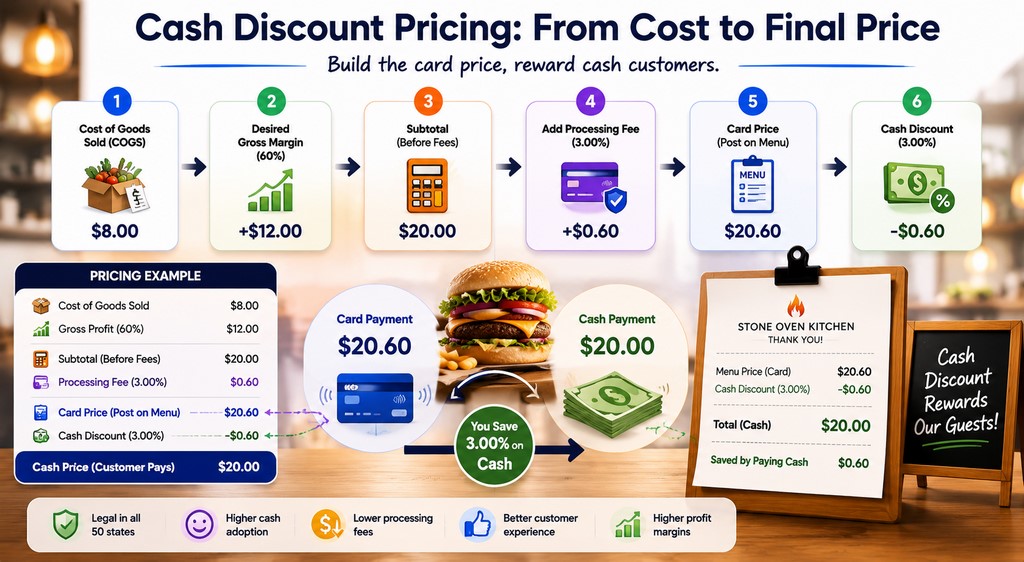
Visa’s U.S. merchant guidance says a merchant offering a cash discount should display either the full card price or both card and cash prices side by side. The final card price must not be created by adding a fee at checkout, because that may be treated as a surcharge. Visa U.S. Merchant Surcharge Q&A
Benefits of a Cash Discount Program
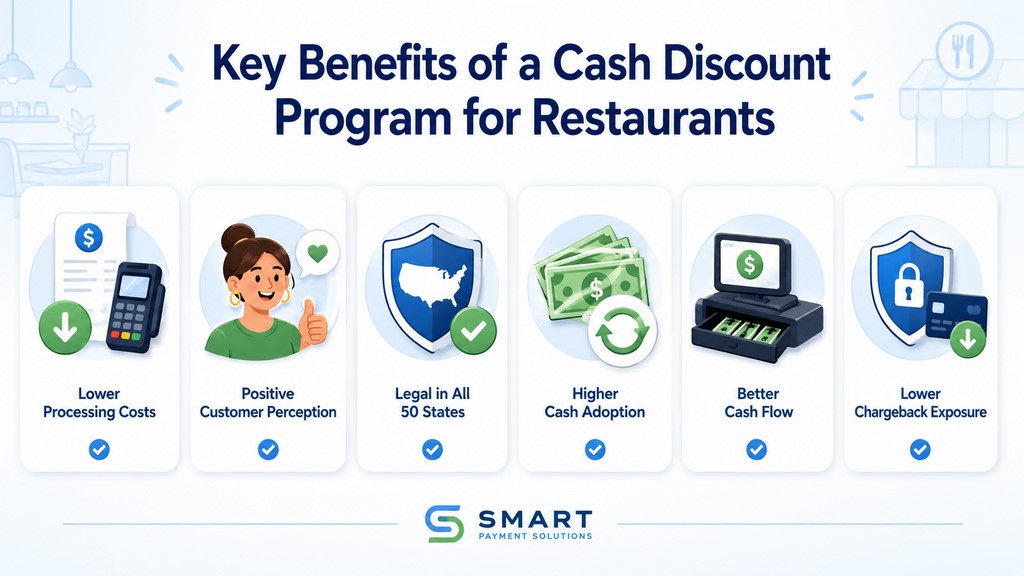
Cash discount programs eliminate processing fees on every cash transaction — that’s the core math. Five additional wins that don’t get enough attention:
Fee elimination on cash transactions. No processing cost on cash means your margin on those sales is fully intact.
Chargeback exposure drops. Cash transactions can’t be disputed through Visa or Mastercard. For restaurants with delivery or high-ticket items, this matters.
Customer perception can be more favorable. A clearly disclosed discount may feel less punitive than a fee added at checkout. Actual cash adoption varies by restaurant type, ticket size, location, customer demographics, and the size of the discount.
Lower card-network complexity. A properly structured cash discount is not subject to the same credit-only and surcharge-cap rules, but it must still follow applicable pricing, disclosure, tax, and consumer-protection requirements.
Cash flow improvement. More cash on hand means fewer float delays from card settlement — typically 1–2 business days per batch.
What Is a Surcharge Program for Restaurants?
How It Works: Adding a Fee for Credit Card Use
You keep menu prices as-is and add a percentage fee when a customer pays with a credit card.
The customer’s bill is $100. They pay with Visa. Your POS adds a 3% surcharge — $3.00 — before displaying the final total. Receipt: Subtotal: $100.00 | Credit Card Surcharge (3%): $3.00 | Total: $103.00.
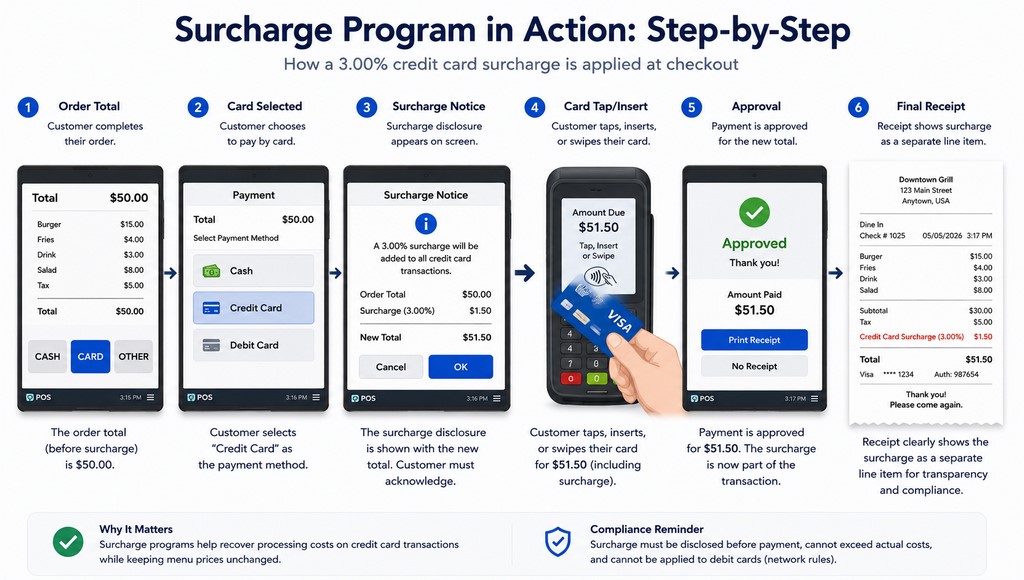
Two hard rules apply: surcharges cannot be applied to debit or prepaid cards, and the amount cannot exceed the permitted cap. Visa limits a U.S. credit-card surcharge to the lower of the merchant’s applicable cost of acceptance or 3%. Mastercard limits it to the applicable merchant discount rate, with an absolute maximum of 4%. Visa U.S. Merchant Surcharge Q&A Mastercard Merchant Surcharge FAQ
Your POS system must use BIN (Bank Identification Number) check technology to automatically detect whether the card is credit or debit and apply the surcharge only to eligible transactions. Without BIN check, one debit surcharge complaint can trigger a chargeback investigation.
Pros and Cons for Your Restaurant
| Factor | Surcharge Program |
|---|---|
| Direct cost recovery | Yes — card users pay the fee |
| Menu price changes needed | No |
| Works on debit cards | No — credit only |
| Customer perception | Negative (feels like a penalty) |
| State restrictions | Yes — multiple states have rules |
| Cash adoption rate | Varies by restaurant, clientele, and disclosure |
The structural challenge with surcharges is customer perception: a separately added fee may feel more punitive than a clearly displayed cash discount. The effect should be measured from the restaurant’s own complaint rate, payment mix, average ticket, and repeat-customer behavior rather than assumed from a universal percentage.
Cash Discount vs. Surcharge: Head-to-Head Comparison
| Feature | Cash Discount | Surcharge |
|---|---|---|
| Mechanism | Discount from listed price | Fee added to bill |
| Customer Perception | Positive (reward for cash) | Negative (penalty for card) |
| Legal Simplicity | Generally simpler when the displayed card price and discount are structured correctly; state disclosure and pricing rules still apply | Restricted or regulated by state law and card-brand rules |
| Card Type Applicability | All payment methods | Credit cards only |
| Signage Requirements | Menu and POS signage | Entry, menu, and POS signage |
| POS Configuration | Price adjustment + discount | Surcharge % + BIN check required |
| Cash Adoption | Varies by restaurant, ticket size, location, and discount | Varies by restaurant, clientele, and surcharge disclosure |
| Tax Treatment | Record the discount consistently in the restaurant’s accounting system | Record surcharge receipts and related processing expenses consistently; treatment depends on applicable tax and accounting rules |
| Admin Complexity | Low | High (BIN check, state rules, debit carve-outs) |
| Cash Flow Impact | Faster (more cash on hand) | Standard (card settlement delays remain) |
| Customer Loyalty Impact | Positive (reward framing) | Neutral to negative |
The accounting line is one most restaurant owners miss entirely. Do not estimate surcharge savings by simply subtracting an assumed income-tax percentage from the amount collected. Surcharge receipts, cash discounts, sales tax, and deductible processing expenses must be recorded according to the restaurant’s accounting method and applicable state and federal rules. Run the proposed setup and sample receipts by your accountant before launch.
Critical Compliance: Rules for Restaurants
Improper surcharging can lead to card-brand assessments against the acquiring institution, processor action, customer disputes, and enforcement under state consumer-protection law. Exact consequences depend on the violation, card brand, processor agreement, and jurisdiction. Compliance isn’t optional.
Card Brand Network Rules (Visa, Mastercard, Amex, Discover)
Visa and Mastercard:
- Visa: surcharge limited to the lower of the applicable cost of acceptance or 3%
- Mastercard: surcharge limited to the applicable merchant discount rate, with an absolute maximum of 4%
- Surcharges prohibited on debit and prepaid cards — BIN check required
- Visa requires disclosure at the point of entry and point of sale, plus separate receipt itemization
- Mastercard requires advance notice to Mastercard and the acquirer before surcharging
- A genuine cash discount must be taken from the displayed card price, not created by adding a card fee at checkout
Visa U.S. Merchant Surcharge Q&A and Mastercard Merchant Surcharge FAQ.
American Express and Discover: acceptance and surcharge conditions depend on the current merchant agreement, processor setup, state law, and brand-level treatment of competing cards. Obtain written confirmation from the processor before enabling either brand.
Violating card-network or processor rules can result in remediation demands, assessments, program suspension, or termination of card acceptance.
State Laws: Where Surcharging Is Restricted
Following Expressions Hair Design v. Schneiderman (U.S. Supreme Court, 2017), the legal landscape changed, but state-level rules still differ. Do not use an old generic list of “legal” or “illegal” states.
As of this review, Connecticut, Maine, and Massachusetts prohibit ordinary retail credit-card surcharges, subject to limited statutory exceptions. Connecticut Department of Consumer Protection Maine Revised Statutes §8-509 Massachusetts Division of Banks
Other states impose detailed price-display rules. New York requires the total credit-card price to be displayed before checkout or shown beside the cash price. California’s pricing rules require clear disclosure of mandatory charges, with restaurant-specific requirements that should be reviewed before implementation. New York State surcharge guidance California Department of Justice pricing guidance
Properly structured cash discounts are generally permitted across the United States, but they are not “restriction-free.” The displayed price, discount presentation, signage, receipts, sales-tax treatment, and consumer disclosures must comply with the rules that apply in each state.
Required Signage
For Surcharge Programs:
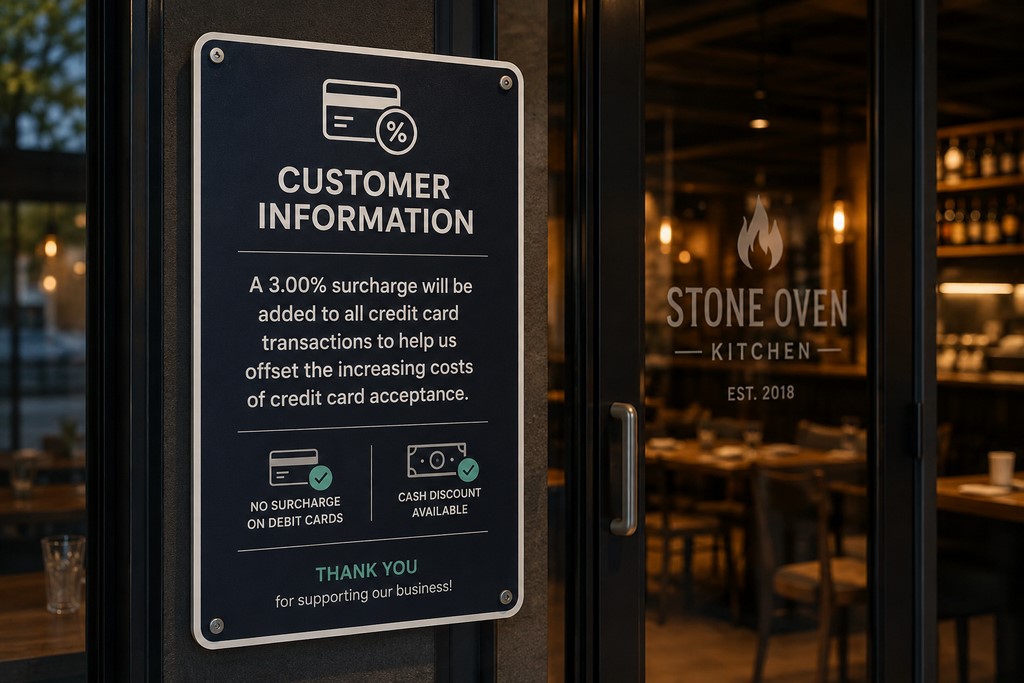
| Location | Required Content |
|---|---|
| Entry | “A credit card surcharge of [X]% applies to all credit card transactions.” |
| Menu or displayed price | Follow applicable state price-display and disclosure rules; some states require the full card price or dual pricing |
| POS display | Surcharge amount shown before payment confirmation |
| Receipt | Itemized: Subtotal / Surcharge / Total |
For Cash Discount Programs:
| Location | Required Content |
|---|---|
| Menu | “Cash price: $20.00 | Card price: $20.62” or equivalent, based on the merchant’s approved calculation |
| POS display | Discount applied and shown before confirmation |
| Receipt | Itemized: Subtotal / Cash Discount / Total |
Missing or unclear disclosure increases the risk of customer disputes and non-compliance. The customer should be able to see the applicable price or surcharge before committing to the purchase, and the receipt should show the calculation clearly.
How the Cash Discount Pricing Model Works
The cash discount pricing model requires one upfront calculation and a systematic menu update.
Step 1: Pull three months of processor statements. Divide total processing-related fees by total card volume to calculate the restaurant’s actual effective rate.
Step 2: Calculate the displayed card price correctly. To preserve a $20.00 cash price while accounting for a 3% cost assessed on the final card amount, use $20.00 ÷ (1 − 0.03) = $20.62. Simply adding 3% produces $20.60 and does not fully account for a 3% fee charged on the final amount.
Step 3: Display dual pricing or a single price with disclosure: “Prices shown include card processing. Cash discount applied at checkout.”
Step 4: Configure your POS to apply the discount automatically when the customer selects cash.
Step 5: Receipt shows the math clearly — Subtotal: $20.62 | Cash Discount: -$0.62 | Total: $20.00.
Visa’s merchant guidance states that the displayed price must be the card price, or the card and cash prices must be displayed side by side. The card price cannot be produced by adding a fee only when the customer presents a card. Visa U.S. Merchant Surcharge Q&A
Calculating Your Savings: Cash Discount vs. Surcharge
Example: ,000 Monthly Card Volume, 3% Processing Rate
Baseline (no program): $1,500/month in fees — $18,000/year.
Illustrative Cash Discount scenario (assume 40% of the original card volume moves to cash; this is an example, not a benchmark):
| Metric | Amount |
|---|---|
| Remaining card volume | $30,000 |
| Monthly processing fees | $900 |
| Monthly savings | $600 |
| Annual savings | $7,200 |
Illustrative Surcharge scenario (assume 60% of the $50,000 card volume is eligible credit-card volume and 40% is debit or prepaid volume that cannot be surcharged):
| Metric | Amount |
|---|---|
| Eligible credit-card volume | $30,000 |
| Debit/prepaid volume | $20,000 — no surcharge permitted |
| Gross surcharge collected at 3% | $900 before additional processing costs and accounting or tax treatment |
| Net monthly benefit | Calculate from the actual eligible credit volume, approved surcharge rate, processing fees, customer payment shifts, refunds, and tax treatment |
Neither program automatically saves more. A cash discount may reduce more card volume when customers switch to cash, while a surcharge can recover part of the cost on eligible credit-card transactions only. Compare both models using the restaurant’s actual credit/debit split and have the accounting treatment reviewed before launch.
Savings by Restaurant Size
| Restaurant Size | Monthly Card Volume | Cash Discount Calculation | Surcharge Calculation |
|---|---|---|---|
| Small (QSR, food truck) | Under $30K | Card volume shifted to cash × actual effective rate | Eligible credit volume × approved surcharge rate, adjusted for related costs |
| Mid-size (casual dining) | $30K–$100K | Card volume shifted to cash × actual effective rate | Eligible credit volume × approved surcharge rate, adjusted for related costs |
| Large (multi-location, chain) | Over $100K | Calculate separately for each location and payment mix | Calculate separately for each state, location, card mix, and merchant agreement |
For multi-location groups and franchises, calculate the result separately for each merchant account and location. In the case below, the reported $2,160 monthly reduction applies to the three-location portfolio as a whole, which equals $25,920 per year — not $2,160 per location. Centralized POS management can help maintain consistent settings and reporting, but every location must still follow the law and merchant agreement that apply to it.
— Max Artemenko, Smart Payment Solutions
Which Program Is Right for Your Restaurant?
When to Choose a Cash Discount Program
- You can display the full card price or clear dual pricing and meet the applicable state disclosure rules
- Your customer base skews cash-friendly — QSR, food trucks, casual dining
- Your own payment data shows that enough customers are likely to choose cash for the discount to matter
- You want positive customer perception
- You’re running high transaction volume
Best fit: QSR, food trucks, fast casual, casual dining, high-volume neighborhood restaurants. See POS systems for restaurants that support dual-pricing natively.
When a Surcharge Program Makes More Sense
- Your customer base is card-heavy — fine dining, upscale restaurants where cash is rare
- You want zero menu price changes
- Your POS supports BIN check natively
- You’ve verified state-level compliance and have written processor approval
- Your ticket sizes and customer behavior support the program after you model the customer-facing cost and complaint risk
Best fit: Fine dining, upscale restaurants, hotel restaurants, card-heavy clientele.
Hybrid Approach
Some multi-channel restaurants consider a hybrid: cash discount for in-restaurant dining and a surcharge on eligible credit-card transactions in channels where it is permitted. This does not automatically maximize savings and can create inconsistent disclosures across channels.
Use a hybrid only when the processor approves it in writing, the POS can identify eligible cards and apply channel-specific logic correctly, and every customer sees the applicable price before completing the order.
POS Integration: Technical Requirements
Surcharge Program — 5 Technical Requirements
1. BIN Check Technology. The system must identify card type (credit vs. debit/prepaid) at the moment the card is presented. Without this, you risk surcharging debit cards — an automatic violation.
2. Automatic Calculation. When a credit card is detected, the POS calculates the surcharge on the subtotal and adds it before displaying the final amount.
3. Receipt Itemization. The surcharge must appear as a separate line item — not buried in the total.
4. Compliance Reporting. Your POS should generate reports showing surcharge amounts applied by transaction.
5. Staff Training Integration. The system should make it easy for staff to explain the charge. Confusion at the register is how disputes start.
Do not assume that a POS brand supports a compliant setup in every state, sales channel, processor configuration, or software plan. Ask the POS provider and processor to confirm in writing how debit and prepaid cards are excluded, how disclosures appear, which brands are supported, and who is responsible for card-network registration or notification.
Choosing a Compliant POS
Ask your POS provider five direct questions:
- Does the system support cash discount dual pricing natively?
- Does the system support surcharge programs with BIN check?
- Can receipts be customized to show surcharge or discount line items?
- Does the system generate compliance reports?
- Is the processor integration explicitly approved for these programs?
SkyTab POS — which Smart Payment Solutions deploys across restaurant clients — can be evaluated for dual pricing, eligible-card identification, receipt customization, and centralized multi-location management. Feature availability depends on the current hardware, software plan, processor configuration, merchant agreement, and location. Confirm the exact implementation scope and timeline in writing before launch.
— Smart Payment Solutions client
Other systems that may support relevant pricing or payment configurations include Toast, Clover, and TouchBistro. Support is not the same as automatic compliance: verify the exact processor, plan, card-identification logic, disclosures, receipt format, and state availability.
For multi-location groups and franchises, prioritize systems with centralized dashboard management, unified reporting, location-level configuration, and documented controls that prevent a rule change in one location from being applied incorrectly in another.
Real-World Case Studies
Case Study 1: QSR Chain — Cash Discount
A casual burger chain with three locations was processing $150,000/month in card payments at 3.2% — $4,800/month in fees.
We implemented cash discount with dual pricing in SkyTab POS. Menu prices increased by 3.2% to establish the card price; the cash discount returned customers to the original price point. Signage installed at each register and on menus.
Within 90 days, this restaurant group reported that 45% of transactions shifted to cash. Monthly fees across all three locations dropped from $4,800 to $2,640. Monthly savings across the portfolio: $2,160. Annual savings: $25,920. Customer satisfaction held steady, and the POS configuration was completed in one day per location. This is a single Smart Payment Solutions deployment result, not a guaranteed benchmark for other restaurants.
— Owner, 3-location casual dining group, Texas
Case Study 2: Fine Dining — Surcharge
An upscale steakhouse processing $125,000/month at 2.8% — $3,500/month in fees — wanted to recover processing costs without adjusting menu prices.
We implemented a 3% credit card surcharge with BIN check enabled. Entry and menu signage installed per Visa and Mastercard requirements. Receipts configured to itemize the surcharge separately.
In this example, 18% of the original card volume moved to cash, reducing the remaining card volume to approximately $102,500. Only eligible credit-card transactions could be surcharged; debit and prepaid transactions were excluded. The restaurant reported $1,470/month in surcharge receipts on approximately $49,000 of eligible credit-card volume. Processing fees fell from $3,500 to approximately $2,870 because less volume remained on cards.
Key takeaway: Do not combine the reduction in processing fees and surcharge receipts into a single “net savings” figure without accounting for the eligible credit/debit split, fees charged on the surcharge amount, refunds, sales tax, income-tax treatment, and customer payment shifts. The final result must be calculated from the merchant’s transaction-level data.
Common Pitfalls to Avoid
Future of Restaurant Payment Processing
Contactless payments and digital wallets are growing in restaurant environments. Apple Pay and Google Pay normally use an underlying card, so interchange and processing costs depend on that card, the transaction classification, and the merchant agreement — not simply on the use of a digital wallet. Verify that the POS applies the correct pricing logic to wallet-funded credit, debit, and prepaid transactions.
Buy Now, Pay Later (BNPL) services like Klarna and Afterpay are appearing in delivery and online-ordering channels. BNPL fees and the ability to apply a discount or surcharge vary by provider contract and payment flow. Do not apply card-surcharge logic to BNPL without written provider approval.
Subscription and loyalty programs are increasingly used to reduce processing costs indirectly — by moving customers toward stored-value accounts (like Starbucks’ app) that carry lower processing costs than card-present transactions.
Implementation Plan and Compliance Checklist
Step 1: Assess Your Current Situation
Pull three months of processor statements. Calculate your average processing rate (total fees ÷ total card volume). Identify your current cash vs. card payment mix. Note your state’s current regulations on surcharges and cash discounts.
Step 2: Choose Your Program
- Cash discount — appropriate when the restaurant can display the full card price or clear dual pricing and expects meaningful cash adoption
- Surcharge — card-heavy customers, zero menu price changes, POS supports BIN check natively
- Hybrid — multiple channels with different payment dynamics
Step 3: Select a Payment Processor
Evaluate on five criteria: explicit program support (in writing), competitive base processing rates, compliance guidance and resources, POS integration quality, and customer support responsiveness.
Do not select a processor from a generic brand list. Ask Toast, Square, Clover, Stripe, SkyTab, or any other provider for written confirmation that the exact program is supported for your merchant category, state, card brands, sales channels, and POS configuration.
— Max Artemenko, Smart Payment Solutions
See payment processing services for a full overview of program options. Learn more about SkyTab for restaurant-specific deployment.
Step 4: Pre-Launch Checklist
Step 5: Monitor and Optimize
Track monthly savings against your baseline. Monitor customer feedback and chargeback rates. Adjust your surcharge or discount percentage if adoption rates are lower than projected. Review compliance quarterly. Stay current with card network and state-level regulatory updates.
Get a Free Payment Audit
If you’re processing more than $20,000/month in card payments and haven’t audited your processing costs in the last 12 months, you’re likely leaving money on the table.
Smart Payment Solutions offers a free payment audit — we analyze your current processing costs, identify where you’re overpaying, and show you exactly how much a cash discount or surcharge program would save your restaurant per month. No sales pitch. No pressure. Just math. We respond within 1 business day.
Additional Resources
- Visa U.S. Merchant Surcharge Q&A
- Mastercard Merchant Surcharge FAQ
- Federal Reserve: 2025 Findings from the Diary of Consumer Payment Choice
- Connecticut Department of Consumer Protection — Credit Card Surcharge
- Maine Revised Statutes §8-509 — Surcharge Prohibition
- Massachusetts Division of Banks — Surcharge Guidance
- New York State — Credit Card Surcharge Disclosure Law
- California Department of Justice — Pricing and Fee Guidance

What do our customers think about us
Frequently Asked Questions

Other Articles
SkyTab POS for Food Trucks: Essential Features and Setup Guide
The Ultimate Directory of Credit Card Decline Codes for Merchants
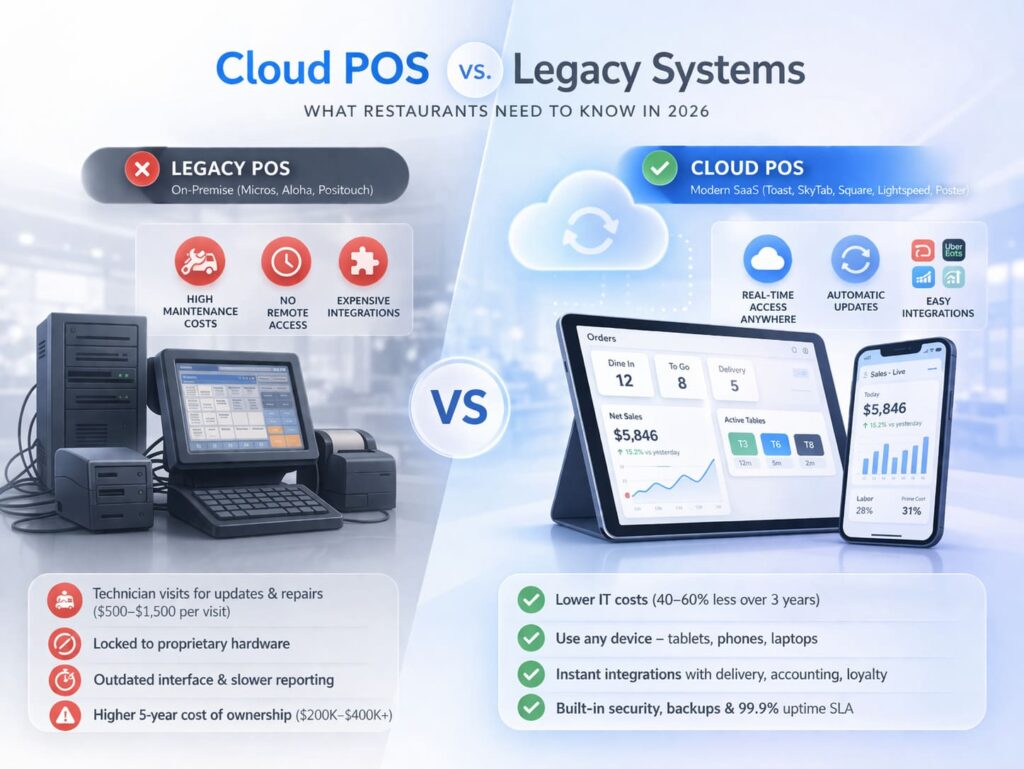
Cloud POS vs. Legacy Systems (Micros/Aloha): What to Choose for a New Restaurant?
